
-
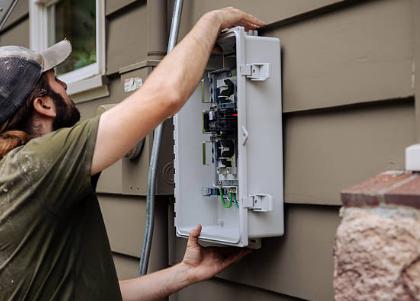 A poorly installed fiber termination box is one of the most common causes of field failures in FTTH deployments—and yet, it’s entirely preventable. Whether you’re a field technician, network manager, or project engineer, getting the installation right the first time saves hours of troubleshooting and ensures a reliable connection for years to come. This comprehensive guide walks you through every stage of the process, from pre-installation planning through testing and documentation. We’ve included a practical checklist, a troubleshooting table of common mistakes, and pro tips based on real-world field experience. Table of Content Preparation Before Fiber Termination Box Installation Step-by-Step Fiber Box Installation Fiber Termination Point Installation Acceptance Checklist Common Fiber Termination Box Installation Mistakes Introduction A fiber termination box (FTB) serves as the critical junction point where the incoming fiber optic cable is spliced, terminated, and distributed to individual subscriber drops. Proper installation ensures low insertion loss, maintains signal integrity, and protects the fiber from environmental damage. Poor installation, on the other hand, introduces attenuation, creates maintenance headaches, and compromises network reliability. This guide covers everything you need to know about fiber termination box installation, from site selection to final acceptance testing. 1. Preparation Before Fiber Termination Box Installation Before mounting the enclosure or opening the fiber cable, inspect the installation environment and prepare all necessary tools and materials. Good preparation speeds up the installation and reduces the risk of damaging the fibers. 1.1 Choose and Evaluate the Installation Location The installation location directly affects both the reliability of the fiber termination point and the ease of future maintenance. Choose a position that provides: Easy access: Technicians should be able to open the box, splice fibers, and perform testing without obstruction. A stable mounting surface: The wall, pole, or supporting structure must be strong enough to hold the enclosure…Читать далее →
-
 If you are searching for where to buy optical network terminal equipment, choosing the right supplier can be just as important as choosing the ONT itself. An Optical Network Terminal (ONT) sits at the customer end of a PON network and connects the optical access network to Ethernet, Wi-Fi, voice, or other user services. ONT and ONU are often used interchangeably in FTTH discussions. However, buying an ONT based only on port count or price can lead to compatibility problems, configuration difficulties, and unnecessary troubleshooting. The key questions are: Will the ONT work with your OLT? Does it provide the interfaces you need? Is the management protocol supported? And will the supplier provide technical support if something goes wrong? This guide explains what to check before purchasing, compares the main buying channels, and introduces five popular Baudcom ONT options for 2026 for home broadband, FTTH deployment, ISP projects, and OEM applications. Table of Contents Key Considerations When Buying an Optical Network Terminal Where to Buy Optical Network Terminals Top 5 Baudcom ONT Models for 2026 Key Considerations When Buying an Optical Network Terminal Before diving into specific models, here are the five factors that should drive your purchasing decision. 1. Port Configuration The number and type of ports determine what services your subscribers can access. A basic 1GE ONT is sufficient for internet-only plans, while a 4GE+2POTS+CATV model supports triple-play services including voice and cable TV. In our research on GPON ONT buying guides, port configuration consistently ranks as the No.1 decision factor for ISP deployments. 2. Wi-Fi Functionality Do you need an all-in-one gateway with built-in Wi-Fi, or will subscribers use their own routers? Built-in Wi-Fi ONTs reduce deployment costs and simplify management, while bridge-mode ONTs give subscribers more flexibility. 3. Management Protocols Look for ONTs that support OMCI (for OLT-managed auto-configuration)…Читать далее →
-
 Every time you stream a 4K movie, join a video conference, or download a large file over Wi-Fi, a sophisticated modulation technique is working behind the scenes. It’s called Quadrature Amplitude Modulation, or QAM. But what is QAM in networking, exactly, and why does it have such a big impact on your internet speed? In simple terms, QAM is a method of encoding digital data onto radio waves so that they can be transmitted efficiently through the air or over cables. To really answer the question “what does QAM mean” for your network, it helps to understand how it squeezes more data into the same amount of space. This article breaks down what is QAM from the ground up, covering the fundamental theory, its real-world importance, the critical trade-offs, and a look at where this technology is heading. Table of Contents QAM Basics Why Is QAM Important in Networking? The Trade-Off: Higher QAM Does Not Always Mean Better QAM in Real-World Applications QAM vs. Other Modulation Technologies When to Use Which QAM? 1. QAM Basics The Core Concept At its heart, QAM is a clever trick of physics. A radio wave has two key properties that can be varied: its amplitude (how tall the wave is, or its strength) and its phase (the wave’s position in its cycle). Instead of using just one, QAM uses both at the same time to transmit data. It does this by creating two carrier waves of the same frequency, but offset by 90 degrees. These are known as the In-phase (I) and Quadrature (Q) components. By varying the amplitude of both the I and Q components and combining them, you can create a specific state for each symbol you want to send. This is commonly visualized on a constellation diagram. The diagram plots each possible…Читать далее →
-
 You launch a signal into a fiber. Most of it travels forward, reaches the receiver, and does its job. But some of it bounces back. That reflected light travels in the opposite direction of your intended signal—and if you’re not managing it, you’re dealing with noise, instability, and potentially damaged components without always knowing why. This is the reality of optical return loss (ORL), a phenomenon that every fiber optic technician and network engineer must understand. While many articles define ORL and mention how to measure it, they often gloss over the practical tools and real-world impact. This blog goes deeper—covering not just what ORL is, but why it matters, the physics behind it, and the tools you actually need to manage it. What Is Optical Return Loss? What Causes Optical Return Loss? Why Does Optical Return Loss Matter? How to Test Optical Return Loss Conclusion 1. What Is Optical Return Loss? Optical return loss (ORL) is the amount of light reflected to the optical source, expressed as a ratio of the power of the outgoing signal to the power of the reflected signal. It is measured in decibels (dB) and stated as a positive value. The formula is: ORL [dB] = 10 × log₁₀ (P_incident / P_reflected) Here’s where many people get confused: reflectance and return loss are inverses of each other. Reflectance is expressed as a negative number (e.g., -50 dB), while return loss is the same magnitude but positive (50 dB). The Golden Rule of dB: Higher Return Loss = Better Performance This is the single most important rule to remember: The higher the ORL value, the less reflection—and the better your system performs. If no signal reflects, you would have infinite return loss. A value of 50 dB is better than 40 dB, which means less power…Читать далее →
-
 If you’ve ever tried to measure optical power on a live PON network with a standard optical power meter, you’ve probably gotten a reading that didn’t make sense. You’re not alone. Measuring optical power is one of the most fundamental tasks in fiber optic testing. But here’s the catch: not all power meters are created equal. Using a standard optical power meter (OPM) on a passive optical network (PON) can give you a number—but it will almost certainly be the wrong number. In this article, we’ll break down the differences between a standard optical power meter and a PON power meter, explain why standard meters fail in PON environments, and give you a clear framework for choosing the right tool for your job. What Is a Standard Optical Power Meter (OPM)? What Is a PON Power Meter? The Core Differences: Head-to-Head Comparison The Technical Why: Why Standard Meters Fail in PONs When You Need a PON Power Meter (and When You Don’t) Conclusion 1. What Is a Standard Optical Power Meter (OPM)? What do optical power meters measure? A standard OPM measures the total average optical power falling on its photodetector across a broad wavelength range—typically 850–1625 nm. It gives you one number representing all the light it detects. Manual wavelength selection Single optical port Measures continuous (CW) signals accurately Cannot distinguish between wavelengths on the same fiber 2. What Is a PON Power Meter? A PON power meter is a selective meter. It uses internal optical filters to isolate specific PON wavelengths and measure each one independently. Automatic wavelength filtering Two optical ports (IN and OUT) for in-line testing Captures burst-mode upstream signals Measures each PON wavelength separately, not as a sum “PON power meter” is not a single product. There are two distinct types, and buying the wrong one wastes money…Читать далее →
-
 If your internet suddenly drops and you see unfamiliar lights on that small box where the fiber line enters your home, you’re likely dealing with a non-functioning optical network terminal. It’s a frustrating situation, especially when you rely on the internet for work, entertainment, and staying connected. The good news is that many ONT issues can be resolved with a few simple steps. This guide will walk you through exactly what to check, from basic power cycling to advanced diagnostics. After reading this article, you will know when you can fix the issue yourself and when you need to contact your Internet Service Provider (ISP). Quick Overview: ONT Lights and What They Mean Is There a Wider Outage? Basic Checks Advanced Checks When to Contact Your ISP Prevention Tips 1. Quick Overview: ONT Lights and What They Mean The first thing to do when your ONT is not working is to look at the indicator lights. These indicator lights are your best tools for troubleshooting. While different manufacturers may use slightly different labels, most ONTs have a similar set of indicators. Visual Chart: Common ONT Light Status Light Label Color/State Meaning Action Needed POWER Solid Green ONT is receiving power Normal Off No power Check outlet, power cable, GFCI Red Hardware fault Contact ISP PON / OPTICAL Solid Green Connected to ISP network Normal Flashing Green Trying to connect Wait a few minutes Off / Red No signal from ISP Check fiber cable, contact ISP LOS / ALARM Off Good signal Normal Red Loss of Signal (fiber issue) Check fiber cable, clean connectors LAN / DATA / ETHERNET Solid/Flashing Green Data passing to router Normal Off No connection to router Check Ethernet cable Ideal State Description In a perfectly working setup, you should see: POWER: Solid green PON/OPTICAL: Solid green…Читать далее →
-
 Fiber optic networks are the backbone of modern communication, carrying vast amounts of data across the globe. But here’s a surprising fact: the number one cause of fiber optic link failures isn’t broken cables or faulty equipment—it’s contaminated connector end faces. Dirt, dust, oil, and microscopic debris on fiber end faces are the “bane of high-speed data transmission”. Even particles invisible to the naked eye can cause signal loss, back reflection, and permanent damage to expensive network equipment. This is where the fiber optical microscope becomes essential. Also known as a fiber optic inspection microscope, this specialized tool allows technicians and engineers to visually inspect connector end faces, detect contamination and defects, and ensure network reliability. In this comprehensive guide, we’ll cover: What a fiber optical microscope is and how it differs from a standard lab microscope Why end-face inspection is critical for network performance The types of fiber microscopes available What magnification you need (from 100x to 400x and beyond) How to inspect a fiber connector step by step How to choose the right microscope for your needs 1. What is a fiber optical microscope? A fiber optical microscope is a specialized inspection instrument designed to examine the end face of fiber optic connectors and cleaved fibers. Its primary purpose is to detect contamination, scratches, pits, cracks, and other defects that can degrade signal transmission in optical networks. Modern networks demand ever-increasing bandwidth and have tighter loss tolerances than ever before. Maintaining pristine connectivity across all fiber optic links is crucial for successful network applications. The fiber microscope is the frontline tool for ensuring connector end faces meet cleanliness standards before mating. How It Differs from a Standard Microscope While a standard laboratory microscope is used for observing biological specimens or materials, a fiber optic inspection microscope has several distinct differences: Feature Standard…Читать далее →
-
 Fiber optic cables are the invisible highways of our digital world, carrying everything from streaming videos to critical business data. When these delicate cables get damaged, the clock starts ticking. Can you patch them? Absolutely—but unlike splicing copper wire, you cannot simply twist strands together or wrap them in electrical tape. Repairing fiber requires precision, the right tools, and a clear understanding of what you are doing. In this guide, we will cover whether fiber optic cables can be patched, how to repair cuts and connector damage, and the essential toolkit you will need. Can You Patch a Fiber Optic Cable? How to Patch Fiber Optic Cable How to Repair a Cut Fiber Optic Cable How to Fix a Fiber Optic Cable with Connector Damage Tools Required for Fiber Optic Repair Can You Patch a Fiber Optic Cable? Short answer: Yes, absolutely. Long answer: Fiber optic cables can be patched, but it’s not like splicing copper wire. You’re not twisting strands together or wrapping them in electrical tape. Fiber optic patch repairs involve either: Fusion splicing – melting two fiber ends together with an electric arc (the gold standard) Mechanical splicing – aligning and clamping fibers in a precision sleeve Connector replacement – terminating the fiber with a new connector However, there are caveats. Before you start, ask yourself three questions: Can you physically reach both ends of the break? (If not, call a professional.) Is it a simple single-fiber cable or a complex ribbon cable? (Ribbon requires specialized tools.) Is the cable crushed over a long section or just cut cleanly? (Multiple breaks = replace, not repair.) If you answered “yes” to #1 and the damage is localized, you’re ready to proceed. Pro Tip: If the cable is longer than 100 meters and the damage is near the end,…Читать далее →
-
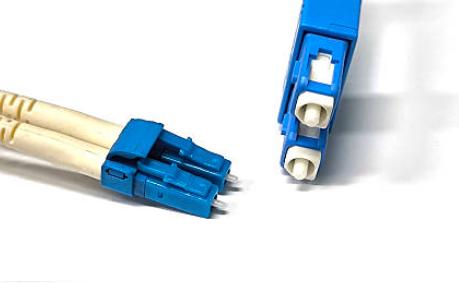 Fiber optic patch cords are the backbone of modern high-speed networks, connecting equipment and enabling data transmission across data centers, telecom networks, and enterprise infrastructure. At the heart of every fiber connection lies the connector, and two of the most widely used types are LC and SC. Choosing between SC and LC patch cable is a decision that directly impacts your network’s performance, scalability, and long-term operational costs. This guide will break down the Difference between LC and SC patch cord—from physical design to real-world applications—to help you make the right choice for your specific needs. Table of Contents What is an LC Patch Cord? What is an SC Patch Cord? LC vs. SC: Direct Comparison How to Choose Between LC and SC? Installation Best Practices for Both Connectors When You Need Both: SC to LC Hybrid Patch Cables 1. What is an LC Patch Cord? What is LC patch cord full form? LC stands for Lucent Connector (often called “Little Connector” for its compact size). It is the industry-standard connector for modern data centers and high-density enterprise networks. The LC connector uses a 1.25 mm ferrule — half the diameter of the SC’s 2.5 mm ferrule. It features a latch locking mechanism (similar to an RJ45 Ethernet plug) that clicks securely into place and prevents accidental disconnection. Key Features of LC Patch Cords 25 mm ferrule: Smaller than the 2.5 mm SC ferrule, making LC ideal for dense installations. Compact design: An LC connector occupies approximately half the space of an SC connector. Latch locking mechanism: Helps prevent accidental disconnection. High-density connectivity: More LC connections can be installed within limited rack and panel space. Common equipment interface: Widely used with SFP and SFP+ optical transceivers. 2. What is an SC Patch Cord? SC stands for Subscriber Connector (also called…Читать далее →
-
 If you’re planning an FTTH deployment — whether you’re an ISP launching a new service, a system integrator designing a network, or an enterprise buyer evaluating equipment — you already know that the ONU (Optical Network Unit) is the device your subscribers will actually see and touch. It’s also the device that will make or break their experience. Choose an ONU with too few features, and you’ll face truck rolls for missing capabilities. Choose one with too many, and you’re wasting budget on features your subscribers will never use. The key is understanding which features matter for which scenario — and how they interact. This guide walks you through every major FTTH ONU configuration option, but unlike a typical spec sheet, we’ll organize them by deployment context. You’ll see not just what each feature does, but when and why you’d choose it. Part 1: The Foundation — What Every ONU Must Get Right Part 2: The Wireless Experience — Wi-Fi as a Competitive Advantage Part 3: Adding Services — Voice, Video, and Storage Part 4: Power and Management — The Operator’s Perspective Part 5: Putting It All Together — Matching ONUs to Deployments Frequently Asked Questions Conclusion Part 1: The Foundation — What Every ONU Must Get Right Before we dive into optional ONU Function, let’s establish the non-negotiable basics. 1.1 PON Compatibility: The One Thing You Cannot Compromise Your ONU must speak the same language as your OLT. This is the single most important compatibility requirement, and it’s not negotiable. PON Standard Downstream Upstream Typical Deployment GPON 2.5 Gbps 1.25 Gbps Global standard — most common today EPON 1.25 Gbps 1.25 Gbps Common in North America and parts of Asia XG-PON 10 Gbps 2.5 Gbps Asymmetric 10G — emerging markets XGS-PON 10 Gbps 10 Gbps Symmetric 10G — enterprise…Читать далее →
-
 Fiber optic networks carry 99% of the world’s internet traffic. But without the optical receiver, all that light would be useless. While optical transmitters get the glory, the receiver does the harder job: taking a weak, distorted light pulse that has traveled for miles and turning it back into clean, usable electrical data. If your video buffers or your CATV picture pixelates, chances are the optical receiver is struggling. In this guide, we will break down: Receiver Optical Means The 5 core components and how they work together Optical Receiver Types Physical Factors That Affect Performance Let’s dive in. Receiver Optical Means An optical receiver is a device that receives optical signals transmitted through a fiber optic cable and converts them into electrical signals that can be processed by networking, CATV, or communication equipment. In simple terms: Electrical Signal → Optical Transmitter → Fiber Cable → Optical Receiver → Electrical Signal Without the receiver, the transmitted light would have no practical value because most electronic devices operate using electrical signals rather than optical signals. What Are the Main Elements of an Optical Receiver? An optical receiver is not a single chip. It is a 5-stage assembly line, and each stage handles a specific job. If any stage fails, the whole system suffers. Element 1: The Photodetector (The “Eye” that Catches Light) This is the very first part of the receiver. It is a tiny piece of special material that acts like a light-catcher. What it does: When the light pulses hit this part, it absorbs them. The energy from the light shakes loose electrons inside the material, which creates a very, very tiny electrical current. Simple analogy: Imagine a solar panel on a calculator. When light hits the solar panel, it creates a little bit of electricity. The photodetector does the…Читать далее →
-
 As fiber optic networks continue to expand in data centers, enterprise campuses, FTTH deployments, and telecom infrastructure, selecting the right fiber patch panel types becomes increasingly important. A well-designed patch panel not only organizes fiber connections but also protects delicate optical fibers, simplifies maintenance, and allows future network expansion. Whether you’re building a new fiber network or upgrading an existing installation, understanding the differences between a fiber patch panel cassette, a fiber optic patch panel rack mount, and a fiber patch panel enclosure can help you make the right investment. In this guide, we’ll explain the most common fiber patch panel types, their advantages, typical applications, and how to choose the best option for your project. What Is a Fiber Patch Panel? Overview of Common Fiber Patch Panel Types How to Choose the Right Fiber Patch Panel Type Frequently Asked Questions What Is a Fiber Patch Panel? A fiber patch panel is a hardware device used to terminate, organize, manage, and distribute fiber optic cables. It provides a centralized location where backbone fiber cables connect to patch cords, making network management much easier. A typical fiber patch panel includes: Fiber adapters (LC, SC, ST, FC, MPO) Splice trays Cable management accessories Cable entry points Front access ports Rear cable routing Instead of having loose fiber cables throughout a rack, patch panels create a clean and structured cabling system that improves reliability and simplifies troubleshooting. Overview of Common Fiber Patch Panel Types Patch Panel Type Best For Typical Capacity Rack Mount Patch Panel Data centers, telecom rooms 12–144+ fibers Wall Mount Patch Panel Small offices, FTTH 4–48 fibers Fiber Patch Panel Cassette High-density modular systems 12–24 fibers per cassette Fiber Patch Panel Enclosure Splicing and cable protection 12–288 fibers Sliding Rack Mount Panel Frequent maintenance 24–96 fibers Fixed Rack Mount Panel…Читать далее →
-
 Every time you connect to WiFi, your personal data—passwords, emails, financial transactions—travels through the air. Without proper protection, anyone within range could intercept that information. That’s where WiFi Protected Access (WPA) comes in. WPA is the security framework that encrypts data between your devices and your router, preventing unauthorized access and eavesdropping. It evolved through three versions—WPA (2003), WPA2 (2004), and WPA3 (2018)—each addressing the flaws of its predecessor. In this guide, you’ll learn what is WPA WiFi, how each version works, which protocol you should use, and how to secure your home network step by step. Why WiFi Security Matters: The Role of WPA The Evolution of WiFi Security Protocols How does WPA Work: Technical Explanation WPA Vulnerabilities and KRACK Which WiFi Security Protocol Should You Use? Practical Guide: How to Check and Update Your WiFi Security Settings on ONU Router Why WiFi Security Matters: The Role of WPA What is WPA for WiFi Before diving deeper, it helps to understand that WPA does two separate jobs: Authentication — proving that you’re allowed to join the network. This is what the password (PSK) does. Encryption — scrambling your data so that even if someone captures it, they can’t read it. These two functions work together. You authenticate to prove you belong, then encryption protects everything you send. A network can have strong encryption (AES) but weak authentication (a simple password), or strong authentication (Enterprise/RADIUS) with no encryption (rare). WPA handles both, which is why it’s the complete security solution for WiFi. The Problem Without Encryption When your WiFi network lacks encryption, your data is broadcast in plain text. Anyone within physical range—a neighbor, someone in a nearby car, or a hacker in a coffee shop—can use freely available tools to capture and read your internet traffic. This includes login credentials,…Читать далее →
-
 If you’ve ever looked into a crowded network rack and wondered how technicians keep hundreds of delicate fiber optic cables straight, the answer is often a humble but essential device: the fiber patch panel. Also known as a fiber distribution panel, this device is the central hub for managing, organizing, and protecting your fiber optic connections. Without it, a network would quickly descend into a chaotic tangle of fragile cables that are difficult to troubleshoot or change. This blog will explain how do fiber patch panels work and why they are critical for any structured cabling system. What Is Fiber Patch Panel? How Do Fiber Patch Panels Work? Fiber Patch Panel Workflow Main Components of Fiber Patch Panels Frequently Asked Questions What is a Fiber Patch Panel? At its core, what is fiber patch panel? It is a mounted hardware unit, typically a metal or plastic enclosure, that serves as a termination point for fiber optic cables. It provides a secure and organized chamber for housing connectors and splice units, effectively ending the permanent cabling run and providing a central point for connections. Instead of running a long fiber cable directly from a wall outlet to a switch, you terminate that long, permanent cable at the patch panel. From the panel, you use short, flexible fiber patch cables (also known as patch cords) to connect to your active equipment, like switches or routers. This separation is key to a manageable network. How Do Fiber Patch Panels Work? To understand how do fiber patch panels work, it helps to think of the panel as a bridge between two worlds: the permanent infrastructure inside your walls and the constantly changing equipment in your server rack. The panel itself does not amplify or process the optical signal—it simply provides a physical meeting point where permanent cables can…Читать далее →
-
 Fiber optic cable is the backbone of many modern communication networks, supporting high-speed data transmission in data centers, telecom networks, FTTH systems, enterprise networks, and industrial applications. Compared with copper cabling, fiber provides high bandwidth, low attenuation, and excellent immunity to electromagnetic interference. However, simply having a fiber optic cable does not guarantee a reliable fiber optic cable connection. A poorly installed connector, contaminated fiber end face, incorrect connector type, or improperly spliced fiber can introduce insertion loss and reflection, weaken the optical signal, and eventually cause intermittent links or complete network failure. So, how to connect fiber cable correctly? The answer depends on the type of cable, connector, equipment, and application. In general, three common approaches are used: connecting pre-terminated fiber optic patch cords, fusion splicing, and mechanical splicing or field termination. This guide explains How to Connect Fiber Optic Cable? Each method, the tools required, connector selection, testing procedures, and common troubleshooting techniques. How to Connect Fiber Optic Cable Before You Start: Critical Preparation Work Understanding Fiber Optic Connectors Method 1: Connecting with Pre-terminated Patch Cables Method 2: Fusion Splicing Method 3: Mechanical Splicing & Field Connectorization Testing Your Connection Troubleshooting Guide 1. Before You Start: Critical Preparation Work Safety First Fiber optic work involves unique hazards that require attention before you make any connections: Never look into a live fiber optic cable or any connected port. The laser light is invisible to the human eye and can cause permanent retinal damage. Handle glass shards with extreme care. During stripping and cleaving, microscopic fragments of glass can become airborne or stick to your skin. Wear safety glasses and dispose of glass debris in designated puncture-proof containers. Use a fiber shard collection box. Keep fibers away from food and drink areas. Glass splinters are nearly invisible and can be ingested accidentally….Читать далее →
Отзывы

Ломовейший – Финляндия11

