
Do you feel like you’re paying too much for those little SFP modules price that connect your network equipment? You’re right. There’s a big secret in the networking world: these small parts are a major money-maker for vendors, and they use some clever tricks to keep it that way.

Let’s break down the walls and look at five things your vendor probably doesn’t want you to know.
1. You’re Paying 10x More for a Name
Many people think brand-name SFPs are better because they are expensive.
But vendors don’t tell you what’s actually inside.
Most large brands do not build their own SFPs.
They order them from the same factories as many trusted third-party suppliers.
The fiber, laser, chipset, and metal housing often come from the same production line.
Think of it like this: Imagine a famous brand selling a regular AA battery for $10, while the same battery from the factory next door costs $2. That’s what happens with many SFP module for network switch.
Brand SFPs include unique code that matches their switch.
This code doesn’t improve performance — it only tells the switch: “This is one of our modules. Please allow it.” This coding is one reason for the huge price increase.
What it means for you: That “genuine” SFP module costs 10 times more than a third-party one, but inside, they are often identical. Vendors add a unique code to lock you in, not to improve performance.
Your Solution: Don’t pay the “brand tax.” Choose third-party modules that offer the same quality and reliability without the outrageous markup. For instance, Baudcom’s SFP modules are built in the same MSA-compliant factories as the big brands, guaranteeing 100% compatibility and performance at a fraction of the cost. You get the same hardware, just without the lock-in code.
2. The “Incompatibility” Error is a Deliberate Lock
You plug in a new, cheaper SFP price, and your switch shows an error: “Unsupported Transceiver.” Sounds scary, right? Your vendor says it’s for your own safety. But is it?
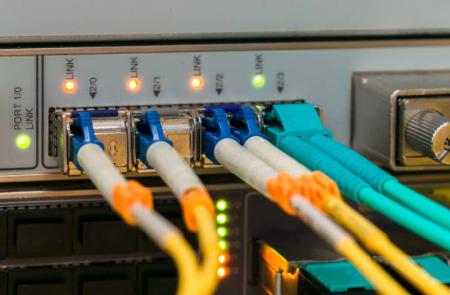
Green ports (working third-party SFPs) and three red port (blocked).
The Secret: This is a software lock, not a hardware problem. Your switch is programmed to check for a secret “password” (a vendor ID code) inside the SFP. If the password doesn’t match, it throws an error. This is done on purpose to stop you from using cheaper options.
🔹 Some brands allow third-party SFPs
Brands like MikroTik, Ubiquiti, Dell, HPE, and many open platforms do not block third-party modules.
🔹 Some switches have a command to unlock
For example, Cisco often allows: service unsupported-transceiver. This unlocks the port and allows third-party SFPs.
💡 What this means for you
You are being locked into one seller. This stops you from shopping around. Before buying SFPs, always check:
- Does your switch support third-party SFPs?
- Does it have a command to enable them?
- Does your firmware version block them?
- Can you downgrade if needed?
Knowing this early saves money and avoids frustration.
Your Solution: Unlock your switch’s potential. Use commands like service unsupported-transceiver on Cisco or seek out plug-and-play compatible modules. Baudcom solves this by pre-coding their SFPs to be recognized as “genuine” by major brands like Cisco, HPE, and Juniper, or by providing clear instructions to bypass the lock. You can free your network from vendor jail in minutes.
3. The “Void Your Warranty” Scare Tactic
Your vendor might say, “If you use another brand, your warranty is void, and your network might break!” This is designed to make you afraid.
Warranty: If your switch breaks, the vendor might ask you to test it with their SFP before helping you. This is fair. But using a third-party SFP does not automatically void your entire switch warranty.
Good third-party companies build their modules to the exact same public standards (called MSA) as the big brands. The chance that a quality third-party SFP will break your switch is extremely low.
What it means for you: Don’t let fear control your budget. You can use other brands safely, especially from trusted suppliers.
Your Solution: Know your rights and be smart. Using a quality third-party SFP does not automatically void your warranty. Keep a few genuine modules for support tickets, and use reliable third-party ones for everything else.
For warranty part
Some verdor say: lifetime warranty, it sounds amazing… but the details can be disappointing.
- Lifetime = Product Lifetime, Not Your Lifetime: If the company stops selling the SFP, the warranty ends. This might be only 3 years, even if your network runs for 10 years.
- You Pay Return Shipping: Some vendors make YOU pay to send the faulty unit back. For a $20 module, $18 shipping is not worth it.
- Slow Replacement Time: Some companies take 2–4 weeks to process a replacement. This is too long for business use.
- Only “Manufacturing Defects”Count: If the failure is from: heat, dirt, humidity, optical overload, insertion damage, electrical problems, compatibility issues, the vendor may reject the claim.
4. SFPs: The Hidden Cost of Networking
Think about how some companies sell printers. They sell the printer itself very cheaply, but the ink cartridges are very expensive. The same thing happens with network gear.

The Secret: Vendors sometimes sell their switches at a low price to get you to buy them. But once you own the switch, you have to buy all the SFP modules from them. This is where they make their real profit. The price you pay for their modules is often 300% to 500% more than the cost!
What it means for you: The real, long-term cost of your network isn’t just the switches; it’s all those little SFP modules you have to keep buying.
Your Solution: Calculate the true cost of ownership. The real expense isn’t the switch; it’s the dozens of SFP modules you’ll need over time. By switching to a cost-effective supplier, you can cut your networking budget by 80% or more. With Baudcom, you get predictable, low pricing without hidden costs, allowing you to budget accurately and allocate savings to other critical projects.
5. Vendors Hide the Total Cost Until It’s Too Late
The Secret: When you get a quote for a new switch, the price of the necessary SFP modules is often omitted, hidden, or listed as a separate line item. This makes the initial investment look deceptively low. The shocking total only appears on the final invoice, after you’re already committed to the purchase.
Your Solution: Force full transparency. Always ask for a complete quote that includes all required SFPs, DAC cables, and optics upfront. Better yet, pre-empt the vendor’s markup by sourcing your optics separately. Baudcom makes this easy by providing a one-stop shop for all your connectivity needs. You can get a full, transparent quote in minutes, ensuring you see the true cost of your project from day one and avoid budget surprises.
🧭 Your Smart & Simple Game Plan
So, what should you do? You don’t have to choose between breaking the bank or breaking your network. Follow this simple plan:
Find a Good Supplier: 🛒 Look for a third-party SFP seller with good reviews and a strong warranty. Don’t just buy the absolute cheapest one from a random website.
Keep a Few “Genuine” Spares: 📦 Buy a small number of official vendor modules. Keep them in a drawer. If you ever need to call vendor support, you can plug one of these in first. This keeps your support contract safe and sound.
Test Them First: 🔬 Before you buy 100 modules, buy 5. Test them in a non-critical part of your network for a week or two. Make sure they work perfectly.
By being smart, you can save a huge amount of money on your network—money that you can use for other important projects. 💰
Stop overpaying. Start using your budget wisely!


