
If you’re planning a fiber optic network, upgrading an existing infrastructure, or purchasing networking equipment for the first time, one of the most common questions you’ll encounter is “How many SFP modules do I need?” Although the answer may appear straightforward, many buyers mistakenly purchase the wrong quantity or the wrong type of module, resulting in additional costs and deployment delays. An SFP module is a small but essential component that enables switches, routers, media converters, and other networking devices to communicate over fiber optic cables. Since every fiber connection depends on compatible transceivers at both ends, understanding how to calculate the required number of SFP modules is critical for successful network planning. Whether you’re building a small office network with only a few fiber links or designing a large enterprise or data center infrastructure with hundreds of connections, this guide will explain How many SFP modules do I need, what is SFP module and the calculation process step by step. You’ll also learn common purchasing mistakes and practical examples that make planning much easier.
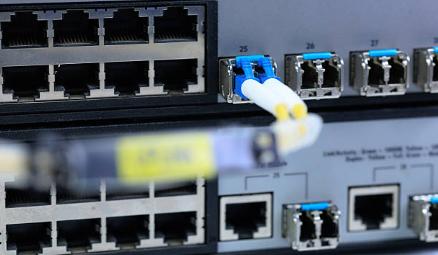
SFP module for network switch
What Is SFP Module?
An SFP (Small Form-factor Pluggable) module is a hot-swappable optical transceiver designed to transmit and receive data between networking devices. Instead of permanently integrating optical interfaces into equipment, manufacturers provide SFP ports that allow users to install the appropriate module based on their application.
Think of an SFP module as the “translator” between electrical signals generated by your switch or router and the optical signals that travel through fiber optic cables. Without this conversion, the devices would not be able to communicate over fiber.
One of the biggest advantages of SFP technology is flexibility. The same switch can support different transmission distances simply by changing the installed module. For example:
- A short-distance multimode module may support 300 meters.
- A single-mode module may support 10 km.
- Long-range modules may support distances of 40 km, 80 km, or even further.
Because they are standardized and hot-swappable, SFP modules make network upgrades easier and reduce the need to replace entire switches when requirements change.
First, A Quick Reality Check
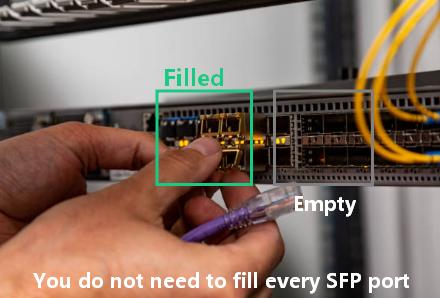
You do not need to fill every SFP port on your switch. Many new buyers think that an empty SFP slot is a problem that needs to be fixed. That is not true at all.
SFP slots are optional expansion ports. Think of them like empty plug sockets in your home. Just because you have ten sockets on a power strip does not mean you need to fill every one with a plug. You only use the ones you actually need. SFP slots work the same way. They exist to give you flexibility, not to force you to buy more parts.
So take a deep breath. You are probably going to buy far fewer modules than you first thought.
Why Is It Important to Calculate SFP Number?
Many buyers focus only on choosing the correct speed or transmission distance while overlooking the quantity required. Unfortunately, purchasing errors can delay installations and increase project costs.
Imagine ordering equipment for a network consisting of ten fiber links. If you assume each connection requires only one SFP module for network switch, you’ll purchase ten modules instead of twenty. Once installation begins, you will quickly realize that a module is also required for each device at the other end; this necessitates additional orders, thereby delaying deployment.
On the other hand, purchasing excessive modules ties up unnecessary budget and inventory.
The Simple Formula: Count Links, Not Ports
Here is the correct approach. You need to identify every active connection you will make, and then multiply.
Step 1 – Identify every device you will connect using fiber or an SFP module
Not every device needs an SFP module. You should only count the devices that will use a special connection. Here are the most common situations where you actually need an SFP module for network switch:
Connecting one switch to another switch. This is often called an uplink. For example, you might connect your office switch to a main switch in a server room.
Connecting a switch to a server that has an SFP network card. Many powerful servers have these ports instead of normal Ethernet jacks.
Connecting a switch to a media converter or a firewall that also uses SFP ports.
Laying cables longer than 100 meters. Normal copper cables stop working after 100 meters. Fiber cables with SFP modules can go much farther.
Step 2 – For each link, remember that you need two modules
This is the most common mistake people make. They count one module per link, but that is only half of what they actually need.
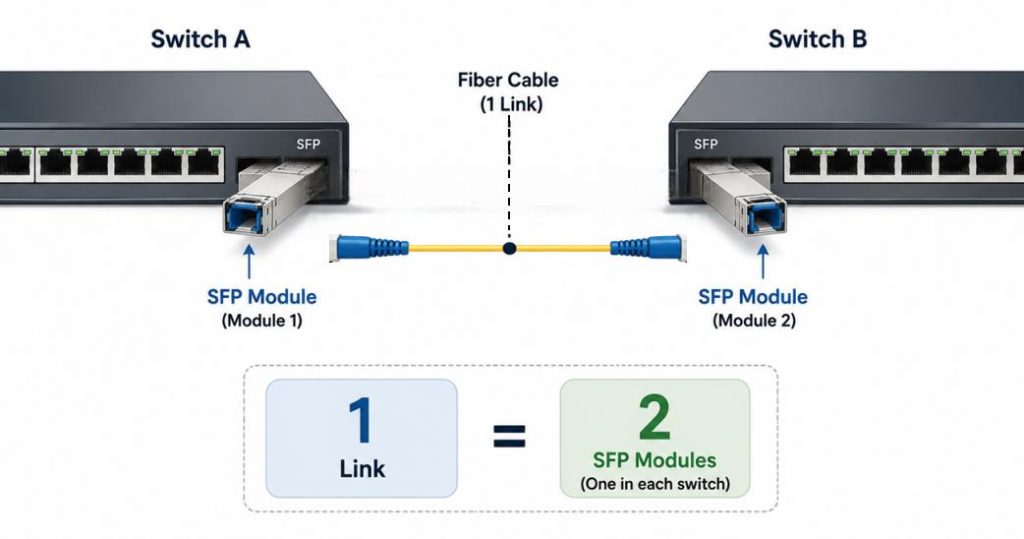
Think about a simple connection. You want to connect Switch A to Switch B using a fiber cable. You will put one SFP module into Switch A. Then you will put a second SFP module into Switch B. The cable runs between the two modules. Without both modules, the link cannot work.
So for every single link you counted in Step 1, you need to multiply by two. One link equals two modules. Two links equal four modules. Three links equal six modules. This rule never changes.
What About BiDi SFP Modules?
Some users become confused after learning about BiDi (Bidirectional) SFP modules, which transmit and receive data over a single fiber strand instead of two.
Does this mean only one SFP module is needed?
The answer is no.
BiDi technology reduces the number of fiber strands required, but it does not eliminate the need for transceivers at both ends.
Total SFP Modules = Number of Fiber Links × 2*
Step 3 – Add spare modules for safety
Networking equipment is usually very reliable. But sometimes things go wrong. An SFP module can stop working. While this situation is uncommon, it can certainly happen.. A module might fail because of a power surge. It might get damaged by static electricity when you touch it. Or it might simply be defective right out of the box.
If a module fails and you do not have a spare, that link will stay down until you order a new one. That could take days. During that time, the devices on that link cannot talk to each other.
This is why network professionals always follow this simple rule: Buy one or two extra modules for each type of module you use.
For example, if you are using only one type of SFP module (say, 1G multimode), buy two extras. If you are using two different types (say, 1G multimode and 10G single-mode), buy two extras for each type. That means four spare modules total.
Spares might seem like an extra cost now, but they are cheap insurance against a broken link later.
Real-World Scenarios
Let me show you how this works in real life. I will walk you through three common situations. Find the one that looks most like your setup.
Scenario A – Small office, one switch, no fiber runs
Imagine you run a small office. You have one switch with 24 normal copper ports and two SFP slots. Every computer, printer, and other device is in the same room as the switch. The longest cable you need is only 30 meters. You have no other switches or servers with SFP ports.
In this case, you do not need any SFP modules at all. Just use the normal copper ports on your switch. They are already there and ready to go. The SFP slots can stay empty forever, and that is perfectly fine.
Verdict: Zero SFP modules needed.
Scenario B – Two switches in different buildings
Now imagine a bigger setup. You have a main switch in Building A and a second switch in Building B. The two buildings are 200 meters apart. Normal copper cables cannot go that far because the maximum is 100 meters. You need to use fiber cables and SFP modules.
Your main switch has four SFP slots. The second switch has two SFP slots. The distance is 200 meters, so you will use fiber.
First, count the link. You have one link between Building A and Building B. That means two SFP modules — one for each switch. Next, add one spare module in case one of them fails. That gives you three modules total.
If you want extra safety, you could buy two spares instead of one. That would be four modules total. But for most small setups, one spare is enough.
Verdict: Three SFP modules total (two for the active link, one spare).
Scenario C – Data center with four servers
Now, let us look at a more advanced setup. You are building a small data center. You have one main switch. You also have four servers, and each server has a 10G SFP+ network card. You also need two uplinks to connect your main switch to two distribution switches upstairs. Finally, you have one separate management link to an out-of-band switch.
Let us count carefully.
First, the four servers. Each server needs one SFP+ module. That is four modules. Each of those four modules connects to a port on your main switch. So your main switch also needs four SFP+ modules. Total for servers: eight modules.
Second, the two uplinks to the distribution switches. Each uplink is one link between two switches. That means two modules per uplink. Two uplinks mean four modules. Total so far: twelve modules.
Third, the management link. This is one link to your out-of-band switch. That means two modules. Total so far: fourteen modules.
Finally, add spares. You are using two different module types here (server connections and uplinks might use different fiber). Buy two spares for each type. That adds four more modules.
Verdict: Eighteen SFP+ modules total (fourteen for active links, four spares).
Common Buying Mistakes
❌ Buying different module types for each end of a link
This is a very common error. Someone buys one SFP module from Brand A and another from Brand B. Or they buy one module that works with multimode fiber and another that works with single-mode fiber. Or they buy one that uses an 850nm wavelength and another that uses 1310nm.
These modules will not talk to each other. It is like trying to make a phone call between two people who speak different languages. The link simply will not work.
The rule is simple. Both modules on the same link must match in fiber type, wavelength, and speed. They can be different brands as long as the technical specs are identical. But for beginners, it is safer to buy two identical modules for each link.
❌ Ordering SFP when you need SFP+
SFP and SFP+ look almost exactly the same. They fit into the same physical slots. But they are not the same thing.
SFP modules usually run at 1 gigabit per second. SFP+ modules usually run at 10 gigabits per second. Many newer switches accept SFP+ modules and can also run older SFP modules. But some older switches only accept SFP and cannot run SFP+.
Always check your switch specifications before ordering. If your switch says “SFP+” on the port, you can use either one. If it only says “SFP,” you cannot use SFP+ modules.
❌ Forgetting the optics in passive devices
People often remember to buy modules for their switches. But they forget about the other devices on the network.
A media converter needs its own SFP module. An older firewall with SFP ports needs its own module. A server network card needs its own module. These are not optional. Every device on both ends of a link needs a module.
So when you count your links, look carefully at both ends. Do not just count the switch side. Count the server side, the firewall side, and the media converter side too.
Conclusion
Calculating the number of SFP modules you need is easier than many people expect once you understand the underlying principle. In most cases, every active fiber link requires two SFP modules—one installed in each connected device. A simple formula, Total SFP Modules = Number of Fiber Links × 2, provides an accurate estimate for standard network designs.
Add one or two spare modules for each different module type you are using. If you are only using one type of module, add two spares. If you are using three different types, add two spares for each type (six total).
Do you have a specific network setup that you are unsure about? Count your devices and links, then compare them to the scenarios above. In almost every case, you will find your answer. If you are still unsure, start with fewer modules than you think. You can always buy more later.


