
Fiber optic networks rely heavily on the correct selection of patch cords. However, many users still struggle with how to identify single mode and multimode fiber patch cord, especially when cables are already installed or labels are missing. Choosing the wrong type can lead to signal loss, poor performance, or complete link failure.
This guide will walk you through practical, field-ready methods to distinguish between single mode fiber patch cables and multimode fiber patch cables, while also clarifying the key differences in performance.

Understanding the Basics: Single Mode vs Multimode Patch Cord
Before identification, it’s important to understand the fundamental difference between the two.
Single mode fiber patch cord
- Core size: typically 8–10 µm
- Light source: laser
- Transmission distance: up to 100 km or more
- Common wavelengths: 1310 nm / 1550 nm
Multimode fiber patch cables
- Core size: 50 µm or 62.5 µm
- Light source: LED or VCSEL
- Transmission distance: usually up to 550 meters
- Common wavelengths: 850 nm / 1300 nm
| Feature | Single Mode Fiber Patch | Multimode Fiber Patch Cables |
| Jacket Color | Yellow | Orange or Aqua (OM3/OM4) |
| Label Standard | OS1, OS2 | OM1, OM2, OM3, OM4, OM5 |
| Core Size | 9/125 µm | 50/125 µm or 62.5/125 µm |
| Typical Use | Long-distance, Telco | Short-distance, Data Centers |
| Light Source | Laser | LED or VCSEL |
In practical deployments, single mode vs multimode patch cord selection depends on distance, bandwidth requirements, and budget constraints. For example, data centers often use multimode for short-reach links, while telecom backbones rely on single mode for long-distance transmission.
Understanding these characteristics provides a theoretical foundation, but real-world identification requires more tangible methods.
How to identify single mode and multimode fiber patch cord

1. Read the Cable Printing (Most Reliable)
Every certified fiber patch cord has printing on the jacket. This is the most definitive way to identify your cable. Look for text printed along the cable.
Single Mode: You will see markings like “9/125” (which stands for 9µm core / 125µm cladding) or “OS1” or “OS2”.
Multimode: You will see markings like “62.5/125” (OM1), “50/125” (OM2/OM3), or specific ratings like “OM3” or “OM4”.
2. Check the Jacket Color (Fastest Visual Method)
The simplest way to tell them apart is by looking at the color of the cable jacket. The industry follows standard color codes defined by TIA-598C to help users quickly identify the fiber type.
Single Mode (OS1/OS2): A single mode fiber patch cord is almost universally yellow. This color has been the standard for single mode for decades.

Multimode (OM1/OM2): Older multimode fiber patch cables (OM1 and OM2) are typically orange or grey.
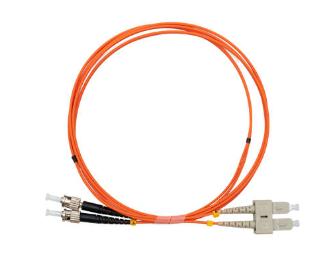
Multimode (OM3/OM4/OM5): Newer, laser-optimized multimode cables use different colors. OM3 and OM4 are usually aqua (light blue/green). OM5, the newest standard, is often lime green.

3. Look at the Connector and Ferrule(Quick Supporting Check)
If the cable jacket is dirty or you cannot see the color, examine the connector ends. The “ferrule” is the tip that holds the glass fiber.
Connector Color: On standard patch cords (like LC or SC connectors), the color of the connector housing is a giveaway. Single mode patch cords almost always have blue connectors. Multimode patch cords typically have beige, black, or grey connectors. (Note: Green connectors usually indicate Angle Polished (APC) connectors, which are usually single mode but also have the green housing).

Core Diameter: If you have a jeweler’s loupe or microscope, look into the ferrule. The core of a single mode fiber patch is much smaller (about 8-10 microns) compared to multimode (50-62.5 microns). To the naked eye, a single mode fiber end looks like a tiny pinprick, while multimode looks like a slightly larger dot.
Why Does It Matter?
Understanding single mode vs multimode patch cord differences is not just about color-coding; it is about network integrity. Single mode is designed for long-distance, high-bandwidth applications (like telecom and ISPs) using laser optics. Multimode is designed for short distances (like data centers and campus networks) using LED or VCSEL optics.
Warning: Never mix and match them. Using a multimode fiber patch cable with single mode optics (or vice versa) can result in massive data loss and damage to the optical components.
Conclusion
To summarize, the next time you need to sort your inventory, remember the three Cs: Color, Connector, and Core.
- Color: Yellow is Single Mode; Orange/Aqua is Multimode.
- Connector: Blue is usually Single Mode; Beige/Black is usually Multimode.
- Core: Check the printing for 9/125 (Single Mode) vs 50/125 or 62.5/125 (Multimode).
Now that you know how to identify single mode and multimode fiber patch cord, you can ensure your network runs at peak efficiency.
👉 Get expert support today — our team can help you quickly determine whether you need a single mode fiber patch or multimode fiber patch cables based on your exact application.
👉 Explore our full range of fiber patch cords — including high-quality options optimized for data centers, FTTH, and telecom networks.


