
What is an MPO Cable?
An MPO cable, also called a Multi-Fiber Push-On cable, is a type of fiber optic cable that contains many fibers in a single connector. The idea behind MPO technology is to make fiber connections faster, neater, and easier to manage, especially when dealing with large amounts of data.
In a normal fiber connection, one connector usually carries one or two fibers. But an MPO connector can hold 12, 24, or even up to 48 fibers in one plug. This means a single MPO cable can do the job of many traditional fiber cables.

Feature
MPO cables are very popular in data centers, telecom systems, and high-speed enterprise networks, where there are hundreds or thousands of fiber connections to manage. Instead of plugging in 12 or 24 separate connectors, engineers can use just one MPO cable, saving both space and time.
The MPO connector is standardized by IEC 61754-7 and TIA-604-5, which ensures it’s compatible with most fiber systems around the world.
👉 In simple terms: An MPO cable connects many fibers at once — it’s like combining many lanes of traffic into one big highway for faster data flow.
A standard LC or SC network cable is like a two-lane road. One lane for sending data (Tx), one lane for receiving (Rx).
An MPO cable is like a massive, multi-lane super-highway. A single, small connector can hold 12, 24, or even 72 lanes of data all at once!
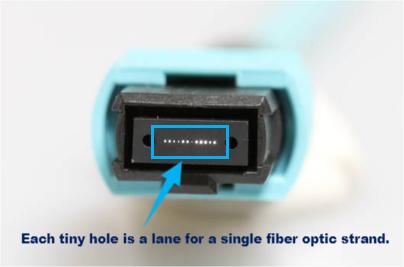
MPO Cable Types
MPO cables come in several types based on how many fibers they carry, what kind of connectors they use, and how the fibers are aligned (polarity). Choosing the right MPO type ensures your system works correctly and efficiently.
1. Based on Fiber Count
The fiber count tells you how many individual fibers are inside the cable.
- 12-Fiber MPO Cable: The most common type, used for 40G Ethernet systems.
- 24-Fiber MPO Cable: Used in 100G networks or higher-speed backbones.
- 48-Fiber or 72-Fiber MPO Cable: Found in large-scale data centers that need very high fiber density.
The more fibers the cable has, the more data it can carry — but it also becomes slightly thicker and more expensive.
2. Based on Connector Type
There are two main connector types:
MPO (Standard): The basic version found in most fiber networks. It’s reliable and cost-effective.
MTP® (High-Performance MPO): A premium version developed by US Conec. It has better alignment, lower insertion loss, and is more durable. MTP cables are often used in high-speed or mission-critical environments.
MPO Trunk Cable: This is a “point-to-point” cable. A cable with an MPO connector on both ends. Creating the main “data highways” between network racks or panels. They are the backbone of a structured cabling system.
MPO Harness / Breakout Cable: This is a “one-to-many” cable. One end has a single MPO connector, and the other end fans out into multiple standard connectors (like 12 fibers becoming 6 separate LC duplex cables). Connecting new, high-density equipment (with an MPO port) to older or traditional equipment (with individual LC or SC ports). It’s a perfect adapter cable.
💡 Tip: All MTP connectors are MPO-compatible, but not all MPO connectors are MTP-compatible.
3. MPO Cable Types Based on Polarity Type
Polarity determines how fibers are aligned and connected from one end to another. It ensures signals go to the right path.
Type A (Straight-Through):
How it works: Fiber 1 (Tx) on one end connects to Fiber 1 (Rx) on the other end. But this creates a problem! Now both ends are trying to “Send” on the same fiber. To fix this, you need to “flip” the cable somewhere else in the link.
Simple Check: The connectors are different genders—one Male (with pins), one Female (without pins).

Type B (Reversed – The Most Common):
How it works: Fiber 1 (Tx) on one end connects to Fiber 12 (Rx) on the other end. It automatically creates the correct Tx-to-Rx path without needing a flip inside the cable. This is why it’s so popular for direct connections.
Simple Check: The connectors are also Male and Female.
Type C (Pair-Flipped):
How it works: It flips adjacent pairs. Fiber 1 (Tx) goes to Fiber 2 (Rx), and Fiber 2 (Tx) goes to Fiber 1 (Rx). It’s another way to achieve the correct Tx/Rx alignment.
Simple Check: The connectors are also Male and Female.
⚙️ Example: If you connect an MPO cable incorrectly (wrong polarity), the signal won’t reach the right receiver — just like plugging your headphone jack into the wrong port.
Applications of MPO Cables
MPO cables are becoming a standard choice for high-speed networks because they save space, reduce installation time, and make upgrading easier. Here are some key areas where MPO cables are widely used:
1. The Heart of Data Centers
This is their home. Every major cloud provider (like Google, Amazon, Microsoft) uses millions of MPO cables.
Connecting Racks: MPO trunk cables run vertically between floors of servers (like a building’s elevator shaft) and horizontally between server racks on the same floor.

2. Factories
Making Installation Fast and Reliable
Pre-terminated Systems: Factories can build entire MPO-based cabling systems that are just shipped to the data center and plugged together like Lego. This cuts installation time from weeks to days and reduces human error.
3. FTTH / FTTx Projects
When you stream a 4K movie on Netflix, that video file is pulled from a server connected by MPO cable.
When you play an online video game, the constant communication between your device and the game server happens over links made by MPO cables.
When you backup your photos to the cloud, they are stored on a hard drive in a data center that is connected to the network with MPO cables.
MPO Cable Distance: How Far Can MPO Cables Run?
Let’s be perfectly clear: The MPO connector itself does not limit the distance.
The fiber type (singlemode or multimode)
The data transmission speed (40G, 100G, etc.)
The transceiver or optical module performance
Let’s break it down 👇
| Network Type | Fiber Type | Typical MPO Cable Distance |
| 40GBASE-SR4 / 100GBASE-SR4 | OM3 Multimode | Up to 100 meters |
| 40GBASE-SR4 / 100GBASE-SR4 | OM4 Multimode | Up to 150 meters |
| 100G / 400G Long Reach | OS2 Singlemode | Up to 10 kilometers or more |
Understand More About Fiber Type,see Fiber optic cable Types Choosing Notes: Multimode OM1 OM2 OM3, Single mode OS1 OS2
Before installing, check the distance between your devices and match it with your cable’s specifications. Using an MPO cable longer than its limit can cause signal loss and lower performance.
Conclusion
In summary, understanding the MPO cable meaning, MPO cable types, and MPO cable distance helps you choose the right solution for your fiber network. MPO cables are powerful, compact, and efficient — designed to make modern networks faster and more reliable.
They offer multiple fibers in one connector, support different network speeds, and work over short or long distances depending on the fiber type. Whether for data centers, telecom systems, or FTTH projects, MPO cables are a smart investment for building high-speed, future-ready networks.
Related Article: Fiber Optical Cable: The Ultimate Guide


