
When setting up or expanding a network, one of the most common questions that arises is about the physical connections on your switch. You’ll see a bank of familiar RJ45 vs. SFP ports and might wonder: what’s the difference, and why does it matter? Choosing the right switch port types isn’t just about what fits; it can impact your network’s performance, cost, and scalability.
In this guide, we’ll break down the key differences between switch port Ethernet (RJ45) and switch port SFP to help you make an informed decision.
Understanding Switch Port Types
A network switch is the heart of any local area network (LAN). It connects multiple devices—such as computers, access points, IP cameras, and servers—so they can share data and communicate with each other.
Each switch comes with different kinds of ports called switch port types, and the most common ones are RJ45 (Ethernet) ports and SFP ports. These ports determine how your devices connect to the network and what kind of cables you’ll use.

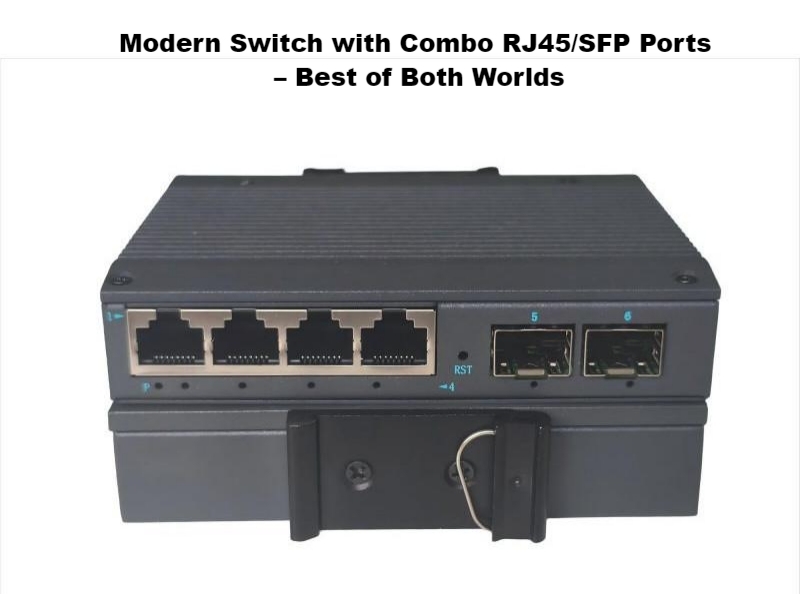
RJ45 ports use copper cables and are the standard for home and small office networks. SFP ports, on the other hand, use fiber optic cables or special transceiver modules, making them perfect for high-speed and long-distance data connections.

1. RJ45 Ports (Switch Port Ethernet)
This is the classic, ubiquitous port you find on virtually every consumer router, switch, and network card. It uses the familiar 8-pin modular jack, often referred to as an “Ethernet port” or “copper port.”
Medium: Uses twisted-pair copper cables (Cat5e, Cat6, Cat6a, etc.).
Common Use: Connecting computers, printers, IP phones, and access points within an office or home. It’s the workhorse for most local area networks (LANs).
Typical Range: Limited to 100 meters (328 feet) for a single run.
2. SFP Ports (Switch Port SFP)

SFP stands for Small Form-factor Pluggable. These are modular slots, not fixed ports. You insert an SFP transceiver into the slot, and that transceiver then accepts a fiber optic or copper cable. This modularity is its superpower.
Medium: Can use either fiber optic cables (for long-distance, high-speed links) or DAC (Direct Attach Copper) cables (for short, high-speed links within a rack).
Common Use: Uplinks between switches, connections to servers, and bridging longer distances. They are the backbone and high-speed highways of a network.
Typical Range: Varies dramatically based on the SFP module and cable type. Multimode fiber can reach 550m, while single-mode fiber can span tens of kilometers.
RJ45 vs. SFP: Key Differences Explained
While both RJ45 and SFP ports help devices communicate, they are designed for different situations. Here’s how they compare:
- Cabling Type: RJ45 ports use copper Ethernet cables, while SFP ports use fiber optic or copper SFP transceivers.
- Distance: RJ45 can reach up to 100 meters, while SFP can extend several kilometers, depending on the fiber type used.
- Speed: RJ45 typically supports up to 10G, while SFP can handle 1G, 10G, 25G, or even higher.
- Cost: RJ45 connections are cheaper and easier to install. SFP connections cost more due to transceivers and fiber cables.
- Interference: Copper cables can experience electrical interference. Fiber optic SFP connections are immune to it, providing a cleaner, more stable signal.
- Latency: SFP ports generally offer lower latency, making them better for fast and stable data transmission.
If your network only needs short connections—like between computers and switches in the same office—RJ45 ports are ideal. But if you’re linking multiple buildings, data centers, or need faster speeds, SFP ports are the better option.
Table
| Feature | RJ45 Port (The Workhorse) | SFP Port (The Specialist) |
| Cable & Technology | Copper wires carrying electrical signals. | Fiber: Light pulses through glass. DAC: Electrical signals through a specialized cable. |
| Maximum Distance | 100 meters (328 feet) for a single run. This is a hard limit for reliable performance. | Fiber: Can range from 550 meters to over 80 kilometers! DAC: Typically 3 to 7 meters. |
| Speed | Common: 1 Gigabit (1G), 2.5G, 5G, 10 Gigabit (10G). 10GBASE-T requires high-quality cabling (Cat6a+). | Common: 1G, 10G, 25G, 40G, and beyond. Often the preferred choice for speeds above 10G. |
| Interference | Susceptible to Electromagnetic Interference (EMI) from power lines, motors, and fluorescent lights, which can cause errors. | Fiber is immune to EMI. This makes it perfect for electrically “noisy” environments like factories. |
| Security | It’s possible to tap a copper line, though difficult. | Tapping a fiber line is extremely hard and causes a noticeable drop in the light signal, making it more secure. |
| Cost | Lower upfront cost. Cables and ports are cheap and ubiquitous. | Higher upfront cost. SFP modules and fiber cables are more expensive. However, they can be cheaper for long-distance runs. |
| Power Usage | Higher, especially at 10G speeds. The electronics needed to push high-speed signals over copper use more power. | Generally lower. Fiber SFP modules, in particular, are very power-efficient. |
| Flexibility | None. An RJ45 port is always for a copper Ethernet cable. | Highly flexible. You can pop in a 1G fiber module today and a 10G DAC module tomorrow without changing the switch. |
When to use RJ45 vs. SFP?

When to Use an Ethernet Switch Port
You’re Connecting End-User Devices: Desktops, laptops, printers, and IoT devices are perfect for standard Ethernet.
Distance is Under 100 Meters: For most office floor plans, 100 meters is more than sufficient.
Budget is a Primary Concern: Copper cables and RJ45 ports are significantly cheaper and require no additional transceivers.
Simplicity is Key: You don’t want the complexity of managing different SFP modules. It’s a simple plug-and-play solution for the access layer of your network.
Real-World Example: Wiring a small office. You run Cat6 cables from a central switch to each employee’s desk and to the network printer. This is the ideal, cost-effective use of RJ45 ports.
When to Use an SFP Switch Port
You Need Longer Distances: Connecting buildings across a campus or between different floors in a large building? Fiber via SFP is your only real option.
You Require High Bandwidth and Low Latency: For backbone connections, links between core switches, or connections to critical servers, SFP ports (especially with 10G+ fiber) provide superior performance.
EMI is a Concern: In industrial environments or data centers with dense cabling, fiber’s immunity to electrical noise is a major advantage.
You Need Flexibility: A single switch port SFP can be a 1Gb fiber link today, a 10Gb copper link tomorrow, and a 25Gb fiber link next year—just by changing the module. This future-proofs your investment.
Real-World Example: Connecting your office’s main network switch to a network-attached storage (NAS) device in the basement server room. Using a 10G SFP connection ensures the fastest possible file transfers.
A Powerful Combo: Using Switch Port Channel
You don’t always have to choose one over the other exclusively. A switch port channel (also known as Link Aggregation Group or LAG) allows you to bundle multiple physical ports into a single logical link. This is a powerful technique you can use with both RJ45 and SFP ports to:
Increase Bandwidth: Combine two 1Gb Ethernet ports to create a 2Gb trunk.
Provide Redundancy: If one cable or port in the channel fails, traffic automatically fails over to the remaining links.
You can even create a port channel using a mix of RJ45 and SFP ports (on many managed switches), as long as they are configured for the same speed and duplex.
Conclusion
So, RJ45 vs. SFP—which should you use? The answer lies in the role the connection will play in your network.
Use RJ45 (switch port Ethernet) for your horizontal cabling—the “last mile” connections to your end users and devices. It’s cost-effective and perfectly suited for the task.
Use SFP (switch port SFP) for your vertical cabling and uplinks—the network’s backbone. It’s designed for performance, distance, and flexibility where it matters most.
By understanding the strengths of each switch port type, you can design a network that is not only powerful and reliable today but also scalable for the demands of tomorrow.


