
Choosing the right cable between SDI and HDMI is critical for any video setup, but the choice is often misunderstood. While both carry digital video and audio, they are designed for completely different environments. SDI (Serial Digital Interface) is the robust workhorse of professional broadcast and live production, whereas HDMI (High-Definition Multimedia Interface) is the universal standard for consumer electronics and home theaters.
This definitive guide will break down what is SDI and HDMI, the key differences between SDI and HDMI cables to help you make the right choice for your project.

What is SDI
What is SDI and HDMI?
SDI, or Serial Digital Interface, is a professional video standard used mainly in broadcast television, video production, and security systems. It sends uncompressed digital video and audio through a special coaxial cable with a BNC connector. SDI is known for being strong and reliable, even over long cable distances. It’s the standard in places like TV stations, live event control rooms, and video studios.
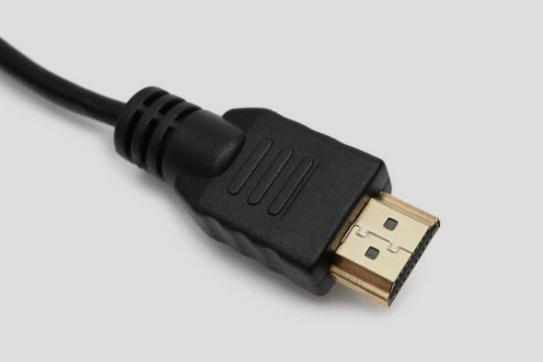
HDMI, or High-Definition Multimedia Interface, is more common in homes and offices. It’s used to connect TVs, computers, projectors, game consoles, and more. HDMI carries both video and audio through one cable. It’s very easy to use—just plug and play—but it doesn’t work well over long distances without help from extra devices.
| Feature | SDI (Serial Digital Interface) | HDMI (High-Definition Multimedia Interface) |
|---|---|---|
| Primary Use | Professional broadcast, live events, studios | Consumer electronics, home theater, gaming |
| Signal Type | Digital video & audio (embedded) | Digital video, audio, & data (CEC, Ethernet) |
| Max Distance | ~300 ft+ (1080p) with coaxial cable | ~50 ft (1080p) without signal boosters/extenders |
| Connector | BNC (Bayonet Neill–Concelman) – Locking | HDMI (Various sizes) – Non-locking |
| Cost | Generally more expensive | Inexpensive and widely available |
| Key Strength | Long-distance runs, rugged reliability, locking connector | Consumer-friendly, carries data, supports high-end audio |
What is HDMI
SDI vs HDMI: What‘s the Difference?
Let’s look at how SDI and HDMI compare in real situations:
1. Where They Are Used
SDI is mostly used in professional places like news stations, film sets, video production studios, and security control rooms. It’s designed to be
stable and handle tough working conditions.
HDMI is used more in homes, schools, offices, and meeting rooms.You’ll find HDMI ports on your TV, Blu-ray player, game console (like PlayStation or Xbox), laptop, streaming stick (like Roku or Fire TV), and many consumer cameras (DSLRs and mirrorless cameras).
2. How Far the Signal Can Travel
One of the biggest differences between SDI and HDMI is the distance the signal can go.
SDI can send video and audio signals over 100 meters (about 300 feet) without needing any extra help. This makes it perfect for big buildings or outdoor broadcast areas.
HDMI usually works best at short distances, around 10–15 meters (30–50 feet). Beyond that, the signal can start to break up unless you use signal boosters or extenders.

3. Durability
SDI is made for heavy use. Its cables are tough, and the connections stay strong, even when moved or unplugged many times.
HDMI cables are fine for home use, but they may not last as long in a demanding work environment.
4. Cost
SDI cables and connectors are generally more expensive than basic HDMI cables. You’re paying for the rugged build quality and the ability to run long distances reliably.
5. Cable and Connector Type
SDI uses coaxial cables with BNC connectors. SDI uses a round connector called BNC. It has a sturdy metal barrel with a little pin in the center. You plug it in and twist a collar to lock it securely. It’s built much tougher than HDMI. These connectors are strong and click into place, so they won’t accidentally come loose.
HDMI uses flat cables with 19-pin connectors. These are easy to plug in, but they don’t lock in place and can be pulled out easily by mistake.

6. Signal Quality and Reliability
Both SDI and HDMI can support high-definition video, like 720p, 1080p, and even 4K. But SDI is often better in professional settings because it sends uncompressed signals, meaning there’s no loss in quality.
HDMI works well too, but sometimes it includes extra protection systems like HDCP, which can block the signal if devices don’t match up correctly.
Copy Protection: SDI does not use HDCP copy protection. This makes it much simpler for professionals to route and switch video feeds in studios or live trucks, but it also means it’s not suitable for playing copy-protected movies or shows from commercial players.
So, SDI vs HDMI Which One Should You Use?
You may have clear thinking about which one should you choose based on above differences.
Choose SDI for:
- Broadcast Studios & Live Production: Camera feeds, video switchers, routing equipment.
- Live Events: Concerts, conferences, church AV systems where long, reliable cable runs are needed.
- Mission-Critical Installations: Anywhere a cable coming unplugged would be a disaster.
Choose HDMI for:
- Home Theater & Gaming: Connecting a PS5, Blu-ray player, or Apple TV to a television or soundbar.
- Conference Rooms & Classrooms: For short runs between a laptop and a display.
- Consumer-Grade Equipment: Virtually all consumer devices use HDMI as the standard output.
Bridging the Gap: HDMI to SDI Converters
What if you have a device with only HDMI (like a nice DSLR camera or a laptop) but need to plug it into professional SDI gear (like a switcher or a long SDI cable run)? That’s where an HDMI to SDI converter comes in!

What it Does: This small box takes the HDMI signal from your device and transforms it into a strong SDI signal. This SDI signal can then travel long distances and plug into professional equipment using sturdy BNC cables.
Frequently Asked Questions (FAQ)
Q1: Can I just use an adapter to plug HDMI into an SDI port (or vice versa)?
A: No, you can’t use a simple, cheap adapter. HDMI and SDI are completely different types of signals. Think of it like trying to plug a garden hose into a fire hydrant connection – the fittings are different, and the water pressure (signal) isn’t compatible. You need an active converter box (like the HDMI to SDI converter mentioned above) to change the signal properly.

Q2: Is it more common to convert HDMI to SDI or SDI to HDMI?
A: Converting HDMI to SDI is much more common in professional settings. Professionals often need to bring sources like laptops, consumer cameras, or graphics computers (which usually have HDMI) into their existing professional SDI video systems (switchers, routers, recorders). Converting SDI to HDMI is usually done to connect a professional SDI feed to a standard HDMI TV or projector for viewing.
Q3: Can I use a long HDMI cable instead of converting to SDI?
A: For distances longer than about 25-30 feet, converting to SDI is usually the better and more reliable choice. Very long HDMI cables are expensive, thick, stiff, and the signal can still weaken or fail. Using an HDMI to SDI converter and then standard SDI coaxial cable is the proven, professional way to send video long distances without problems.
Q4: Do HDMI to SDI converters add delay?
A: Yes, most converters add a very small amount of delay (usually just 1 or 2 video frames). For most uses like presentations or playback, this tiny delay isn’t noticeable. However, if you need perfectly synchronized video feeds for live switching (like multiple camera angles), you need to be aware of this small delay and choose converters known for minimal latency.
【Edited in September 2025】


