
When it comes to setting up a network, the type of router you choose can make all the difference. Routers come in various types, each offering different features to meet the specific needs of users. In this guide, we’ll explore router types from multiple perspectives, including functionality, scale, and usage. Plus, we’ll answer some frequently asked questions to help you make the best decision for your network.
1. Different router types Based on Functionality
Wireless Routers: A wireless router is the most common type used in homes and small offices. This router connects to your internet modem and broadcasts a Wi-Fi signal, allowing multiple devices (like phones, laptops, smart TVs, etc.) to connect to the internet without any cables. The wireless connection is typically either 2.4 GHz or 5 GHz, depending on the router.

Wired Routers: A wired router connects your devices to the internet via Ethernet cables. Unlike wireless routers, wired routers don’t broadcast a Wi-Fi signal; instead, they provide a direct, stable connection for each device. This type is less common for home use but is popular in business environments or for users who need top performance and reliability.
Modem-Router Combos: A modem-router combo combines both the functions of a modem and a router in one device. The modem connects directly to your ISP (Internet Service Provider), and the router distributes that connection to your devices. This is an all-in-one solution that simplifies your setup.
Mesh Routers: 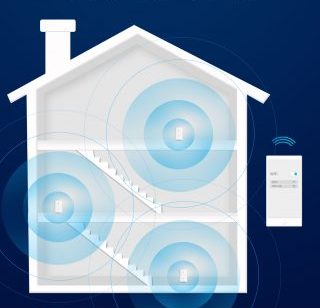 routers consist of multiple router units (or “nodes”) that communicate with each other to create a single, unified Wi-Fi network. Each node in the mesh network acts as a part of the whole system, broadcasting Wi-Fi and ensuring better coverage throughout a large area. If one node fails or has poor signal strength, the others can still maintain a stable connection.
VPN Routers: A VPN router routes all internet traffic through a Virtual Private Network (VPN), encrypting the connection to protect your privacy. Unlike typical routers that just route traffic between your devices and the internet, VPN routers mask your IP address, ensuring that your online activity is secure and anonymous.
Travel Routers: Travel routers are small enough to fit in your pocket. When you’re in a hotel with sketchy Wi-Fi, you connect the travel router to the hotel network, then connect all your devices to your travel router. This creates a secure, private network just for you. Some even have built-in VPNs for extra security on public networks.
2. Router Types Based on Usage and Scale
Home Routers: Home routers are the most common type of router used for personal and household internet connections. They typically offer both Wi-Fi and wired connections, allowing a variety of devices to connect. Most home routers have features like parental controls, guest networks, and some advanced security settings.
Small Business Routers: Small business routers offer more advanced features than home routers, including improved security protocols, Quality of Service (QoS) for prioritizing certain types of traffic, and more powerful Wi-Fi signals. They are designed to support multiple users and heavy traffic, which is common in small businesses.
Enterprise Routers: Enterprise routers are designed for large businesses or organizations with complex networking needs. These routers can support thousands of devices, provide advanced traffic management, and offer robust security features. They can handle large-scale operations and manage multiple VLANs (Virtual Local Area Networks) for separate departments or groups.
Industrial Routers: These routers work in factories, on oil rigs, or in outdoor weather stations. They’re built with protective casings to withstand extreme temperatures, vibrations, and dust. Unlike home routers that might quit in hot weather, industrial routers keep working in environments from freezing cold to desert heat.
Core Routers: Core routers are used in the backbone of the internet. They are responsible for directing data between different networks and managing large amounts of internet traffic. These routers are designed for maximum performance and efficiency, and they are typically used by ISPs or in large data centers.
Edge Routers: Edge routers sit at the boundary between your local network and the wider internet. Your Internet Service Provider (ISP) uses edge routers to connect neighborhoods to their main network. In businesses, edge routers provide the first layer of security, checking all incoming and outgoing traffic. They’re like security checkpoints at the entrance to a building complex.

3. Router Types Based on Network
Single Router Systems: A single router system is a simple network setup where one router connects directly to your modem and distributes the internet connection to your devices. It’s the most common configuration for home and small office networks.
Distributed Router Systems: In a distributed router system, multiple routers or access points are used to expand and improve network coverage across a larger area. These systems can be set up in various ways, such as connecting a wired router to multiple wireless access points.
Hybrid Router Systems: A hybrid router system combines the strengths of both wired and wireless networks. You can have wired Ethernet connections in certain rooms or areas and Wi-Fi coverage for others, depending on your needs.
Virtual Routers: A virtual router isn’t a physical device—it’s software running on a regular computer server. Cloud providers like Amazon AWS use thousands of virtual routers to manage traffic between customers’ cloud services. The advantage is flexibility: you can create or modify virtual routers instantly without buying new hardware.
Router Selection Guide
Choosing the right router can be a daunting task given the wide variety of router types available. To help simplify the decision-making process, we’ve created a router selection guide.
Determine Your Network Size and Coverage Area
For smaller spaces, a single, traditional wireless router should be sufficient. Place it centrally to ensure maximum coverage. Make sure the router is positioned away from walls and obstacles to avoid signal degradation.
For homes with multiple floors or large square footage, a mesh system is ideal. Mesh systems use multiple router nodes to blanket the entire home with Wi-Fi coverage, eliminating weak spots and dead zones. If your home has thick walls or is built with materials like concrete or brick, Wi-Fi signals may not travel as effectively. If certain areas of your home experience weak Wi-Fi signals due to the house structure or materials (e.g., thick walls), you might need to add a Wi-Fi repeater or extender. This device can amplify your signal, helping to reach distant rooms or floors.
Consider Your Internet Speed and Bandwidth Requirements
Basic Browsing and Streaming:
If you primarily use the internet for browsing, emailing, and streaming videos, a Wi-Fi 5 router or a modem-router combo will meet your needs. These routers are affordable and capable of handling casual use.
Gaming, 4K Streaming, and Video Conferencing:
For more intensive tasks like gaming, 4K streaming, or video calls, a wired router (Ethernet) will offer the most stable and fastest connection. If you prefer wireless, a Wi-Fi 6 mesh router is a great option for maintaining high speeds across multiple devices without lag.
Next, count your connected devices. A light household with under 15 devices (phones, laptops, a TV) can use a basic router. For 15-30 devices—a typical family with smart home gadgets—choose a higher-end router or an entry mesh system. For heavy use with 30+ devices, such as a smart home with many cameras and speakers, you need a powerful mesh system or prosumer router with a strong processor to manage the traffic.
Evaluate Your Security Needs
Home Network: Ensure your router offers basic security features like WPA3 encryption and a firewall. Some home routers also include parental controls and guest networks.
Small Business Network: Small businesses typically need more robust security, such as VPN support, advanced firewalls, and Quality of Service (QoS) to prioritize essential business traffic (e.g., video conferences, file sharing). If you’re handling sensitive client data, ensure that your router supports secure VPN connections for remote workers or traveling employees.

Enterprise Network: For enterprises, security is paramount. Look for routers that support VLANs (Virtual LANs) for segmentation of network traffic, intrusion detection systems, and VPN support for encrypted remote access. These features help protect against cyber threats and ensure safe communication across your organization.
Future-Proofing Your Router
Wi-Fi 5 (802.11ac): Suitable for basic tasks but not ideal for future needs.
Wi-Fi 6 (802.11ax): A better choice for handling multiple devices and higher speeds. Ideal for households with lots of smart devices or businesses expecting growth.
Wi-Fi 7: If you’re looking to stay ahead of the curve, consider a Wi-Fi 7 router, which promises even faster speeds and enhanced performance, particularly for high-demand applications like VR and AR.
Budget Considerations
Finally, match your budget. Expect to spend a little more on a business router with enhanced security and better performance, especially if you have several devices or employees. Enterprise routers are generally more expensive but are designed for high-capacity use. Invest in one if you have a large office or network infrastructure that requires top-notch performance and security.
Frequently Asked Questions (FAQ)
-
What is the difference between a modem and a router?
Modem: Connects to your ISP and brings the internet into your home or office. It converts the incoming signal into a format your devices can use.
Router: Distributes that internet connection to various devices in your home or office. It routes the data between devices and the internet.
-
Do I need a router and a modem?
Yes, unless you’re using a modem-router combo. A modem is necessary to connect to the internet, and a router is required to distribute the internet connection to your devices. If you opt for a modem-router combo, you can have both in one device.
-
Which router type is best for gaming?
Wired routers are the best for gaming because they offer faster speeds, lower latency, and more stable connections than wireless routers. However, if you prefer wireless, a mesh router can help maintain good performance across a larger area.
-
What is a mesh router, and do I need one?
A mesh router system uses multiple units (nodes) to provide seamless Wi-Fi coverage across large areas. If your house or office is large or has Wi-Fi dead zones, a mesh router can help eliminate those and provide strong coverage everywhere.
-
Can I use a VPN with any router?
Many modern routers support VPN configurations, but you should check your router’s specifications to ensure compatibility. If you want a router with built-in VPN support, a VPN router is your best option.
-
What is Quality of Service (QoS) in routers?
QoS is a feature that allows you to prioritize specific types of internet traffic, such as streaming or gaming, to ensure those activities run smoothly, even if the network is under heavy load.
-
How do I know if I need an enterprise router?
If you have a large business or need to manage a complex network, an enterprise router is designed to handle high traffic and provide advanced features like redundancy, high security, and large-scale management.
Conclusion
Choosing the right router type is essential to creating a fast, secure, and reliable network. Whether you’re a home user, small business, or managing a large enterprise network, understanding different router types will help you make the best decision based on your needs. By considering factors like coverage, speed, and security, you can ensure your network is optimized for both performance and reliability.
Keep Learning
Ultimate Guide to Routers Everything You Need to Know


