
If you have recently upgraded to a fiber optic connection, you’ve likely noticed a small device installed by your Internet Service Provider (ISP). That device is the ONU (Optical Network Unit). While most users understand that the ONU converts light signals into internet data, fewer understand a critical feature now built into these devices: IPv6 on ONU.
As the world runs out of traditional IPv4 addresses, the shift to IPv6 is no longer optional. But what exactly is IPv6, what is it used for, and how does it actually work inside a fiber network? Let’s break it down.
First, What Is IPv6? (And What Is It Used For?)
Before we dive into the ONU, let’s clarify the protocol itself.
IPv6 (Internet Protocol version 6) is the latest version of the Internet Protocol. Its primary job is to identify and locate devices on a network so they can communicate over the network. You can think of it as a postal address for your smartphone, laptop, or smart TV.
So, IPv6 what is it used for? In short, it solves the “address exhaustion” crisis of IPv4. While IPv4 supports about 4.3 billion addresses (which we’ve run out of), IPv6 supports 340 undecillion addresses—enough for every grain of sand on Earth. Practically, it is used for:
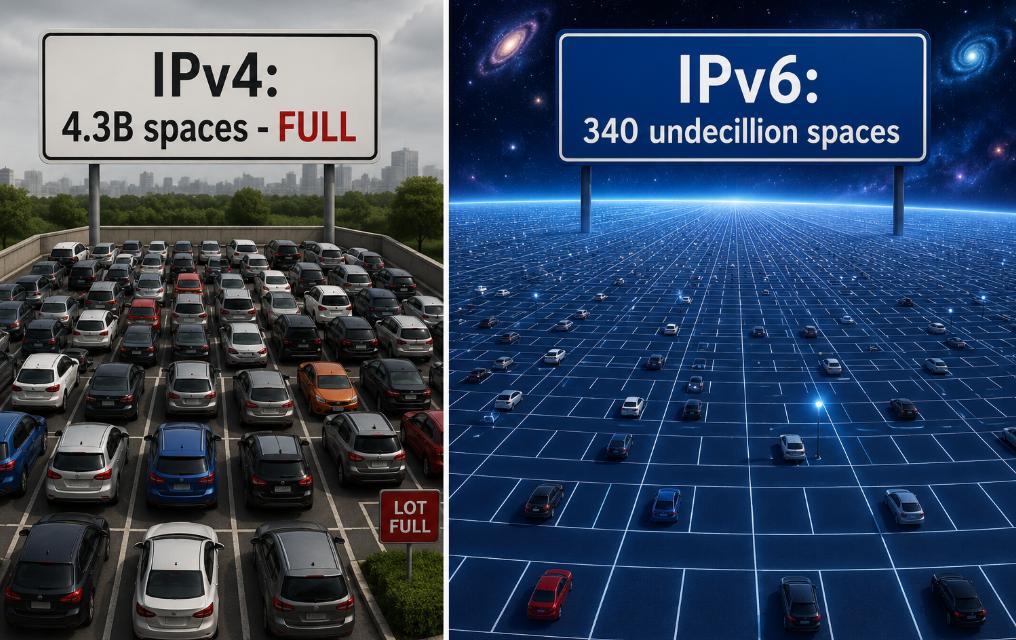
Parking Space as Address
End-to-end connectivity without needing clunky workarounds like NAT (Network Address Translation).
Enhanced security with mandatory IPSec support.
More efficient packet processing, which improves speed.
How IPv6 Work: The Basics
To understand how IPv6 works, you need to forget the dotted-decimal notation of IPv4 (like 192.168.1.1). IPv6 uses hexadecimal digits separated by colons (e.g., 2001:0db8:85a3::8a2e:0370:7334).
Here is the simple flow:
Address Autoconfiguration (SLAAC): Devices generate their own unique IPv6 address without needing a central DHCP server (though DHCPv6 can still be used).
Neighbor Discovery (NDP): Devices on the same local network find each other, replacing ARP in IPv4.
No NAT: Every device can have a public, globally routable IPv6 address. The router simply forwards packets rather than translating them.
But where does the ONU fit into this picture?
The Role of IPv6 on ONU in Fiber Networks
In a fiber network, the ONU is the demarcation point—the box where fiber optics meets your home’s Ethernet or Wi-Fi. For IPv6 to work, the ONU must act as a bridge or a router.
Here is how IPv6 on ONU functions in a typical fiber-to-the-home (FTTH) setup:
1. The WAN Side (ISP Connection)
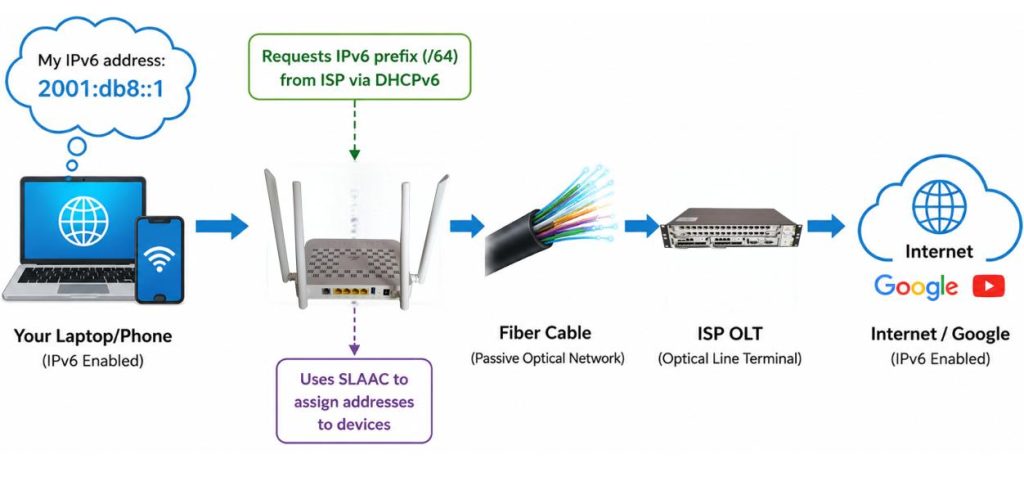
Your ONU connects to the ISP’s Optical Line Terminal (OLT). Using PPP over Ethernet (PPPoE) or IPoE, the ONU requests an IPv6 prefix from the ISP’s DHCPv6 server. It typically uses a /64 or /56 prefix—assigning a large block of addresses to your entire home.
2. The LAN Side (Your Devices)
Once the ONU receives the IPv6 prefix, it advertises that prefix to your router (if the ONU is in bridge mode) or directly to your devices (if the ONU is in router mode). Using SLAAC, your smartphone, laptop, and smart TV automatically generate secure, unique IPv6 addresses.
3. The Packet Journey
When you request a website over IPv6:
- Your PC sends an IPv6 packet to the ONU.
- The ONU forwards it as an optical signal up to the OLT.
- The ISP routes it natively over IPv6 to the destination server (e.g., Google, YouTube).
- The server responds directly to your PC’s IPv6 address—no NAT required.
Why Should You Care About IPv6 on ONU?
If your ONU does not support IPv6 properly, you may experience:
- Slow loading of IPv6-preferring sites (like Facebook or Netflix).
- Cascading issues with gaming consoles or peer-to-peer applications.
- Buffering on some streaming services that have moved entirely to IPv6 internally.
Conversely, enabling IPv6 on ONU ensures:
- Lower latency for real-time apps (gaming, Zoom).
- Direct device-to-device communication (essential for IoT and smart homes).
- Future-proofing your fiber network for the next decade.
Conclusion
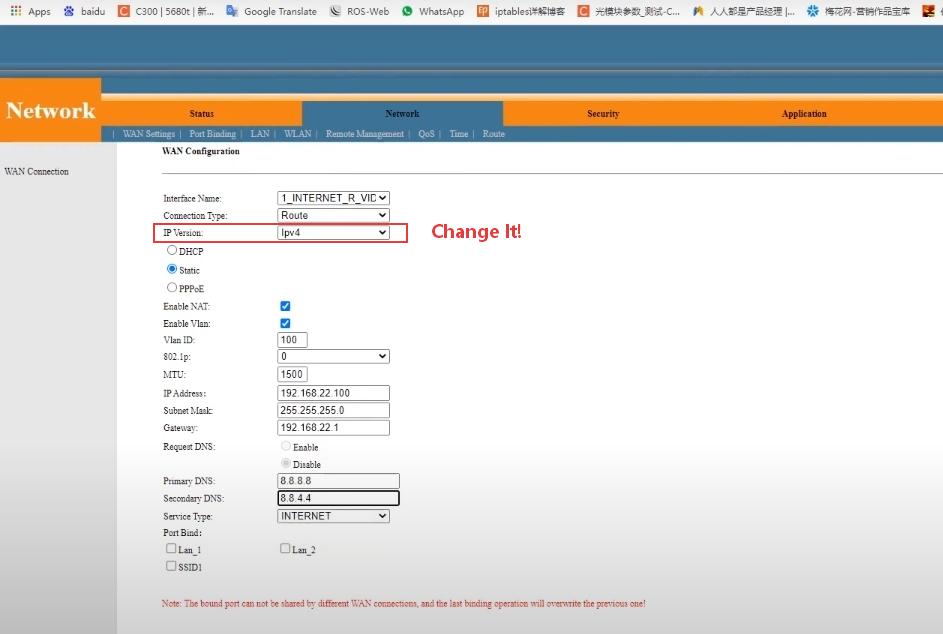
Most modern ONUs (like those from Baudcom, Huawei, Nokia, or ZTE) support IPv6 by default. However, some Internet Service Providers (ISPs) disable IPv6 in the firmware. To check:
Log into your ONU’s web interface (usually 192.168.1.1).
Look for “WAN Settings” or “IPv6 Configuration.”
Ensure “IPv6 Enable” is checked and mode is set to “DHCPv6” or “SLAAC.”
If those options are missing, contact your ISP. In a world of 50 billion connected devices, an IPv6-capable ONU isn’t a luxury—it’s the foundation of modern fiber networking.


