
In today’s Ethernet connection world, the need for stable and fast internet access has never been greater. Whether you’re streaming videos, working remotely, or simply browsing the web, having a reliable network connection is crucial. While Wi-Fi is convenient, there are times when a wired Ethernet connection is preferable due to its speed and reliability. This is where USB to Ethernet adapters come into play.
If you’ve ever found yourself in a situation where you need to connect a device to a wired network but don’t have an Ethernet port, a USB to Ethernet adapter could be the solution you’re looking for. In this blog post, we’ll explore why such adapters are essential and Different USB Connector Types you can choose.

Why Do We Need a USB to Ethernet Adapter?
Devices Without Built-In Ethernet Ports
Modern devices like smartphones, tablets, and ultra-portable laptops lack Ethernet ports. Their slim designs leave no room for such ports. USB to Ethernet adapters solve this. They enable wired network connections. This is crucial for business travelers. It ensures stable internet where Wi-Fi is spotty or unavailable.
Improved Stability and Speed
Wi-Fi is widely available. It isn’t always stable or fast. Crowded spaces or weak signals worsen performance. Ethernet offers a direct internet link. It avoids interference from devices. It provides faster speeds and lower latency. This is crucial for gaming, video calls, or downloading large files.

Use in Public or Remote Locations
In certain environments like hotels, conference rooms, or even remote areas, Ethernet may be the only reliable form of internet wire access. A USB to Ethernet adapters allow you to access wired internet even if your device was only designed for wireless connectivity. This is especially handy when you’re in a place that doesn’t offer Wi-Fi but does provide Ethernet ports.
Bypassing Network Congestion
Wi-Fi Ethernet connection can become congested, particularly in public spaces or areas with many users. With a USB to Ethernet adapters, you can bypass this congestion by using a direct wired connection, which can be faster and more reliable, even if multiple devices are on the same Wi-Fi network.
Benefits of Using a USB to Ethernet Adapter
Enhanced Internet Speed and Stability
The most significant advantage of using a USB to Ethernet adapter is the improvement in network speed and stability, especially when Wi-Fi signals are weak or unreliable.
Versatility
These adapters are compatible with many devices, including smartphones, tablets, and laptops. If you have multiple devices that lack an Ethernet port, one adapter can provide you with a wired connection on all of them.
Convenience for Travel
If you travel often for work or leisure, USB to Ethernet adapters can be a lifesaver. It takes up very little space and ensures you have access to a reliable internet connection wherever you go.
Cost-Effective
Instead of buying a more expensive device with a built-in Ethernet port, a USB to Ethernet adapter provides a low-cost solution to your connectivity needs.

Different USB Connector Types you can choose
Understanding the USB connector types can also help when choosing the right adapter. There are two primary types ofUSB connectors to be aware of:
 USB Type-A
The USB Type-A connector is the older and more common of the two USB Connector Types. It is found on many older smartphones, tablets, and other portable devices. The connector itself is small, rectangular, and slightly tapered at the ends. It’s primarily used for charging and data transfer.
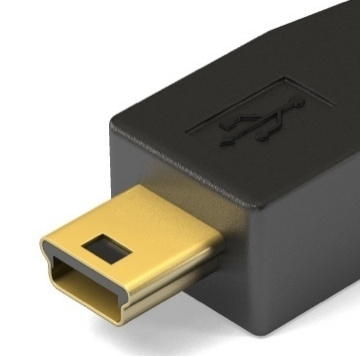 USB Type-B
The USB Type-B connector is less common but is still used in some applications, especially in devices like digital cameras, certain printers, and older devices in the tech ecosystem. It is slightly wider and more square-shaped compared to the Type-A connector, making it easier to differentiate.
In the case of adapters, a USB to Ethernet adapter might come with a USB Type-B plug for certain devices (especially older models), but today’s adapters are often designed for the more prevalent USB Type-A.
USB OTG (On-The-Go)
Many modern mobile devices support USB OTG functionality, which allows the device to act as a host to connect to other peripherals, such as a USB keyboard, mouse, or external storage device. If your device supports OTG, a USB to Ethernet adapter can work seamlessly to provide wired internet connectivity.
Conclusion
A Micro USB to Ethernet adapter is essential for stable, high-speed internet on devices without Ethernet ports. These adapters are portable and easy to use. They provide a reliable alternative to Wi-Fi, especially where wireless connections are slow or unstable.
Knowing Micro USB connector types ensures compatibility with your device. This helps maximize the adapter’s performance. A wired connection improves online experiences, whether working, gaming, or browsing.


