
If you manage, deploy, or maintain Huawei MA5800 Optical Line Terminals (OLTs), you’ve likely faced a common but critical puzzle: two line cards, both labeled as 16-port GPON interfaces, seemingly identical at a glance, yet fundamentally different in function and design. They are the Huawei GPUF and the Huawei GPHF.
Mistaking one for the other isn’t a minor clerical error—it can halt network expansions, cause costly installation failures, and lead to chronic performance issues. This comprehensive guide will walk you through not only how to tell them apart, but why doing so is a non-negotiable skill for any telecom professional.

Huawei GPUF and Huawei GPHF Key Differences:
On the surface, the GPUF and GPHF share a mission: connecting fiber to your customers via 16 GPON ports. But beneath the identical rows of optical interfaces lies a philosophical split in Huawei’s OLT design evolution.
The Huawei GPUF:
Think of the GPUF as a brilliant specialist. It excels at one job: being a GPON Interface Unit. It is a single-width, dedicated service card.
Its Role: To terminate optical signals from customer premises and convert them into data streams for the network.
Key Functional Interfaces:
GPON Ports (16 Ports)
The GPUF card provides 16 GPON ports for connecting to the customer premises equipment (CPE), like ONTs (Optical Network Terminals). These ports handle the downstream and upstream optical data traffic between the OLT and the CPE.
Performance: Each port provides up to 2.5 Gbps downstream and 1.25 Gbps upstream speeds.
Management Interface (for System Control)
The GPUF card interfaces with the OLT’s management system, typically through out-of-band management like Ethernet or dedicated control channels.
The management interface enables network administrators to configure and monitor the card’s status, performance metrics, and alarms.
Service Interfaces:
Optical Service Interface: This is the interface between the GPON ports and the fiber optic network, typically using SC/APC connectors or similar fiber-optic interfaces.
Ethernet Uplink Interface (for connection to backplane or core network): In the case of the GPUF, this is more basic and involves standard GPON connectivity, relying on external uplinks provided by the OLT chassis.
Its Limitation: It cannot function alone. It is a component in a traditional, distributed OLT architecture.
The Huawei GPHF
The GPHF represents the next step in integration. It is a converged GPON Service and Control Board. It’s a double-width card that embodies the “all-in-one” philosophy.
Its Role: To perform both the service termination of a GPUF and the system control functions of an MCUD card.
Key Functional Interfaces:
GPON Ports (16 Ports)
Like the GPUF, the GPHF provides 16 GPON ports for customer connections. These ports deliver standard GPON service to the CPE, but the GPHF also supports additional PON technologies like XG-PON and XGS-PON.
Performance: Each port provides up to 10 Gbps downstream and 10 Gbps upstream speeds, enabling higher-capacity services compared to the GPUF.
10 Gigabit Ethernet (10GE) Uplink Ports
GPHF includes 2 x 10GE uplink ports (typically via SFP+). These uplink ports provide direct connectivity to the core network or other OLT nodes, enabling high-speed data transfer. The 10GE uplinks make the GPHF card capable of functioning as a self-contained subsystem, bypassing the need for a dedicated backplane card for system control.
The 10GE uplinks are crucial for larger, more demanding networks and help in future-proofing the network for higher bandwidth needs.
System Control and Service Termination
The GPHF card integrates the system control functions traditionally handled by a separate MCUD card, acting as both the GPON service termination unit and the OLT control unit. This means the GPHF serves as a converged card, handling both data traffic management and system control.
The integration of GPON service and system control functions into a single card simplifies the design and reduces the need for multiple cards in the OLT.
Management Interface (for System Control)
Similar to the GPUF, the GPHF card also interfaces with the OLT’s management system. The management interface allows administrators to configure the card, monitor performance, and track data traffic.
Optical Service Interface
The GPHF card uses the same optical interfaces as the GPUF for the GPON ports, typically utilizing SC/APC connectors. However, the GPHF can also support additional fiber-optic interfaces for XG-PON and XGS-PON.
Its Power: It is a self-contained subsystem. A single GPHF card, when provided with power and uplinks, can act as a miniature, fully functional OLT node.
Its Design: This integration is visible. Look at its front panel: next to the 16 GPON ports, you will find dedicated 10 Gigabit Ethernet uplink ports (typically 2x SFP+). These uplinks connect directly to the core network, bypassing the need for a separate backplane journey to a central control card.
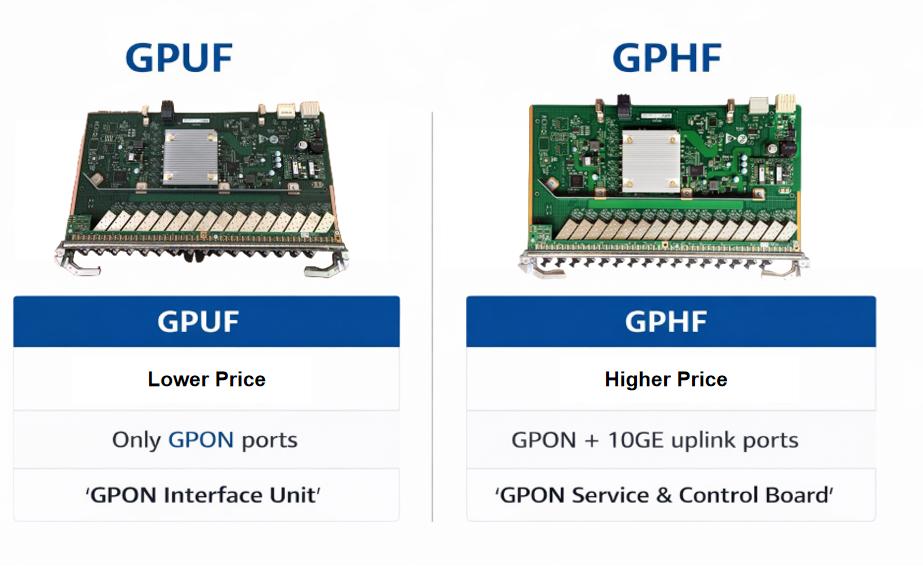
Key Differences:
Performance Capacity:
GPUF: Supports standard GPON technology with a downstream speed of 2.5 Gbps and an upstream speed of 1.25 Gbps per port. It’s ideal for smaller, moderate-traffic networks.
GPHF: Supports GPON, as well as XG-PON and XGS-PON, with up to 10 Gbps downstream and up to 10 Gbps upstream per port. This makes it suitable for high-capacity networks that require faster speeds and more flexible services.
Service Support:
GPUF: Primarily designed for standard GPON services, ideal for residential broadband and simpler network setups.
GPHF: Supports multiple PON technologies, including XG-PON and XGS-PON, enabling future-proofing for higher-speed services and more demanding applications.
Scalability:
GPUF: Best for smaller-scale deployments where high-speed capabilities are not a priority.
GPHF: Offers better scalability, supporting higher bandwidth and multiple PON technologies, making it the preferred choice for large-scale or future-ready networks.
Power Consumption:
GPUF: Typically more energy-efficient due to its simpler design and less demanding service requirements.
GPHF: Consumes more power but justifiably so, given its enhanced performance capabilities and support for higher-speed services.
Cost:
GPUF: More cost-effective, making it a good option for smaller deployments or budget-conscious projects.
GPHF: Generally more expensive due to its higher performance, scalability, and support for next-gen PON technologies.
How to Distinguish Between the Huawei GPUF and Huawei GPHF Cards
Since both the GPUF and GPHF cards look similar in terms of their external appearance, distinguishing them can be tricky. However, there are several methods to identify which card is in use:
- Model Number or Labeling
The most straightforward way to distinguish the two cards is by checking the model number or label printed on the card itself. You’ll often find the model number “GPUF” or “GPHF” on the external casing. This is the easiest and quickest method.
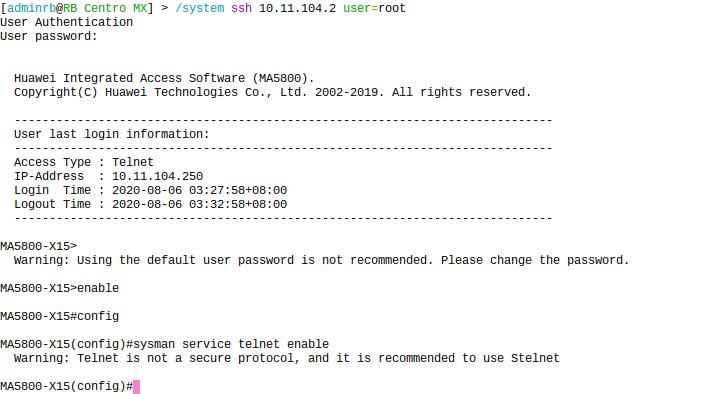
- Access the OLT’s Web Interface or CLI (Command Line Interface)
Web Interface: Log into the Huawei MA5800 OLT web interface and navigate to the interface card management section. The installed cards will be listed with their respective models and other details.
CLI Commands: If you prefer the command line, use commands like:
display ont board
display version
These commands will provide detailed information about the installed interface cards, helping you distinguish between GPUF and GPHF.
- Performance Metrics
The GPHF will support higher data throughput and multiple PON technologies (e.g., XG-PON, XGS-PON) and will show significantly higher performance metrics (e.g., up to 10 Gbps speeds).
The GPUF, in contrast, supports standard GPON with lower throughput (up to 2.5 Gbps), which can be confirmed by checking the card’s downstream and upstream speed metrics.
- System Logs and Firmware Version
The firmware version of the installed cards will vary based on their capabilities. The GPHF card will have advanced firmware to support higher-speed technologies, whereas the GPUF will have firmware optimized for standard GPON.
Use CLI commands like:
display version
display ont version
to check the installed firmware and card specifications.
Why We Need to Distinguish the Huawei GPUF and GPHF Cards
Distinguishing between the Huawei GPUF and Huawei GPHF cards is essential for several reasons, each of which ensures that your network remains efficient, scalable, and cost-effective.
1. Optimizing Network Performance
The performance capacity of these cards differs significantly. Using the GPHF card in environments with high bandwidth demands ensures that your network can handle future traffic needs without bottlenecks. On the other hand, using the GPUF for smaller-scale deployments or less demanding applications ensures that you are not over-investing in unnecessary capacity.
2. Future-Proofing and Scalability
The GPHF card supports next-generation PON technologies, making it ideal for networks that need to scale in the future. If you plan to upgrade your network to 10G speeds or support more advanced services, the GPHF will be the better choice. By distinguishing the two cards, you can ensure that your network is designed for both current and future demands.
3. Cost Efficiency
The GPUF card is a more cost-effective solution, which can be ideal for small-scale deployments or budget-conscious projects. However, using the GPHF where higher performance
is needed justifies the extra cost due to its support for higher speeds and multiple PON technologies. Distinguishing the cards helps you select the most cost-effective solution based on your network’s needs.
4. Ensuring Service Quality
By selecting the correct card, you can ensure that you meet the service level requirements for your customers. For instance, if you need to provide high-speed broadband for business or enterprise clients, the GPHF card will be able to deliver the performance and scalability required. For basic residential broadband, the GPUF card is more than sufficient.
5. Troubleshooting and Maintenance
When problems arise, understanding which card is in use will help in troubleshooting network issues. Since the GPHF supports higher speeds and more advanced services, identifying it allows you to eliminate performance as a potential issue. Conversely, knowing that you have a GPUF card can help you understand the card’s limitations and adjust your expectations for service performance.
6. Compatibility and Integration
The GPHF card supports a wider range of PON technologies, so distinguishing it from the GPUF is necessary when designing networks that integrate both GPON and next-gen PON services. Understanding the capabilities of each card ensures that you don’t run into compatibility issues while expanding or upgrading your network.
Conclusion
Distinguishing between the Huawei GPUF and Huawei GPHF cards is essential for optimizing your network’s performance, ensuring future scalability, and choosing the most cost-effective solution based on your needs. Whether you’re working on a small residential deployment or a large-scale enterprise network, understanding the key differences and knowing how to identify the cards will help ensure your network is configured for success.
By leveraging tools like model labeling, the OLT’s web interface, and CLI commands, you can easily differentiate between the two cards and make the right choice for your network.


