
In our hyper-connected world of 2025 – where smart offices, cloud gaming, 8K streaming, and the explosive growth of IoT devices are the norm – the unseen backbone of your digital life matters more than ever. That backbone? Your network hardware. And where does that critical hardware live? Often, inside a Outdoor telecommunication cabinets Cabinet.
If you’re new to networking or wondering whether you need a network cabinet, this beginner’s guide will help you understand what they are, how they work, and why they are more important than ever in 2025.

What Is a Network Cabinet (Rack)?
A network cabinet, sometimes referred to as a network rack or data cabinet, is a specialized enclosure designed to house and organize network equipment. Think of it as the secure, organized, and climate-controlled “nerve center” for your network equipment. Typically made of sturdy steel (sometimes aluminum or glass), designed specifically to house, protect, and manage:

Network Switches: The traffic cops directing data between your devices.
Routers: Your gateway to the internet, connecting your local network to the wider world.
Patch Panels: The tidy termination point for all your network cables running through walls and ceilings.
Servers (Small Scale): Like NAS devices for storage or application servers for small businesses.
Uninterruptible Power Supplies (UPS): Battery backups keeping everything running during outages.
Firewalls/Security Appliances: Guardians protecting your network from threats.
Modems/Fiber Termination Units: Your connection to the internet service provider.
Why Do You Need One in 2025?
1. Maximum Organization
As our homes and offices get smarter, the number of devices explodes. A cabinet provides dedicated vertical space. Cables are neatly routed using built-in channels and managers, preventing tangles and making it much easier to trace connections when something goes wrong (or you need to upgrade). No more dusty piles of gear under desks!

2. Security & Physical Protection
Lock those doors! This keeps curious fingers, accidental bumps, spilled coffee, and even intentional tampering away from your expensive and critical hardware. It also protects against dust and debris, which can cause overheating and component failure over time.
3. Great Performance
Cooling & Airflow Management (Critical in 2025!): Modern network gear, especially powerful Wi-Fi 7 routers, PoE++ switches powering dozens of devices, and compact servers, generates significant heat. A well-designed cabinet promotes proper airflow (front-to-back is standard). Many cabinets come with fans or have mounts for them, actively exhausting hot air and drawing in cool air. Overheating is a primary cause of hardware failure and sluggish performance – a cabinet actively fights this. Good airflow and stable mounting help ensure that your devices run efficiently and with fewer disruptions.
Noise Reduction: Fans and spinning hard drives (in NAS devices) can be noisy. Enclosing this equipment in a cabinet significantly dampens the sound, making your workspace or living area much quieter and more pleasant.
Safety: Keeps high-voltage power supplies (like those in a UPS) and potentially hot components safely enclosed and away from accidental contact. Neat cabling also reduces tripping hazards and prevents cables from being crushed or damaged.
4. Professionalism & Scalability
Scalability:As your network grows, a cabinet makes it easier to add new devices without having to overhaul the entire setup.
Whether it’s for your home lab or a small business startup, a cabinet presents a clean, professional look. More importantly, it provides a standardized, scalable structure (using “U” measurements – 1U = 1.75 inches of vertical space). Need to add a new switch or a bigger UPS? Just slide it into the next available “U” slot – it’s designed for easy expansion.
With devices getting smaller but more powerful, a outdoor telecommunication cabinets allows you to pack significant capability into a small footprint, efficiently utilizing your valuable floor or closet space.
Wall mount vs Floor mounted closet
Floor-Mounted (Freestanding) Cabinets: Larger enclosures (18U to 45U+ common) that sit directly on the floor. Designed to hold heavier equipment like servers and large UPS units. Essential for businesses with more complex needs or significant server infrastructure. Often have casters for mobility.
Wall-Mount Cabinets: Smaller, lighter cabinets (often 6U to 15U) designed to be securely bolted to a wall. Perfect for smaller setups (home offices, small retail, network closets) where floor space is limited. Great for centralizing modem, router, switch, and patch panel.
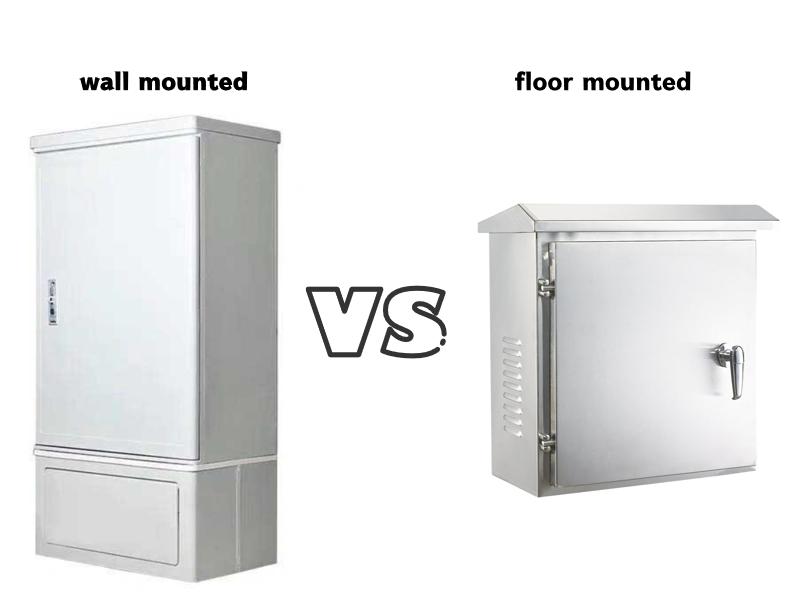
wall mount vs floor mounted closet
| Feature | Wall-Mount Cabinet | Floor-Standing Cabinet |
|---|---|---|
| Best For | Home offices, small businesses, network closets, limited space. | Larger businesses, server rooms, heavy equipment, extensive gear. |
| Typical Size | 6U to 15U | 18U to 45U+ |
| Capacity | Lighter loads: modem, router, switch, patch panel, small UPS. | Heavy loads: servers, large switches, big UPS units, full stacks of gear. |
| Pros | Saves floor space, cost-effective for smaller setups. | High capacity, better stability for heavy gear, often mobile on casters. |
| Cons | Limited weight and space capacity. | consumes floor space, typically more expensive. |
Key Considerations When Choosing a Network Cabinet in 2025:
Size (U Height): Count the equipment you have now and estimate what you might add in the next few years. Leave 20-30% free space for airflow and future growth. Common starter sizes: 6U-12U (wall), 18U-24U (floor).
Depth: Modern switches and servers are often deeper than older models. Ensure the cabinet depth accommodates your deepest piece of equipment (including cable bends at the back) plus space for airflow. Shallow cabinets (~600mm) suit basic networking, deeper cabinets (800mm, 1000mm+) are needed for servers.
Cooling: How much heat will your gear generate? Does the cabinet have ventilation (mesh doors, side vents)? Are fan mounts included? Will you need active cooling fans? This is crucial for reliable 2025 hardware.
Security: Do you need lockable doors? Steel vs. glass front? (Glass lets you see status lights but offers less physical security).
Cable Management: Look for built-in cable entry/exit points (top, bottom, sides) and features like vertical cable managers on the sides of the rails and horizontal managers between equipment.
Location & Environment: Where will it live? A dusty warehouse needs more protection than a clean office. Consider ambient temperature too. Will it be in a noisy server room or a quiet office corner (impacting need for sound dampening)?
Physical Access: How often will you need physical access? Swing-frame cabinets (where the whole frame tilts out) offer fantastic rear access but take more space. Fixed-frame is more common.
Frequently Asked Questions (FAQ)
Q: What does “U” mean in a server rack?
A: “U” is a standard unit of measure for rack height. 1U equals 1.75 inches (44.45 mm). Equipment is manufactured in multiples of this height (e.g., a 2U server).
Q: Can I put a network cabinet in a closet?
A: Yes, but ventilation is critical. Ensure the closet has adequate airflow or that the cabinet has active cooling to avoid heat buildup.
Q: Is a network rack worth it for a home network?
A: Absolutely. If you have more than just a modem and router—think a switch, NAS, patch panel, or UPS—a small wall-mount rack organizes and protects your investment, ensuring reliability.
Conclusion
A network cabinet is no longer just industrial equipment. It’s a fundamental tool for anyone serious about having a reliable, organized, scalable, and safe network infrastructure. As our dependence on seamless connectivity grows and the power (and heat!) of our devices increases, the humble network cabinet becomes the unsung hero ensuring everything just works.
Investing in the right cabinet saves you time (troubleshooting is easier), money (protecting hardware from damage and overheating), frustration (untangling cables!), and sanity (reducing noise and clutter). In the tech landscape of 2025, it’s not a luxury – it’s a necessity for building a robust digital foundation.
【Edited in August 2025】


