
-
 What is Wi-Fi 7, and Do You Actually Need It? You’ve probably seen the headlines: the next generation of wireless technology, Wi-Fi 7, is on the horizon. It promises to be the biggest leap in home networking in years. But with Wi-Fi 6 and 6E still feeling plenty fast for most, you’re likely asking the big question: Is Wi-Fi 7 worth it? It’s a fair question. Upgrading your router can feel like a chore, and the tech specs are often confusing. In this guide, we’ll cut through the hype and break down exactly what is Wi-Fi 7, explore its groundbreaking Wi-Fi 7 features, and help you decide if it’s time to upgrade or if you should wait. We’ll also answer a crucial practical question: will Wi-Fi 7 work with older devices? Let’s dive in. What Is Wi-Fi 7? Officially known as IEEE 802.11be, Wi-Fi 7 is the seventh generation of Wi-Fi technology. While every new standard promises more speed, Wi-Fi 7 is different. It’s not just an incremental update; it’s a fundamental overhaul designed to solve the modern problem of congestion. Think of it this way: Your current Wi-Fi is like a road system. Wi-Fi 5 was a reliable two-lane highway. Wi-Fi 6 added more lanes and better traffic lights to handle more cars (your devices). Wi-Fi 7, however, is like building an entire, intelligent transportation network with flying cars and smart tunnels. It’s engineered for a world where a single household might have: Someone streaming an 8K movie on the TV Another person in a competitive, lag-sensitive VR game A dozen smart home devices (lights, cameras, speakers) chattering away A video conference call happening in the home office Why Wi-Fi 7? Because our old roads are getting clogged. Wi-Fi 7 builds the smart, multi-layered super-highways we need to keep…Read more →
-
 Fiber cleavers are precision tools. Whether you call it a fiber cleaver blade or a fiber cutter blade, that tiny circular piece of metal determines whether you get a clean, low-loss splice or a headache of failed jobs and repeated re-cleaves. But cleaver blades don’t last forever. In fact, replacing or rotating the blade at the right time is one of the easiest ways to maintain splice quality and prevent downtime. This guide walks you through: When a cleaver blade should be replaced How to replace (or rotate) a fiber cleaver blade Common signs your blade is worn Tips to extend blade life Why the Fiber Cleaver Blade Matters A fiber cleaver creates a perfectly flat, 90-degree end face so the splicer can fuse the cores with minimal splice loss. A worn blade doesn’t cut cleanly—it crushes, chips, or drags the glass, leading to: High splice loss:The irregular end faces prevent perfect core alignment, causing measurable signal attenuation that can push splices beyond acceptable limits. Angled end faces: These defects are often flagged by the splicer as “cleave angle error” or “end face defect,” forcing you to stop and re-cleave. Fiber breakage:A dull blade can create micro-fractures that cause the fiber to shatter unpredictably instead of breaking cleanly along the score line. Re-cleaves and wasted time:Every bad cleave means stripping, cleaning, and cleaving again, killing your productivity on a large fusion splice project. Contamination inside the splicer:Glass shards and debris from a poor cleave can be blown into the splicer’s electrodes and V-grooves, leading to maintenance issues and potential damage. If your splicing suddenly becomes unpredictable, the cleaver blade is one of the first things to check. When to Replace a Fiber Cleaver Blade Most high-quality cleaver blades have 16 or 24 positions, meaning they can be rotated multiple times before replacement. The…Read more →
-
 In the world of networking, flexibility and scalability are key. Whether you’re connecting switches in a data center or linking a server to your network, SFP (Small Form-factor Pluggable) modules are the unsung heroes that make it all possible. These compact, hot-swappable transceivers allow you to customize your network connections for copper or fiber optic cables. But if you’re new to handling these delicate components, the process can seem a bit daunting. How do you install one correctly? How do you removing SFP module from a switch without breaking it? Worry not! This step-by-step guide will walk you through the entire process of SFP module installation and safe removal. First, A Crucial Question: Are SFP Modules Hot-Swappable? Yes, absolutely! This is one of their greatest features. SFP modules are designed to be hot-swappable, meaning you can install or remove them from a switch, router, or network card without powering down the equipment. However, a word of caution: While the hardware supports it, always be aware that removing an active SFP module will immediately terminate the network link it carries. Removing an active SFP will immediately terminate its network link, causing an outage. Furthermore, the safest and most professional practice is to disable the switch port in software before physically touching the module. This prevents link flapping, protects the hardware, and ensures laser safety. Part 1: How to Install an SFP Module Proper installation is critical for both the performance of the module and the health of your switch port. Follow these steps carefully. What You’ll Need: The SFP module (compatible with your switch). The appropriate cable (e.g., LC fiber patch cable, RJ45 copper cable). An ESD (Electrostatic Discharge) wrist strap (recommended). Step-by-Step Guide: Prepare and Inspect: Start by inspecting the SFP module and the cable. Check the optical bore of…Read more →
-
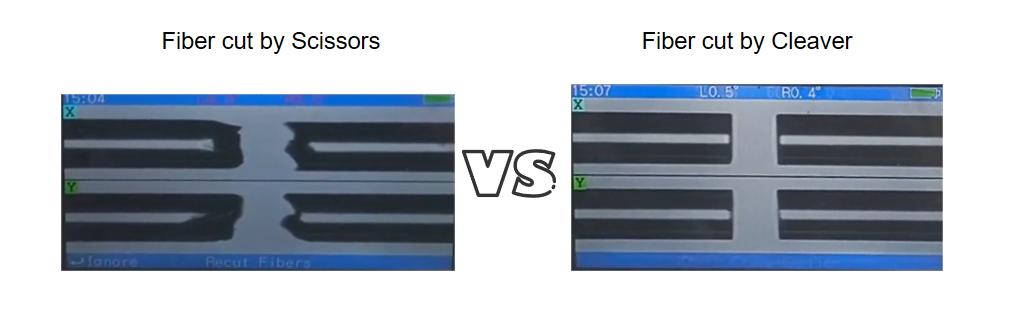 In the world of fiber optics, people often talk about the fancy splicing machines and strong testing tools. But there is a simple, very important fiber cutter tool that does not get much attention: the fiber cleaver. If you have ever asked yourself how technicians get that perfect, shiny end on a very thin piece of glass, you are about to learn the answer. A bad break in the fiber is the main reason why splices can fail and why light signals can become weak. So, let’s talk about what this necessary tool does and the correct way to use it. What Is a Fiber Cleaver, Exactly? To put it simply, a fiber cleaver is a fiber cutter tool used to carefully “cut” or break an optical fiber to get it ready for joining or for putting a connector on it.\ But you might wonder—why can we not use a normal wire cutter or a pair of scissors? The reason is in what we are trying to achieve. We do not want a rough, crushed cut. We need an end that is perfectly flat, completely smooth, and exactly square to the fiber. This makes sure that when two fibers are put together, the most light possible can travel through them without getting weak or bouncing back. Think about it like cutting a drinking straw. If you squeeze it with scissors, the end gets mashed out of shape and will not connect well with another straw. But if you make a small scratch on it and then snap it, you get a clean, even break. A fiber cleaver does this exact same thing, but it does it with incredible accuracy. The Main Job of a Cleaver Its most important job is to create a controlled break in the glass fiber. It…Read more →
-
 When you’re working with fiber networks, one small feature can save you hours of troubleshooting and help you avoid unexpected downtime — This feature is called DDM/DOM. Many SFP modules support it, but not everyone understands what it does or why it is so useful. In this guide, we break everything down in clear, simple language so anyone can understand how DDM/DOM works and why you should care about it. 1. What Exactly Is DDM/DOM? DDM means Digital Diagnostics Monitoring, and DOM means Digital Optical Monitoring. Even though the names are different, they refer to the same feature. DDM/DOM allows an SFP module to check important internal information and report it to your switch. You can think of it as a small built-in monitoring system inside the SFP. This system continuously checks things like temperature, voltage, and optical power levels. In other words, DDM/DOM gives you a real-time view of how healthy your SFP module is and how well your fiber link is performing. A good way to imagine DDM/DOM is like a “health app” for your SFP. Just like your phone tracks your heartbeat, steps, or sleep, the SFP tracks its temperature, laser strength, and receive power. Instead of guessing what might be wrong, you can open your switch interface and see real numbers that tell you what is happening inside the module. 2. Why Is DDM/DOM Important? Moving from a standard SFP to an SFP with DDM is like trading in a basic car for one with a full diagnostic dashboard. The benefits are immense: ✔️ 1. Faster Troubleshooting When a link goes down or becomes unstable, many people start guessing: “Is the fiber dirty? Is the cable damaged? Is the SFP broken?” With DDM/DOM, you no longer guess. For example, if you see very low RX power, you know immediately…Read more →
-
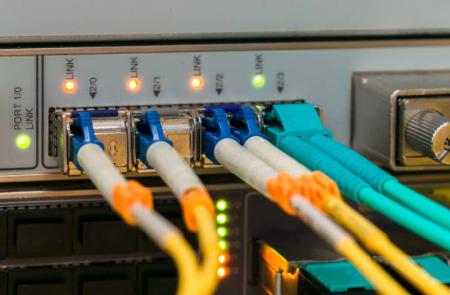 Do you feel like you’re paying too much for those little SFP modules price that connect your network equipment? You’re right. There’s a big secret in the networking world: these small parts are a major money-maker for vendors, and they use some clever tricks to keep it that way. Let’s break down the walls and look at five things your vendor probably doesn’t want you to know. 1. You’re Paying 10x More for a Name Many people think brand-name SFPs are better because they are expensive. But vendors don’t tell you what’s actually inside. Most large brands do not build their own SFPs. They order them from the same factories as many trusted third-party suppliers. The fiber, laser, chipset, and metal housing often come from the same production line. Think of it like this: Imagine a famous brand selling a regular AA battery for $10, while the same battery from the factory next door costs $2. That’s what happens with many SFP module for network switch. Brand SFPs include unique code that matches their switch. This code doesn’t improve performance — it only tells the switch: “This is one of our modules. Please allow it.” This coding is one reason for the huge price increase. What it means for you: That “genuine” SFP module costs 10 times more than a third-party one, but inside, they are often identical. Vendors add a unique code to lock you in, not to improve performance. Your Solution: Don’t pay the “brand tax.” Choose third-party modules that offer the same quality and reliability without the outrageous markup. For instance, Baudcom’s SFP modules are built in the same MSA-compliant factories as the big brands, guaranteeing 100% compatibility and performance at a fraction of the cost. You get the same hardware, just without the lock-in code. 2. The “Incompatibility” Error is a…Read more →
-
In the world of networking, few things are as frustrating as a link that simply won’t come up. You’ve plugged in your SFP (Small Form-factor Pluggable) module, connected the cable, and… nothing. The port lights are dark, and your network monitoring system is sounding the alarm. This scenario, often summed up as “SFP not working,” is the starting point for many network troubleshooting sessions. These tiny transceivers are the critical bridge between your network devices and the cabling infrastructure. When they fail or malfunction, they can cause everything from minor performance hits to complete network outages. But fear not—most SFP issues are predictable and solvable. This guide will walk you through the top 5 common SFP problemsI and walk you through how to fix them easily, even if you’re not a network engineer. 1. Compatibility Issues The Problem: You insert a new SFP, and the switch either doesn’t recognize it at all or throws an error. The module may be physically compatible, but the device’s software is rejecting it. This is one of the most frequent causes of an “SFP not working” scenario. Why It Happens: Vendor Lock-Down: Major switch manufacturers (like Cisco, HPE, Juniper) use a coded EEPROM in their SFPs. If the switch doesn’t see its expected vendor code, it will disable the port. Outdated Firmware: The switch’s operating system may be too old to recognize the specific SFP model or its firmware version. Incorrectly Programmed Third-Party Modules: While third-party SFPs are a cost-effective solution, they must be properly programmed with the correct vendor, type, and wavelength data to be accepted. How to Fix It: Source Strategically: Always purchase SFPs from vendors who explicitly guarantee compatibility with your specific switch model and firmware version. Update Switch Firmware: Before deploying new modules, check for and install updated firmware for your…Read more →
-
Navigating the world of networking hardware can feel like learning a new language. You see terms like SFP+ and QSFP+ on switch spec sheets and transceiver modules, and it’s easy to get them confused. If you’ve ever wondered about SFP+ vs. QSFP+, you’ve come to the right place. This guide will clearly explain what is SFP and QSFP, break down their differences in simple terms, and tackle the common question of QSFP vs SFP compatibility. By the end, you’ll know exactly which one to use for your project. What is SFP and QSFP? Before comparing SFP+ vs. QSFP+, let’s understand what SFP and QSFP are. The term SFP stands for Small Form-factor Pluggable. It is a small, hot-swappable transceiver — meaning you can plug it in or take it out of a network device without turning the power off. It connects your switch or server to fiber optic or copper network cables. SFP modules are commonly used for speeds like 1G or 10G and are perfect for short to medium distances. On the other hand, QSFP stands for Quad Small Form-factor Pluggable. The word “Quad” means it can carry four data channels in one module. This makes it much faster than a regular SFP. It’s designed for high-performance networks such as data centers or cloud systems where large amounts of information move quickly between devices. 👉 In simple words: SFP handles one channel. QSFP handles four channels, so it can move four times more data. Understanding SFP+ and QSFP+ ⚡ The “+” sign in SFP+ and QSFP+ means an upgraded version that supports faster speeds. SFP+ is an enhanced version of SFP. It supports up to 10 Gigabits per second (10G). You’ll see SFP+ modules in modern enterprise networks, switches, and servers. They are great for both fiber optic and copper…Read more →
-
 When setting up or expanding a network, one of the most common questions that arises is about the physical connections on your switch. You’ll see a bank of familiar RJ45 vs. SFP ports and might wonder: what’s the difference, and why does it matter? Choosing the right switch port types isn’t just about what fits; it can impact your network’s performance, cost, and scalability. In this guide, we’ll break down the key differences between switch port Ethernet (RJ45) and switch port SFP to help you make an informed decision. Understanding Switch Port Types A network switch is the heart of any local area network (LAN). It connects multiple devices—such as computers, access points, IP cameras, and servers—so they can share data and communicate with each other. Each switch comes with different kinds of ports called switch port types, and the most common ones are RJ45 (Ethernet) ports and SFP ports. These ports determine how your devices connect to the network and what kind of cables you’ll use. RJ45 ports use copper cables and are the standard for home and small office networks. SFP ports, on the other hand, use fiber optic cables or special transceiver modules, making them perfect for high-speed and long-distance data connections. 1. RJ45 Ports (Switch Port Ethernet) This is the classic, ubiquitous port you find on virtually every consumer router, switch, and network card. It uses the familiar 8-pin modular jack, often referred to as an “Ethernet port” or “copper port.” Medium: Uses twisted-pair copper cables (Cat5e, Cat6, Cat6a, etc.). Common Use: Connecting computers, printers, IP phones, and access points within an office or home. It’s the workhorse for most local area networks (LANs). Typical Range: Limited to 100 meters (328 feet) for a single run. 2. SFP Ports (Switch Port SFP) SFP stands for Small…Read more →
-
 Fiber optic cables are the foundation of high-speed internet. They carry data as light signals instead of electricity, making them faster, more reliable, and less prone to interference. But for these cables to perform well, each connector must be installed and maintained with precision. This guide covers the installation of Fiber Fast Connectors—a popular, field-installable solution. We’ll cover cleaning techniques, the right tools, and even fiber optic installation in house, all explained in simple, practical language for beginners and professionals alike. What Is a Fiber Optic Connector and Why It Matters A fiber optic connector links two fiber cables together so that light passes through smoothly. If the connection is misaligned or dirty, the light signal weakens — which means slower internet speeds or complete signal loss. Common Fiber Connector Types SC (Subscriber Connector): Square, push-pull design, common in homes and offices. LC (Lucent Connector): Smaller and ideal for compact or high-density systems. ST (Straight Tip): Uses a twist-on connection, often in legacy networks. FC (Ferrule Connector): Screw-type connection that’s secure and vibration-resistant. Common Fiber Connector Types (like SC, LC) remain the same, but a Fiber Fast Connector is a specific method of installation. It’s a pre-polished connector that contains a small, internal stub of factory-polished fiber and a matching gel. You simply cleave your fiber and insert it into the connector, where it mechanically aligns with the pre-polished stub. This eliminates the need for field polishing, making it faster and easier. A successful fiber optic connector installation ensures: Maximum Light Transfer: A clear path for data, meaning faster speeds and lower latency. Network Reliability: No dropped connections during important calls or gaming sessions. Long-Term Performance: A well-installed connector will last for years without issues. All these connectors need accurate installation and consistent cleaning to ensure maximum performance. Essential Fiber Optic Cable…Read more →
-
 If you’ve ever worked with network switches, routers, or fiber optic cables, you’ve almost certainly come across a small, pluggable module called an SFP. You might have also heard the terms SFP+ and SFP28 thrown around. They look almost identical, so what’s the difference? In this blog, we’ll break down exactly what does SFP mean and explore the key distinctions in the SFP vs SFP28 debate, as well as where SFP+ fits into the picture. What Does SFP Mean? SFP stands for Small Form-factor Pluggable. It’s a compact, hot-swappable transceiver used for both telecommunications and data communications. The “hot-swappable” part is crucial—it means you can insert or remove the module without powering down the switch or router, making network upgrades and maintenance a breeze. Think of an SFP module as a translator. Its job is to convert electrical signals from the switch into optical signals for fiber cables (or electrical signals for copper cables), and vice-versa. This flexibility allows network engineers to easily customize and scale their networks based on distance and cable type requirements. The Evolution of Speed: SFP, SFP+, and SFP28 While the physical form factors are similar, the key difference lies in their data rates and applications. They are part of an evolutionary path driven by the world’s insatiable appetite for more bandwidth. SFP (The Original) Data Rate: Up to 1.25 Gbps (Gigabits per second), with some supporting 4.25 Gbps. Common Use Cases: Standard 1 Gigabit Ethernet, Fibre Channel, and SONET/SDH networks. These are the workhorses for decades of enterprise and service provider networks. The Bottom Line: The foundational standard for 1G connectivity. SFP+ (The 10G Successor) Data Rate: Up to 10 Gbps and commonly supports 8G and 16G Fibre Channel. Common Use Cases: 10 Gigabit Ethernet is the sweet spot. SFP+ became the dominant standard…Read more →
-
 In today’s world of fast internet and digital communication, optical fiber connectors are very important. They are small parts that help connect two fiber optic cables together so light signals can pass through easily. These connectors are used in data centers, telecom systems, home fiber networks, and even in industrial control systems. Without good fiber connectors, even the best cables cannot deliver strong and stable network performance. If you are new to fiber optics or want to understand more about it, this article will clearly explain what is optical fiber connector, what it does, what parts it has, and what different network fiber connector types are available. We will also talk about fiber fast connectors and give you some practical tips for installation and maintenance. What Is Optical Fiber Connector? An optical fiber connector is a small mechanical device that joins two optical fibers together in a precise way. Its job is to make sure that the tiny glass cores inside each fiber line up perfectly, so the light signal can travel from one fiber to another with very little loss. Unlike fiber splicing, which permanently melts fibers together, connectors can be attached and removed easily. This makes them perfect for testing, maintenance, or expanding a network. For example, when a technician installs a new fiber link in a building or data center, they often use connectors so that cables can be replaced or reconnected later if needed. They are the universal plug-and-socket system for our fiber optic networks, used to connect your router, link switches in a data center, and join cables in a telephone exchange. Functions of Optical Fiber Connectors A connector is much more than a simple coupler. It has several critical jobs: Precise Alignment: Its most important task. The core of a single-mode fiber can be…Read more →
-
 Whether you are setting up an FTTH (Fiber to the Home) or FTTB (Fiber to the Building) network, the fiber distribution box installation process plays a critical role in ensuring smooth data transmission and long-term reliability. The fiber distribution box—sometimes called a fiber box or internet distribution box—is the point where feeder cables from the central office connect with distribution cables going to individual users. If the box is not installed properly, you might face issues like high signal loss, unstable connections, or water damage. Let’s go step-by-step through how to identify whether your fibre box installation was done correctly—and what you can do to fix common mistakes. The good news is that you don’t need to be a tech expert to spot a bad setup. By performing a simple visual inspection, you can have confidence in your setup or know when to call your provider. Let’s walk through the key signs of a professional fibre box installation. 5 Point Inspection Checklist for Installation 1. The Location: Is It Practical and Protected? Start by looking at where the box is placed on your wall. A well-planned location is the first sign of a quality installation. The box should be easily accessible, not hidden behind a bookshelf or buried in a cluttered closet. Remember, a technician might need to get to it quickly for maintenance or troubleshooting. Furthermore, it should be positioned reasonably close to a power outlet. While the fiber distribution box itself doesn’t plug in, the modem or Optical Network Terminal (ONT) that connects to it does. A logical installation minimizes the distance between the box and the modem. Finally, if the box is in a garage, basement, or utility room, ensure it’s mounted in a spot with a low risk of flooding, dripping water, or excessive dust. Accessibility: The…Read more →
-
 In modern optical communication networks, especially FTTH (Fiber to the Home) systems, the fiber distribution box plays a crucial role in ensuring stable, efficient, and reliable signal distribution. But for those new to fiber deployment, questions often arise — what is a fiber box and how does it work within an FTTH setup? This article will break down the fundamentals, applications, and benefits of using an optic fiber distribution box, with practical insights for network installers and engineers. What Is a Fiber Distribution Box? A fiber distribution box, also known as a fiber termination box or fiber optic distribution box, is an enclosure designed to connect, protect, and manage optical fiber cables in communication networks. It provides a secure space where incoming fiber optic cables from the provider’s network are terminated and distributed to individual subscribers. In simpler terms, it’s the key interface point between the external network (feeder cable) and the indoor network (drop cable) — ensuring smooth and organized fiber connections. Imagine a massive, high-speed train (the main fiber cable) arriving in your city, carrying mail for every single person in your neighborhood. This train can’t go to every individual house. Instead, it goes to a central mail sorting facility. This facility: Accepts the huge shipment (the main cable). Protects the mail from rain, wind, and thieves. Sorts and organizes the mail into individual piles for each street and house. Dispatches mail carriers (the individual fiber lines) to deliver the right mail to the right home. A fiber distribution box is that mail sorting facility for light signals. It’s the vital link where the internet’s “main line” connects to your personal line. Key Functions of an Optic Fiber Distribution Box A fiber distribution box serves multiple essential functions in an optical network: Cable Termination It terminates feeder and drop…Read more →
-
In our hyper-connected world, the demand for speed, bandwidth, and reliable data transmission is insatiable. At the heart of this digital revolution lies a technology that carries information at the speed of light: fiber optic cable. This pillar page serves as your central hub for understanding everything about fiber optic cables. We will demystify the technology, break down the different types, explore key applications, and provide a clear framework for selecting the right cable for your needs. Whether you’re a network engineer, IT manager, or simply curious about the infrastructure that powers the internet, this guide is for you. Table of content Understanding Fiber Optical Cable Core Building Blocks: Fiber Types Choosing the Right Fiber Cable Specialized Fiber Cable Types Understanding the Limitations Selection Guide and Best Practices Ethernet and CAT Cables (for Comparison) 1. Understanding Fiber Optical Cable A fiber optic cable is a network cable that contains strands of glass fibers inside an insulated casing. They are designed for long-distance, high-performance data networking, and telecommunications. Compared to wired cables (like Copper Ethernet Cables), fiber optic cables provide higher bandwidth and can transmit data over longer distances. they offer: Higher bandwidthand longer transmission distances Immunity to electromagnetic interference (EMI) Superior security and reliability 🔗 Learn more: What is the Bandwidth of Fiber Optic Cable 2. Core Building Blocks: Fiber Types The first and most critical distinction in fiber optics is between the two main types of optical fiber, which dictate performance, distance, and cost. Single-Mode Fiber (SMF) Core Concept: Features a very thin core (typically 8-10 micrometers) that allows only one mode of light to propagate directly down the fiber. Multimode Fiber (MMF) Core Concept: Has a larger core (typically 50 or 62.5 micrometers) that allows multiple modes (or paths) of light to travel simultaneously. 🔗 Explore further: What are the Two…Read more →
Testimonials

Lomoveishiy – Finland11

