
Fiber optic splitters are vital components in modern communication systems, facilitating the distribution of optical signals to multiple destinations. These devices help improve network performance and efficiency, especially in systems like Passive Optical Networks (PONs), where a single fiber must serve multiple users. To ensure optimal performance, it’s important to choose the right fiber optic splitter type, but it’s equally crucial to understand the configurations and packaging types of these splitters.
In this blog, we’ll explore the common types of fiber optic splitters, their configurations, and packaging options to help you choose the best solution for your needs.

What is a Fiber Optic Splitter?
A fiber optic splitter is a passive optical device that divides a single optical signal into multiple output signals. This division allows one optical fiber to serve multiple end-users, making it a crucial element for networks such as Fiber to the Home (FTTH), Cable TV, and telecommunications. Splitters come in different types, configurations, and packaging types, each suited for specific applications and network environments.
Option A: FBT Splitters – The Twisted & Fused Approach
Imagine this: Picture taking two or three strands of thin glass fiber (each thinner than a human hair) and carefully heating them until they soften and melt together over a small section. That’s exactly how Fused Biconical Taper (FBT) splitters are made.
How the light splits: When the light signal reaches this fused section, some of the light naturally “spills over” from the main fiber into the fused neighboring ones. It’s like water flowing through two hoses that have been melted together at one spot—some water will flow into the second hose.
Where to use them best:
- Simple, small jobs where you only need 2 or 4 outputs from one input.
- Tight budget projects where the lowest upfront cost is the main concern.
- Specific older systems like some cable TV (CATV) networks that use particular light wavelengths.

Option B: PLC Splitters – The Precise Micro-Chip
Imagine this: Instead of melting fibers, picture a tiny glass chip (smaller than your fingernail) that has microscopic channels etched onto its surface, like a perfectly designed roadmap for light. This technology is similar to how microchips are created, where microscopic channels are etched into the glass to guide the light signal precisely.
How the light splits: The light signal travels along these perfect, factory-made channels. At engineered split points, the light divides with mathematical precision. Every output gets exactly the same amount of light.
Where to use them best:
- Modern networks that need to serve many users (like Fiber-to-the-Home for a neighborhood).
- Growing systems where you might need to upgrade capacity later.
- Any application that uses multiple light wavelengths for different services (like internet, phone, and TV all on one fiber).
PART 2: Fiber Optic Splitter Configurations Types
In addition to the fiber optic splitter types, it’s essential to consider the configuration of the splitter. The configuration determines how the splitter divides the signal and the number of output fibers it supports. The most common configurations include:
- 1xN Splitters
A 1xN splitter takes a single input fiber and splits the signal into N output fibers, where N is the number of outputs. These splitters are ideal for distributing signals from one central source to multiple endpoints, such as in FTTH networks.
Example:
A 1×8 splitter takes one fiber input and splits it into 8 output fibers.
- MxN Splitters
In an MxN splitter, multiple input fibers are split into multiple output fibers. These splitters are used when there is a need to distribute multiple signals across multiple outputs.
Example:
A 2×4 splitter splits 2 input fibers into 4 output fibers.
- Hybrid Splitters
Hybrid splitters combine different types of splitters in one device, often using different ratios or configurations. These splitters are used in specialized applications where different splitting ratios or combinations of inputs and outputs are needed.
Example:
- A 1×2 PLC splitter with an additional FBT for a different splitting ratio.
- 1×4 splitter feeding four 1×8 splitters = 1×32 total split
Allows more flexible physical placement (central office + street cabinets)
PART 3: Fiber Optic Splitter Packaging Types
The packaging is how the splitter is protected and made ready for installation. It has nothing to do with how the splitter works, but everything to do with how easy it is to install and maintain.
1. Bare Fiber / “The DIY Kit”
What it looks like: It’s just the splitter element sealed in a tiny tube, with plain, unprotected fiber strands (pigtails) coming out of both ends. There are no connectors on the ends—just bare glass fibers.
Installation: Requires fusion splicing. A technician must use a special, expensive machine to precisely melt and fuse each bare fiber to another fiber in your network. It’s a skilled job.

fiber splitter 1×2
Best for:
- Manufacturers building pre-made cable assemblies in a factory.
- Very space-crammed indoor boxes where every millimeter counts.
- Projects where lowest unit cost is critical and you have splicing expertise.
Not for: Quick field installations, outdoor use, or anyone without a fusion splicer.
2. Mini Module / “Plug-and-Play” Box
What it looks like: A small, sturdy plastic or metal box (like a deck of cards). On the sides are standard fiber optic connectors (like SC, LC, or APC). You can see the label telling you the split ratio (e.g., 1×8).
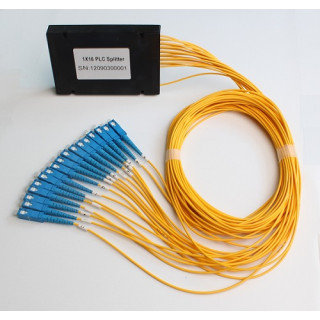
Installation: Extremely simple. A technician just cleans the connector ends and plugs them in to the corresponding ports on a patch panel or terminal. No tools needed beyond a cleaning kit.
Best for:
- Most field installations (apartment building basements, office telecom closets).
- Situations where ease and speed of installation save labor costs.
- Locations where equipment might need to be reconfigured or moved later.
Think of it as: The “consumer-friendly” option—ready to use right out of the box.
3. LGX Module / “The Professional Rack System”
What it looks like: A standardized rectangular cartridge (the module) that slides neatly into a metal frame (chassis) mounted on a 19-inch equipment rack. It looks very organized, like books on a shelf.
Installation: The chassis is mounted on the rack first. Then, splitter modules are purchased separately and slid into the slots. Cables are managed neatly along the sides.

rack mount plc splitter
Best for:
- Data centers, central offices, and network hubs.
- Projects that need a clean, professional appearance and easy management.
- Systems that will grow over time, as you can just add more modules to empty slots.
Think of it as: The “enterprise-grade” solution for managing many splitters in one place.
4. Outdoor / Waterproof “Armored” Package
What it looks like: A rugged, sealed cylinder made of stainless steel or hard plastic. It has heavy-duty strain relief where the cables exit. It’s rated IP67/IP68, meaning it’s completely dust-tight and can survive being submerged in water.
Installation: Mounted inside an outdoor cabinet, on a telephone pole, or directly buried in the ground. Designed to be handled by technicians wearing gloves, often in bad weather.
Best for:
- Any location outside a climate-controlled building.
- Street cabinets, poles, and buried vaults in FTTH networks.
- Harsh environments with moisture, dust, or extreme temperatures.
Think of it as: The “all-terrain vehicle” of splitter packaging—built to withstand the elements.

PUTTING IT ALL TOGETHER: A PRACTICAL GUIDE
Scenario 1: Connecting a 40-Apartment Building to Fiber Internet
Technology Choice: PLC Splitter. Why? You need to split one line to many apartments (likely a 1×32 split). PLC provides even service to all residents and handles all the modern wavelengths.
Packaging Choice: LGX Module installed in the building’s telecom room, or Outdoor Package in a street cabinet if the split happens outside. Why? Professional, organized, and scalable.
Scenario 2: Adding a Backup Line Between Two Office Buildings
Technology Choice: FBT Splitter. Why? You only need a simple 1×2 split to create a redundant path. The low cost of FBT is perfect for this limited job.
Packaging Choice: Outdoor Package. Why? The splitter will likely sit in a weatherproof box between the buildings.
Scenario 3: A Factory Building Pre-Terminated Fiber Cables
Technology Choice: PLC Splitter. Why? Most cables they build are for modern networks.
Packaging Choice: Bare Fiber. Why? They will splice the splitter directly into the cable inside their clean, controlled factory, minimizing cost and size.
Conclusion
Choosing the right fiber optic splitter type, configuration, and packaging is crucial for achieving optimal network performance. Whether you’re designing a telecom network, a high-speed data center, or a residential FTTH system, understanding the distinctions between splitter types and their packaging options ensures you make the best choices for your network. Just remember: don’t give a field technician a bare fiber splitter, and don’t place an indoor module in a muddy ditch.
By understanding both the internal technology and the external packaging, you can make confident choices that result in a network that performs reliably and is cost-effective to install and maintain for years to come.


