
No PPPoE configurations were found on your ONU? Learn exactly how to configure GPON ONU settings, understand what PPPoE means, and unlock bridge mode with Super Admin access.
When setting up a 4GE WiFi GPON ONU (such as the BD-ONU-114HW-G), many users encounter a confusing situation: they log into the device expecting to set up their internet connection, only to discover that no PPPoE configurations were found anywhere in the interface. The menu options for ONU PPPoE configuration seem to have vanished. The bridge mode setting is invisible. The credentials printed on the device label grant only basic access, leaving you completely unable to configure the device the way you need.
Whether you need bridge mode for your own router or want the ONU to handle the PPPoE connection directly, this guide has you covered.
What PPPoE Means in Fiber Networks
PPPoE (Point-to-Point Protocol over Ethernet) is a network authentication protocol used by ISPs to manage user access. It allows a device to establish a connection using a username and password, ensuring that only authorized users can access the internet.
In GPON networks, PPPoE plays a critical role because:
- It authenticates subscribers before granting access
- It allows ISPs to manage billing and sessions
- It assigns IP addresses dynamically after successful login
When discussing ONU PPPoE configuration, it’s important to understand that PPPoE is not always handled by the ONU itself. Depending on the network design, PPPoE can be configured either on the ONU or on a connected router.
Why “No PPPoE Configurations Were Found” Appears
If your ONU interface shows no PPPoE configurations were found, it does not necessarily mean something is broken. In most cases, it is due to configuration logic or access limitations.
Let’s break down the real reasons in detail.
-
ONU Permission Restriction (Most Common Cause)
Most GPON ONUs provided by ISPs are restricted devices, not fully open networking equipment.
When you log in using a default account:
You typically get limited user-level access
Advanced features like WAN settings and PPPoE are hidden
You cannot create or modify PPPoE configurations
Only a super administrator account can:
- account: adminisp
- password: adminisp
Access full ONU PPPoE configuration
Modify WAN modes (bridge/routing)
Create PPPoE interfaces
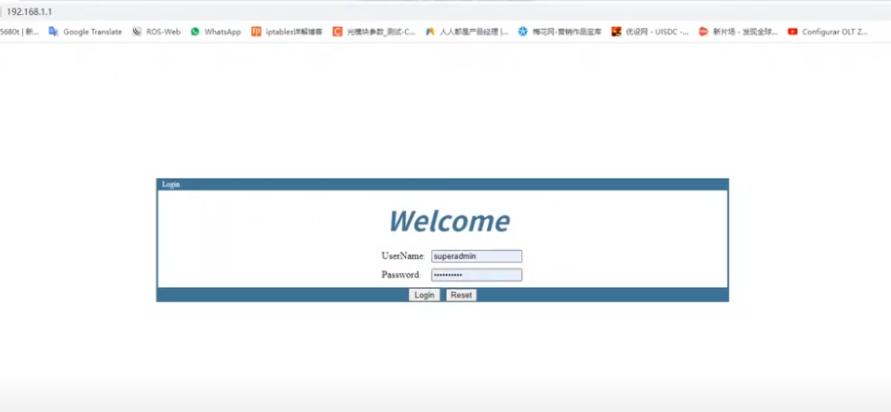
👉 This is why many users see no PPPoE configurations were found, even though the ONU actually supports it internally.
-
ONU Is Working in Bridge Mode
Another major reason is that the ONU is configured in bridge mode, which is very common in FTTH deployments.
In this mode:
The ONU acts as a Layer 2 device
It simply passes traffic between fiber and Ethernet
It does NOT perform PPPoE dialing
This means:
You will not see PPPoE settings on the ONU
PPPoE must be configured on an external router
👉 If you are trying to configure PPPoE on the ONU in bridge mode, the system may show no PPPoE configurations were found, because PPPoE is not intended to be used there.
-
ISP Locks the ONU Configuration
In many real-world deployments, the ISP fully controls the ONU through the OLT (Optical Line Terminal).
This includes:
Pre-configured WAN connections
Fixed VLAN assignments
Disabled manual configuration
Because of this:
Users cannot modify WAN settings
PPPoE configuration options are hidden or locked
Any manual changes may be overridden automatically
👉 This is a key reason why ONU PPPoE configuration is unavailable, even when you have access to the device.
-
Firmware or UI Limitation
Some ONUs use customized firmware that intentionally simplifies the interface.
This can result in:
Hidden WAN configuration pages
Removed PPPoE configuration options
Limited visibility of network parameters
Even though the hardware supports PPPoE, the interface may not expose it to users.

How to Configure GPON ONU for PPPoE
If you need to configure PPPoE, follow this structured method based on your network scenario.
Step 1: Determine Where PPPoE Should Be Configured
Before making changes, confirm the correct setup:
Routing Mode ONU → Configure PPPoE on ONU
Bridge Mode ONU → Configure PPPoE on router
👉 Misidentifying this step is the most common mistake when learning how to configure GPON ONU.

Step 2: Access Advanced Settings
Try logging in with a higher-privilege account to unlock full configuration.
If successful, you should be able to:
Create a WAN connection
Select PPPoE mode
Enter username and password
Without this access, ONU PPPoE configuration cannot be completed.
Step 3: Configure PPPoE Parameters
If PPPoE is available, configure it as follows:
Connection type: PPPoE
Username: Provided by ISP
Password: Provided by ISP
VLAN ID: Required in most cases
Make sure all parameters match ISP requirements, otherwise the connection will fail.
Step 4:Contact ISP for Configuration Support
If you still see no PPPoE configurations were found, the issue is likely controlled by the ISP.
You may need to request:
PPPoE credentials
VLAN information
Access permissions
ONU profile adjustment
Quick Troubleshooting Checklist
Use this checklist to quickly diagnose the issue:
No PPPoE option → Likely permission restriction
PPPoE fails to connect → Check VLAN and credentials
Cannot edit WAN → ISP lock
Works on router but not ONU → ONU in bridge mode
Frequently Asked Questions
Q1: What does PPPoE mean, and why do I need to know about it?
What PPPoE means is essential knowledge for anyone setting up a fiber or DSL internet connection. PPPoE (Point-to-Point Protocol over Ethernet) is the authentication method your ISP uses to verify your account and grant internet access. When you understand what PPPoE means, you understand why you need to enter a username and password somewhere in your network—either on the ONU itself or on a separate router. Without proper PPPoE configuration, your ONU cannot establish an internet connection regardless of how strong the fiber signal is.
Q2: Can I damage my ONU by using Super Admin mode?
No, using Super Admin mode does not physically damage the ONU. However, incorrect configuration—such as entering the wrong VLAN ID, misconfiguring PON parameters, or deleting essential default settings—can temporarily disrupt your internet connection. Always document existing settings before making changes, or take screenshots of working configurations so you can revert if needed.
Q3: Why did I see no PPPoE configurations were found when I logged in?
If no PPPoE configurations were found when you logged into your ONU, you were almost certainly using a General User account rather than Super Admin. General User accounts are deliberately restricted to prevent accidental changes. The PPPoE settings are present in the device firmware—they are simply hidden from view until you log in with Super Admin credentials. This is the most common reason users report that no PPPoE configurations were found on their device.
Q4: Will using bridge mode affect my internet speed?
Bridge mode typically has no negative impact on internet speed and may actually reduce latency by eliminating double NAT. However, the performance of your internet connection in bridge mode depends largely on the quality of your downstream router. A high-quality router with robust processing power will handle PPPoE dial-up and network traffic more efficiently than the ONU’s built-in routing functions.
Q5: How to configure GPON ONU if I don’t have the PPPoE credentials?
If you do not have your PPPoE credentials, contact your ISP. They are responsible for providing these credentials when you sign up for service. Some ISPs configure the ONU automatically and do not provide PPPoE credentials to customers—in such cases, the ONU must remain in route mode, and you should not attempt to change it to bridge mode without ISP assistance.
Q6: Why do ISPs lock down ONU PPPoE configuration?
ISPs lock down ONU PPPoE configuration to reduce support costs. When customers accidentally misconfigure PPPoE settings, VLAN tags, or bridge mode incorrectly, they can lose internet connectivity entirely. Resolving such issues often requires a technician visit (a “truck roll”), which costs the ISP time and money. By restricting access to these settings, ISPs minimize the risk of customer-induced service disruptions.

Conclusion
Now that you understand what PPPoE means and how it functions in your network, you can confidently decide whether to configure PPPoE directly on the ONU in route mode or enable bridge mode to use your own router. You have learned how to configure GPON ONU settings step by step, and you know how to troubleshoot if Super Admin access is denied.
The knowledge of how to configure PPPoE properly transforms your ONU from a locked, limited device into a flexible piece of networking equipment that you can tailor to your specific needs. Whether you are a home user simplifying your setup or a networking enthusiast optimizing performance, Super Admin access gives you the control you deserve.
No PPPoE configurations were found on your ONU? Learn how to configure GPON ONU settings
To fully understand ONU/ONT, just read this article: Optical Network Unit ONU (ONT) — Complete Guide & Knowledge Hub


