
-
 Investing in an Optical Time Domain Reflectometer (OTDR) is a critical decision for any fiber optic technician or project manager. But with dozens of models on the market boasting different specifications like dynamic range, pulse width, and dead zones, how do you know what is the best otdr for your specific needs and budget? Choosing the wrong instrument can lead to inaccurate readings, an inability to diagnose complex network faults, or simply overspending on capabilities you’ll never use. This comprehensive OTDR buyer’s guide cuts through the complexity. We’ll break down the five most critical OTDR specifications in plain English, explain how they impact real-world testing, and provide a clear framework to help you select the perfect instrument—whether you’re working on long-haul telecom lines, dense FTTx networks, or local data center links. By the end of this guide, you’ll be able to compare models with confidence and make a smart investment for your toolkit. MINI OTDR 6000 series OTDR Handheld OTDR Key OTDR Specifications You MUST Understand Before Buying Think of these specs as the DNA of an OTDR. Understanding their practical impact is the key to a smart purchase. 1. Dynamic Range: The Most Important OTDR Spec? What it is: The maximum loss an OTDR can measure, from the start of the trace to the end of the measurable signal. It’s essentially the OTDR’s “seeing distance.” Why it matters: A higher dynamic range allows you to test longer fibers and detect events (like splices or connectors) farther down the line. It also provides a cleaner signal-to-noise ratio at the end of the trace. Selection Tip: Short-Distance (LAN/Data Center < 10km): 25-30 dB is usually sufficient. Medium-Distance (FTTx/PON < 50km): Look for 35-40 dB. Long-Haul (Telecom > 80km): You’ll need a high-performance OTDR with 40+…Read more →
-
An ONU (Optical Network Unit) is a key component in a fiber-optic network, primarily used in Passive Optical Networks (PONs). It serves as the interface between the optical fiber network and the end-user devices. The ONU Configuration receives the optical signals transmitted over fiber optics and converts them into electrical signals for user devices like computers, phones, and other networked equipment. ONU Router Setup correctly is crucial for ensuring smooth, efficient, and secure network operation. Below is an essential guide for configuring an ONU to optimize network management. 1. Initial Setup and Accessing the ONU Management Interface Power up the ONU: Ensure the ONU Configuration is properly connected to both the fiber optic network and the user’s local network. Access the management interface: Typically, you can access the ONU management interface through a web browser by entering its IP address (which is usually set to a default like 192.168.100.1 or 192.168.1.1). The login credentials (username/password) are typically provided in the device’s manual or packaging. 2. Network Configuration IP Configuration: Set static IP addresses or use DHCP (Dynamic Host Configuration Protocol) for automatic IP assignment. In most cases, you’ll want to assign static IPs to ensure consistent network management and routing. VLAN Configuration: Configure VLANs (Virtual LANs) if required for separating traffic types (e.g., voice, data, video). VLAN tagging can help with security, QoS (Quality of Service), and traffic ONU management. PON Configuration: Set up the PON parameters, including the PON ID and the optical port configurations. These settings will enable the ONU Configuration to connect with the Optical Line Terminal (OLT) at the service provider’s end. 3. Bandwidth ONU management and Quality of Service (QoS) QoS ONU Configuration: To prioritize certain types of traffic (e.g., VoIP, video streaming, or critical business applications), configure QoS settings. QoS ensures that high-priority traffic gets sufficient bandwidth,…Read more →
-
 In today’s world, having fast and reliable internet is more important than ever. One of the best ways to deliver high-speed internet is through Fiber-to-the-Home (FTTH), where fiber optic cables run all the way to your home. In this blog, we’ll break down what is an ONU and how Optical Network Unit Function and Support help maximize the bandwidth in FTTH networks. What is an ONU? Before we get into bandwidth, let’s first understand what an ONU is. Simply put, an Optical Network Unit (ONU) is a device that connects the fiber optic line coming from your internet service provider to your home. It converts the light signals in the fiber optic cable into electrical signals that your devices, like computers or smartphones, can use. The Optical Network Unit management makes sure that the high-speed internet from the fiber network reaches your home without any loss in speed or quality. Read more about what is an onu? Can it work as a router? Why is Bandwidth Important in FTTH? Bandwidth is a term that refers to the amount of data that can be sent over the internet in a certain amount of time. The higher the bandwidth, the faster and smoother your internet connection will be. FTTH networks offer a lot of bandwidth because fiber optics can carry large amounts of data very quickly. However, just having a fast connection isn’t enough. It’s essential to use that bandwidth efficiently. And that’s where ONUs come in. They ensure that the available bandwidth is used in the best way possible, so you get the most out of your FTTH connection. How Do ONU Function and Support Maximize Bandwidth? ONUs Support Converting Signals Without Losing Speed When data travels through fiber optic cables, it’s sent as light signals. But your home…Read more →
-
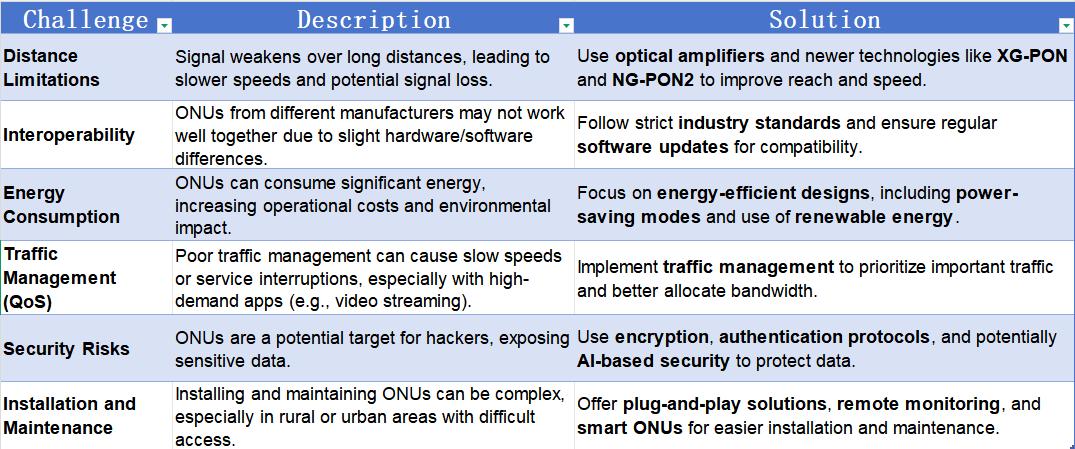 Optical Network Units (ONUs) are essential for delivering high-speed internet through fiber-optic networks. They act as the bridge between the internet provider’s fiber network and your home or business. While ONUs offer fast and reliable connections, they still face several ONU challenges. In this post, we’ll look at the main issues that can affect ONU performance and how they’re being solved, including a closer look at ONU CATV for cable TV services. 1. Distance: The Fiber Signal Struggles Over Long Distances One of the biggest Optical Network Units (ONUs) challenge is the distance between the provider’s central network (called the Optical Line Terminal or OLT) and the ONU. The farther the signal has to travel, the weaker it becomes. This is especially a problem for older technologies like GPON, which typically work well within 20 kilometers (about 12 miles) but can lose signal strength as the distance increases. Solution: To solve this, providers use devices called optical amplifiers to boost the signal. Newer technologies like XG-PON and NG-PON2 are also being developed to handle longer distances and faster speeds, improving performance. 2. Compatibility: Not All Optical Network Units Play Well Together In large networks, it’s common to have ONUs from different manufacturers, which can sometimes lead to compatibility issues. Even though most ONUs follow the same standards, small differences in design and software can cause them to not work well together. Solution: The best way to handle this is to make sure that ONUs follow strict industry standards. Regular software updates can also help ensure compatibility. Newer technologies like NG-PON2 are designed to make these kinds of problems easier to manage. 3. Energy Use: Powering ONUs Without Wasting Energy As the number of ONUs increases, so does ONU challenges energy consumption. In large networks, this can add up, increasing costs and impacting the environment. ONUs need to balance high-speed performance with energy…Read more →
-
 In today’s digital age, network uptime is more critical than ever. From businesses relying on continuous communication to service providers ensuring customer satisfaction, any interruption can lead to significant OLT failed. One of the most effective ways to ensure network reliability and minimize downtime is through OLT support fiber protection. And when it comes to Optical Line Terminals (OLTs), 1+1 fiber protection is a game-changer. What is OLT support 1+1 Fiber Protection? 1+1 fiber protection is a redundancy mechanism that uses two fiber links to ensure uninterrupted service. They are one active and one backup.If the primary fiber fails, the system switches to the backup, maintaining continuous service. For businesses and service providers, this means no more worrying about fiber cuts or degradation causing network outages. With 1+1 fiber protection, your network can self-heal in real-time, without manual intervention, keeping your operations running smoothly. Why 1+1 Fiber Protection Matters Minimize Network Downtime: Fiber OLT failed can occur due to natural disasters, accidental digs, or other unforeseen factors. 1+1 protection ensures that these disruptions don’t translate to service interruptions. Maintain Service Quality: With automatic OLT failed over, there is no delay or degradation of service even during fiber faults, ensuring that your customers experience the same high-quality service they rely on. Enhance Network Resilience: By diversifying your network paths with redundant fibers, you increase overall network robustness and reduce the risk of single points of failure. Can Baudcom GPON OLT support 1+1 fiber protection? Yes! Our OLTs (Such as, Baudcom 4,8,16 or 32 Port GPON OLT) with 1+1 fiber protection help ensure that your network remains operational, secure, and efficient. By adopting this advanced protection mechanism, you reduce the risk of service outages and keep your network at peak performance, all while providing peace of mind to your customers. Two main ways of How does Baudcom’s GPON OLT implement 1+1 fiber protection: Type…Read more →
-
 Fiber optic technology has become the backbone of modern communication networks, enabling faster data transfer and more reliable internet connections. However, like any specialized technology, fiber optic installation and fiber optic cable testing require the right tools for the job. Whether you’re a seasoned technician or just starting out, understanding the essential tools for fiber optic work is critical to ensuring efficient and effective results. Here are the Top 10 Fiber Optic Equipment Every Technician Should Have to succeed in their work. 1. Fiber Optic Cable Stripper Purpose: Stripping the protective coatings off fiber optic cables is one of the most delicate tasks in the fiber optic installation process. The cable stripper is designed to remove the outer jacket without damaging the fiber itself. Why It’s Essential: A precise and clean strip is critical for ensuring the fibers are ready for splicing or termination, which directly impacts signal quality and reliability. Recommendation: Look for a high-quality stripper with adjustable blades to accommodate different cable types and sizes. 2. Cleaver Purpose: The cleaver is used to precisely cut or cleave fiber optic cables. This is an essential Fiber Optic Equipment for ensuring that the fiber’s end face is flat and smooth before splicing or terminating. Why It’s Essential: A clean, sharp cleave is essential for successful fusion splicing, as any imperfections could cause signal loss or misalignment of the fibers. Recommendation: Invest in a high-quality, adjustable cleaver that provides consistent, accurate cleaves across various fiber types. 3. Fusion Splicer Purpose: A fusion splicer is used to fuse two fiber optic cables together using heat, creating a seamless, permanent bond between the fibers. This is one of the most critical tools in fiber optic installation. Why It’s Essential: Fusion splicing ensures that the fibers are joined with minimal signal loss and optimal performance. It’s the most reliable method of connecting…Read more →
-
Optical Line Terminals (OLTs) are crucial components in delivering fiber-to-the-home (FTTH) and fiber-to-the-premises (FTTP) services. Huawei, one of the leading companies in telecom equipment, offers the MA5800 series OLTs to support large-scale fiber deployments. These devices are designed to provide operators with a reliable, scalable, and cost-effective solution to deliver broadband services to consumers and businesses. In this blog, we’ll take a closer look at the Huawei OLT Smartax MA5800 X2 Price and MA5800 X7 price. Huawei OLT MA5800 X2 The Huawei MA5800 X2 is a compact, high-density OLT that is well-suited for medium to large-scale fiber deployments. It is designed to offer a flexible and scalable solution, supporting various GPON (Gigabit Passive Optical Network) and XG-PON (10 Gigabit GPON) technologies. Key Features of the Smartax MA5800 X2: High Density & Scalability: Supports up to 16 GPON or XG-PON ports per line card. Can accommodate up to 2 service cards, offering high throughput and scalability. Reliability and Stability: Offers redundancy features like power supplies and fans to ensure continuous service. Advanced fault-tolerant mechanisms ensure high service availability. Energy Efficiency: Optimized for low power consumption, making it a cost-effective solution for broadband service providers. Flexible Service Offering: Capable of delivering a wide range of services, including broadband, IPTV, and VoIP. Huawei OLT MA5800 X2 Price The Smartax MA5800 X2 Price can vary depending on factors such as the region, local distributors, and specific configurations. Generally, the cost for this model can range between $1,500 to $15,000 USD. This price range may vary if additional modules or accessories are included. However, for precise pricing, it’s essential to reach out to a Huawei distributor or reseller. Huawei OLT MA5800 X7 The Huawei MA5800 X7 is a more advanced and high-capacity OLT designed for larger-scale, high-demand broadband networks. The MA5800 X7 is capable of delivering ultra-high-speed internet to thousands of users, offering…Read more →
-
 In today’s Ethernet connection world, the need for stable and fast internet access has never been greater. Whether you’re streaming videos, working remotely, or simply browsing the web, having a reliable network connection is crucial. While Wi-Fi is convenient, there are times when a wired Ethernet connection is preferable due to its speed and reliability. This is where USB to Ethernet adapters come into play. If you’ve ever found yourself in a situation where you need to connect a device to a wired network but don’t have an Ethernet port, a USB to Ethernet adapter could be the solution you’re looking for. In this blog post, we’ll explore why such adapters are essential and Different USB Connector Types you can choose. Why Do We Need a USB to Ethernet Adapter? Devices Without Built-In Ethernet Ports Modern devices like smartphones, tablets, and ultra-portable laptops lack Ethernet ports. Their slim designs leave no room for such ports. USB to Ethernet adapters solve this. They enable wired network connections. This is crucial for business travelers. It ensures stable internet where Wi-Fi is spotty or unavailable. Improved Stability and Speed Wi-Fi is widely available. It isn’t always stable or fast. Crowded spaces or weak signals worsen performance. Ethernet offers a direct internet link. It avoids interference from devices. It provides faster speeds and lower latency. This is crucial for gaming, video calls, or downloading large files. Use in Public or Remote Locations In certain environments like hotels, conference rooms, or even remote areas, Ethernet may be the only reliable form of internet wire access. A USB to Ethernet adapters allow you to access wired internet even if your device was only designed for wireless connectivity. This is especially handy when you’re in a place that doesn’t offer Wi-Fi but does provide Ethernet ports. Bypassing Network…Read more →
-
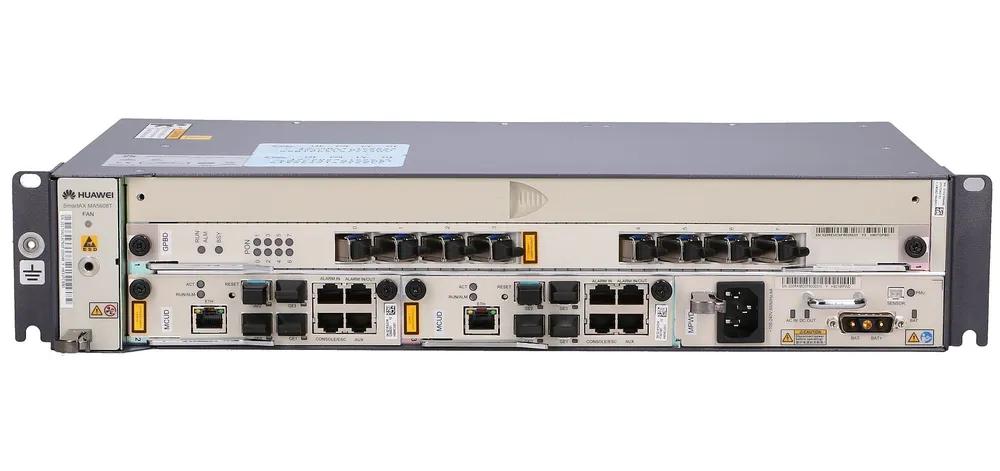 The Huawei OLT MA5608T is an important device used in modern broadband networks. It helps service providers deliver fast internet to homes and businesses using fiber-optic connections. This device is part of Huawei’s MA5600 series and plays a key role in building Fiber to the Home (FTTH) networks, offering high-speed internet, TV, and other services. In this blog, we’ll explain the main features of the Huawei SmartAX MA5608T and why it’s important for GPON optical line terminal internet providers. What is an OLT (Optical Line Terminal)? Before we dive into the details of the MA5608T, let’s first understand what an OLT is. An Optical Line Terminal (OLT) is a device used in Passive Optical Networks (PONs). It connects multiple Optical Network Terminals (ONTs) or Optical Network Units (ONUs) at the customer’s location to the internet. The OLT does several important jobs: Traffic management: It handles data from many users and sends it to the right place. Signal conversion: It turns electrical signals into optical (light) signals and vice versa. Speed control: It makes sure each user gets fair internet speeds. Key Features of the Huawei OLT MA5608T 1. Small and Flexible Design The MA5608T is a small device, only 1U in height, which means it takes up very little space in a server rack. Despite its size, it delivers strong performance and is capable of supporting large numbers of users. This makes it ideal for both small and large network setups, especially where space is limited. 2. Supports Many Users and High Speeds The device supports up to 8 PON ports, which means it can connect to many ONTs (Optical Network Terminals) at customer homes or businesses. Each PON port can serve up to 128 users, depending on the splitter ratio used. This allows the MA5608T to support hundreds of users from a single unit….Read more →
-
 As demand for high-speed internet increases globally, Fiber-to-the-Home (FTTH) deployments are becoming essential for providing residents with reliable, fast broadband connections. Whether you’re an Internet Service Provider (ISP) planning your first FTTH network or expanding an existing one, the deployment of Optical Line Terminals (OLT) and Optical Network Units (ONU) plays a critical role in delivering top-quality service. In this blog, we will cover the best practices for deploying a successful FTTH network, with a particular focus on the installation and configuration of OLTs and ONUs, two of the most vital components of any fiber optic system. Understanding FTTH network, OLT and ONU Before diving into the best practices, let’s take a quick look at the core components of an FTTH network: FTTH (Fiber-to-the-Home): This is a broadband network architecture where optical fiber runs directly to the customer’s home, providing extremely high-speed internet, video, and voice services. OLT (Optical Line Terminal): The OLT is located at the service provider’s central office or point of presence (PoP). It is responsible for managing the network, controlling the data flow between the core network and the ONUs, and providing upstream and downstream traffic. The OLT network is the central point that connects multiple customers via optical fiber. ONU (Optical Network Unit): The ONU is installed at the customer’s premises and connects the fiber optic line from the OLT to the customer’s local network (such as routers, switches, and computers). It serves as the bridge for data transmission between the FTTH network and the end user. Step 1: Plan the Network Design and Topology The first step in deploying an FTTH network is to plan your network’s design and topology. Your choice of topology and layout will affect the performance, scalability, and cost-effectiveness of your network. Topologies: Point-to-Multipoint (P2MP):This is the most common architecture for FTTH deployments, where one OLT network serves…Read more →
-
In the fast-paced world of fiber optic communication, the stakes are high. Whether it’s streaming ultra-high-definition videos, enabling real-time communications, or supporting the intricate networks that drive cloud services, data has to travel at lightning speeds. But there’s a catch—as light signals travel through the fiber, they degrade. The longer the journey, the weaker the signal. To combat this, technologies like optical amplifier and optical repeater come into play. But here’s the thing: they’re not interchangeable. They each have their strengths, and knowing when to use one over the other can make or break the performance of your fiber optic network. In this post, we’ll break down the critical differences between optical booster amplifier and optical repeaters, helping you understand when to choose one over the other for your communication needs. Optical Amplifier vs. Repeaters: What’s the Difference? At their core, both optical fibre amplifier and repeaters have a similar goal: boosting the signal so that it can travel farther. However, the way they achieve this is radically different. Optical Amplifier: Light on Light Imagine a light signal traveling through miles of fiber optic cables. The farther it travels, the more its strength diminishes. An optical amplifier comes in as the silent hero—quietly boosting the light signal without converting it to an electrical form. It’s like a high-speed pit stop where the light gets a boost, and it’s back on its way, without much fanfare. The most common type? Erbium-Doped Fiber Amplifiers (EDFAs). These nifty devices use a rare-earth element—erbium—to amplify light directly. They’re efficient, fast, and can handle high-bandwidth, long-distance transmissions with minimal signal loss. Optical repeater: Regenerating the Signal On the other side of the spectrum, we have repeaters. These are a bit more involved. A repeater receives the optical signal, turns it into an electrical signal, amplifies it, and then…Read more →
-
 Filter Wavelength Division Multiplexer (FWDM) is used in optical communication to manage the transmission of multiple wavelengths.Read more →
-
 In today’s bandwidth-hungry world, network administrators constantly face the same dilemma: how to increase network capacity without breaking the bank on new fiber infrastructure. Enter Coarse Wavelength Division Multiplexing (CWDM)—a technology that has revolutionized how we think about fiber utilization. But what is CWDM exactly, and why has it become such a popular solution for metropolitan and access networks? What is CWDM? To answer that question, let’s start with a basic definition: Coarse Wavelength Division Multiplexing (CWDM) is a technology that combines multiple optical signals at different wavelengths onto a single fiber optic cable, effectively multiplying the fiber’s carrying capacity . Think of it as adding multiple lanes to a highway—each wavelength serves as a dedicated lane carrying its own stream of data, all traveling simultaneously without interfering with one another . The “coarse” in its name refers to the relatively wide spacing between these wavelengths. Unlike its more sophisticated cousin Dense Wavelength Division Multiplexing (DWDM), which packs wavelengths tightly together, CWDM uses a more spacious 20nm channel interval . This wider spacing might sound like a disadvantage, but it’s actually the secret behind CWDM’s cost-effectiveness and practical appeal. Key Characteristics of CWDM Uses multiple wavelengths of light on a single fiber Supports up to 18 wavelengths defined by the ITU CWDM grid, though practical deployments often use 8 or 16 channels depending on fiber type and system design Wide channel spacing of 20 nm Lower cost compared to dense wavelength technologies Ideal for metro and access networks How CWDM Works A CWDM system consists of three fundamental components: CWDM Transceivers (Lasers) These are specialized optical modules, typically Distributed Feedback (DFB) lasers, that emit light at specific CWDM wavelengths . Unlike DWDM systems requiring temperature-controlled (cooled) lasers, CWDM uses uncooled lasers—a key cost-saving feature. The wavelength drift with temperature is…Read more →
-
 Bidirectional Transceiver, WDM BIDI, transmit wavelengths bidirectionally on a single fiber, increase capacity, reduce optical networks cost.Read more →
-
 optical booster amplifier boost optical signal’s strength with high gain for further transmission over long distances. Placed after transmitter. Line amplifier offer moderate gain to maintain the signal’s strength and prevent attenuation over long transmission paths. installed in middle location. Pre-amplifier provide low to moderate gain, enhancing weak signals to detectable levels without introducing significant noise or distortion.Read more →
Testimonials

Lomoveishiy – Finland11

