
-
 What is Network Topologies, ring network and star network Network topology refers to the structure of elements (nodes, links, etc.) within a network. It defines how devices (such as computers, routers, switches, etc.) are connected and how data flows between them. Network topologies are usually found in local area networks (LAN). Any given node in a LAN has one or more physical links to other devices in the network. Mapping these links graphically generates a geometric shape that can be used to describe the physical topology of the network. A variety of physical topologies are used in the LAN, including ring network, bus network, and star network. What is Ring network In a Ring network topology, each device is connected to two other devices, forming a closed loop. Through this loop, data can flow in one direction or in both directions. Data is transmitted around the ring until it reaches its destination. Data is transmitted through a ring line among the devices along the route, with the previous device forwarding the data to the next device in the sequence. What is Star network In a star network topology, each communication equipement is connected to a central hub. Data on a star network passes through the hub before continuing to its destination. The hub manages and controls all the functions of the network. It also acts as a repeater for the flow of data. In a typical network, a hub can be a network switch, an Ethernet hub, a wireless access point, or a router. When a device wants to communicate with another, it sends the data to the central hub, which then forwards the message to the intended recipient.A star topology reduces the impact of transmission line failures by connecting each host to the hub independently. Star network is one of the most…Read more →
-
 The fiber optic cable fusion splicers are important equipment in FTTX, it is important to operate the fiber optical fuison machine correctly.Read more →
-
 Fiber optic connector SC and LC are important part of a fiber optic network, used to connect and transmit optical signals between devices.Read more →
-
 Wavelength Division Multiplexing (WDM) is a technology enabling high-capacity data transmission over optical fibers, including CWDM, DWDM. After read the article, you will know: What is WDM? How does WDM work? What are the types of WDM? Why do we need to use it?Read more →
-
You can know What does RS232 mean, What is RS485, What is RS422, What is the difference between RS232, RS422 and RS485 by this article.Read more →
-
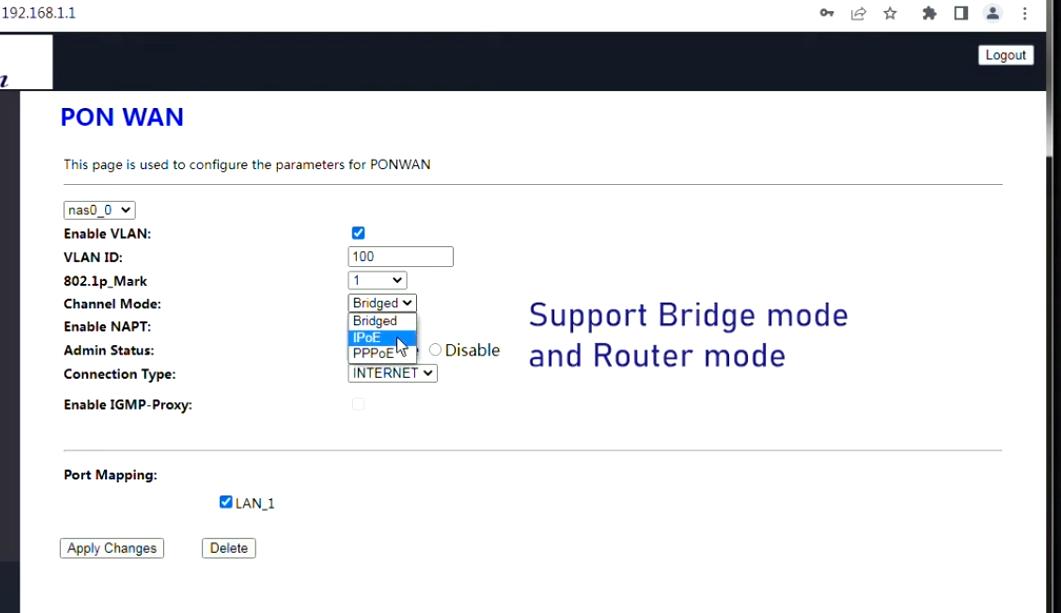 No PPPoE configurations were found on your ONU? Learn exactly how to configure GPON ONU settings, understand what PPPoE means, and unlock bridge mode with Super Admin access. When setting up a 4GE WiFi GPON ONU (such as the BD-ONU-114HW-G), many users encounter a confusing situation: they log into the device expecting to set up their internet connection, only to discover that no PPPoE configurations were found anywhere in the interface. The menu options for ONU PPPoE configuration seem to have vanished. The bridge mode setting is invisible. The credentials printed on the device label grant only basic access, leaving you completely unable to configure the device the way you need. Whether you need bridge mode for your own router or want the ONU to handle the PPPoE connection directly, this guide has you covered. What PPPoE Means in Fiber Networks PPPoE (Point-to-Point Protocol over Ethernet) is a network authentication protocol used by ISPs to manage user access. It allows a device to establish a connection using a username and password, ensuring that only authorized users can access the internet. In GPON networks, PPPoE plays a critical role because: It authenticates subscribers before granting access It allows ISPs to manage billing and sessions It assigns IP addresses dynamically after successful login When discussing ONU PPPoE configuration, it’s important to understand that PPPoE is not always handled by the ONU itself. Depending on the network design, PPPoE can be configured either on the ONU or on a connected router. Why “No PPPoE Configurations Were Found” Appears If your ONU interface shows no PPPoE configurations were found, it does not necessarily mean something is broken. In most cases, it is due to configuration logic or access limitations. Let’s break down the real reasons in detail. ONU Permission Restriction (Most Common Cause) Most GPON…Read more →
-
What is an Aggregation Switch in a Network? Why do we need to use Aggregation Switch? After reading this article, you can understand that What an Aggregation Switch is, how it works and why we need to use it.Read more →
-
 An add-drop multiplexer (ADM) is an important element of an optical fiber network. What is ADM? How does ADM work? After reading this article, you can understand what ADM is, how it works and why we need it. What is ADM? ADM enables addition and drop of signals in a communications network. Its main function is to allow signals from several different sources on a single transmission line to be combined and separated in a more efficient way. Particularly in fiber optic communication systems, ADM can help to multiplex multiple low-speed signals into a single high-speed transmission link, or to extract specific signals from the multiplexed signals for routing. Add-Drop Multiplexer (ADM) are also known as optical add/drop multiplexers (OADM). How does an ADM work? Add wavelengths: An ADM allows multiple lower-speed data streams to be added (combined) into a single higher-speed transmission channel. This process is called multiplexing, and it helps in utilizing the full bandwidth of the transmission medium (like fiber optics) more efficiently. Drop wavelengths: The ADM can also drop a specific signal or wavelengths from the multiplexed stream, allowing it to be directed to a different part of the network. This means that, without disrupting the overall transmission, specific data can be extracted for further processing or delivery to the end-user. Why we need ADM? Enhance Bandwidth Utilization: ADM make it possible to combine multiple low-speed signals into a single high-speed stream. By reducing the need for additional physical lines, ADM optimize network efficiency and reduce infrastructure costs. Flexible Network Management: ADM provide flexibility by allowing specific signals to be added or removed on-demand. This makes it easier to adjust the network as requirements change, without needing to overhaul the entire system. It provides operators with the flexibility to dynamically adjust traffic flows, making the network more adaptable to varying demands. Support for Multiple Services: An ADM supports…Read more →
-
 Why we need to use launch cable? After reading this article, we can learn about what the fiber launch cable is, and why we need to use it when measure the fiber optics with OTDR.Read more →
-
 A POE ONU is a type of Optical Network Unit that supports Power over Ethernet (POE). What is POE ONU? What are the differences between POE ONU and ONU? After reading the article, you can understand what the POE ONU is and why we need to use it. What is ONU? In telecommunications, an Optical Network Unit (ONU) is a device used in fiber optic communication, particularly in Passive Optical Networks (PON). It converts optical signals to electrical signals in fiber network. What is POE? POE (Power over Ethernet) is a technology that transmit data signals and power over Ethernet cables to POE-enabled devices, such as monitors, VoIP phones and wireless access points. One of the major benefits of POE is that it eliminates the need for additional power since the interface typically uses a standard Ethernet connection and power supply can be provided through this interface. POE technology simplifies the cabling process by transmitting data and power over a single cable, reducing the need for additional power cables. What is POE ONU? A POE ONU is a type of Optical Network Unit that supports POE. It can deliver power over Ethernet to devices like VoIP phones, and cameras, eliminating the need for separate power adapters. The ability to transmit both power and data through a single Ethernet cable simplifies the installation process. By using POE, you can reduce the power outlets and adapters needed for connected devices. Why we need to use POE ONU? Power supply: A network surveillance can be considered as a system, there are at least dozens of surveillance cameras. In order to conveniently, flexibly and quickly supply power to the cameras, POE ONU power supply is an ideal choice. Cost-efficient: A network cable transmit data and power supply at the same time. It can not only simplify…Read more →
-
How to Test Fiber Cable by OTDR?After reading this article, you can learn about what the OTDR is and how fiber cable can be tested by OTDR.Read more →
-
If you work in telecommunications or network engineering, you’ve likely heard of Synchronous Digital Hierarchy (SDH). But what is the device that makes it all work? In this guide, we break down exactly what an SDH Optical Terminal is in telecommunication, its core functions, and why it remains a foundational technology in global network infrastructure. TL;DR: An SDH Optical Terminal (or Terminal Multiplexer) is a critical network device that aggregates multiple lower-speed electrical signals (like E1/T1 lines) into a single, high-speed optical signal for transmission over fiber optic cables. What is SDH Optical Terminal? With the advancement of technology, the need to transmit not just voice, but also text, and video has grown significantly. In the 1970s and 1980s, several network technologies emerged, including the T1 (DS1) and E1 carrier systems (1.544/2.048 Mbps). As we entered the information society, there was a strong demand for modern information transmission networks. It could economically and effectively provide a variety of circuits and services. However, the technologies had limitations, such as a lack of service variety, complexities in expansion, and bandwidth constraints. It made modifications within their original frameworks insufficient. In this case, Synchronous Digital Hierarchy was developed. Among the various broadband fiber-optic access network technologies, the SDH Optical Terminal has become the most commonly used. SDH Optical Terminal refers to the optical fiber transmission equipment based on Synchronous Digital Hierarchy (SDH) technology. Its main function is to achieve optical fiber transmission and reception of digital signals. Core Functions of an SDH Optical Terminal Think of the SDH Optical Terminal as the central hub or the “start/end point” of an SDH network. Its primary jobs are: Aggregation (Multiplexing): Combining multiple 2Mbps, 34Mbps, or 140Mbps PDH signals into a standard high-speed STM-N optical signal (e.g., STM-1, STM-4, STM-16). Electrical-to-Optical (E/O) Conversion: Transforming the electrical data…Read more →
-
Fiber media converters are network devices that connect two different types of media. It extends the transmission distance of a network by converting data signals from electrical signals (copper wires) to optical signals (fiber optics) without causing signal degradation. After reading the article, you will know the benefits of fiber media converter.Read more →
-
 Modern networks rely on fast and stable data transmission to support cloud computing, video streaming, AI workloads, 5G communication, and enterprise connectivity. As network speeds continue increasing, traditional copper cabling faces limitations in bandwidth, transmission distance, and electromagnetic interference. Fiber optic communication solves these problems by transmitting data using light signals through optical fiber. At the heart of this technology is the optical module, also known as an optical transceiver. Optical modules are essential components used in switches, routers, servers, and telecom equipment to enable high-speed fiber communication. In this guide, you will learn what an optical module is, how it works, its internal components, common types, key specifications, and where it is commonly used. Table of Contents What Exactly Is an Optical Module? How Does an Optical Module Work? What is the Parameter of an Optical module? Common Types of Optical Modules (By Form Factor & Speed) Key Specifications to Understand Where Are Optical Modules Used? What Exactly Is an Optical Module? An optical module is a compact networking component that converts electrical signals into optical signals for transmission through fiber optic cables. It also performs the reverse process by converting incoming optical signals back into electrical signals that networking equipment can understand. Optical modules are commonly installed in devices such as Ethernet switches, routers, servers, OLTs, media converters, and storage systems. They are usually hot-swappable, meaning they can be inserted or removed without powering down the equipment. Compared with traditional copper connections, optical modules support much higher bandwidth, longer transmission distances, lower signal loss, and stronger resistance to electromagnetic interference. How Does an Optical Module Work? The process happens in three simple steps: Step 1: Transmit (Electrical → Light) The network switch sends an electrical data signal to the optical module. Inside the module, a laser driver activates…Read more →
-
PDH devices (optical transceivers and protocol converters), some of devices support console management and the other support GUI. What is the difference between these two kinds of management? How should we choose? What is the management console? It is a terminal used to monitor and control a network locally. It is also referred to as the Hardware Management Console (or HMC). It supports storage system hardware and firmware installation and maintenance activities. It has the advantage of being less costly. But the process of entering commands is complicated. What is management GUI? Management graphical user interface can be used to monitor, configure, and operate most functions. Through Panel indicator LEDs function, Implementation can be visualised directly.This interface mainly displays state information associated with the device. It has the advantage of being easy to operate and visualise. How to choose them? Management console operation is complicated, need professional technical engineer to operate. If your company have professional engineers, you can choose the device with console. Management GUI is easy to operate, it is easy to monitor the PDH fiber multiplexer run status. It is also very easy to configure the device parameters, for example, VLAN, port rate, duplex/hal duplex etc. For most clients, we suggest to choose the device with GUI, which will reduce your maitainance time and cost.Read more →
Testimonials

Lomoveishiy – Finland11

