
When building or upgrading a network, one of the most important components that often gets overlooked is the fiber media converter. These devices play a crucial role in connecting different types of network infrastructure, converting electrical signals from copper cables to optical signals transmitted over fiber optics. Whether you are working on a small office setup or a large-scale enterprise network, choosing the right fiber media converter is essential for optimal performance and reliability.
But with dozens of models, specs, and technical terms, choosing the right one can feel overwhelming. Don’t worry—this isn’t a decision that requires a networking degree. With this straightforward buyer’s checklist, you’ll be equipped to select the perfect media converter for your needs.

1. Understand Your Network Requirements
Before diving into the technical features, it’s important to evaluate the basic needs of your network. Understanding your network requirements will help you narrow down the options.
Data Transfer Rates: The first factor to consider is the speed at which your network operates. Fiber media converters typically support Fast Ethernet (100Mbps), Gigabit Ethernet (1000Mbps), and even higher speeds like 2.5GbE or 10GbE.
Fast Ethernet (10/100 Mbps): Suitable for basic internet, point-of-sale systems, or legacy equipment. Most cost-effective.
Gigabit (10/100/1000 Mbps): The modern standard. Essential for video streaming, large file transfers, and contemporary business networks.
10 Gigabit: For data centers, backbone connections, or high-performance computing. (Note: These are significantly more expensive and specialized).Be sure to match the converter’s speed with your network’s performance needs to avoid bottlenecks.
Distance Considerations: How far do you need the fiber optic connection to reach? Fiber media converters are designed to transmit signals over varying distances, and this is where single-mode and multi-mode fiber come into play.
Multi-Mode Fiber (MMF): Typically has an orange or aqua jacket. Used for shorter distances (up to 550 meters for Gigabit). More common within buildings.
Single-Mode Fiber (SMF): Typically has a yellow jacket. Used for long distances (up to 160 km!). Common for connections between buildings or across campuses.
2. Determine Ports You Need
-
Determining the Number of Ports You Need
How many connections do you need to make? Fiber media converters come in single-port and multi-port versions, depending on your network size.
Single-Port: A single-port converter is designed for a dedicated, point-to-point link, making it ideal for a straightforward task like connecting a switch in one building to a switch in another over a single fiber run.
Multi-Port: a multi-port converter acts as an aggregation point, capable of handling several Ethernet connections simultaneously. This makes it perfect for scenarios where you need to connect multiple devices from one location, such as a cluster of security cameras, back to the network core.
If you anticipate future network expansion, consider buying a multi-port model to avoid needing to upgrade later.
-
Choosing the Right Copper (RJ45) Port
Next, consider the type of copper Ethernet port required.
The standard RJ45 port is the most common, used for transmitting data to devices like computers, servers, or switches that have their own power source.
However, for connecting remote devices such as wireless access points or IP cameras, a media converter with a Power over Ethernet (PoE) port is transformative. A PoE port delivers both data and electrical power over the same Ethernet cable, eliminating the need to install separate power outlets at often hard-to-reach locations.

-
Fiber Port Flexibility
The most critical choice is the type of fiber interface, which determines your long-term flexibility and cost.
- Converters with a fixed fiber interface have a transceiver (with connectors like SC,FC or ST) permanently built into the unit. While sometimes cheaper initially, this design locks you into a specific fiber type, wavelength, and transmission distance.
When to use it: For very small, static installations where the fiber parameters are guaranteed never to change, and cost is the absolute primary concern.
- SFP Slot: This modular design allows you to insert a separate, hot-swappable SFP transceiver module. The key advantage is unparalleled adaptability; you can change from multi-mode to single-mode fiber or upgrade distances simply by swapping the SFP module (a $5-$25 component) instead of the whole device.
When to use it: For professional and future-conscious installations. The initial investment is slightly higher, but the long-term savings in adaptability and maintenance are significant.

Decision Flowchart:
Count Connections: “How many devices am I connecting at this spot?” → Single-port or Multi-port.
Check Power Needs: “Do my remote devices (cameras, APs) need to be powered over the Ethernet cable?” → Standard RJ45 or PoE RJ45 (and which PoE type).
Choose Fiber Interface: when you have a high-volume, identical, and completely static deployment where minimizing initial unit cost and part count, Choose Fixed fiber ports. Choose a model with an SFP slot for flexibility, future-proofing, and ease of maintenance. Then, buy the appropriate SFP module separately based on your fiber cable type and required distance.
Plan for Growth: If you expect to add more devices, choose a multi-port model. The SFP slot inherently handles technology changes.
3. Check Compatibility with Your Equipment
The fiber media converter must be compatible with the other equipment in your network. Here are a few things to check:
Ethernet Standards: Ensure the converter matches your network’s standards. For example, if your network runs on Gigabit Ethernet (1000Mbps), ensure the converter supports this speed. Some advanced models also support 2.5GbE or 10GbE for high-performance needs.
Connector Types: Fiber media converters use different connectors for fiber cables, such as LC, SC, ST, or MTP/MPO. Make sure the converter matches the connectors used in your network infrastructure.

4. Assess Environmental and Power Considerations
Fiber media converters come in different form factors to fit your network’s physical environment:
Form Factor & Installation
Standalone/Desktop: Single, compact units. Perfect for one-off installations (like connecting a remote security camera).
Rackmount/Chassis: Holds multiple converter modules. Ideal for data centers or telecom closets where space and organization are critical.
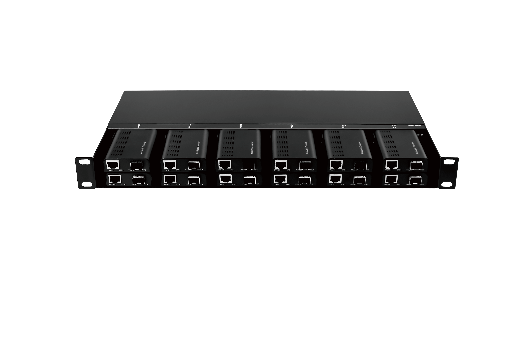
DIN-Rail: Designed for industrial panels (factory floors, traffic control systems). Built to withstand vibration and harsh conditions.
Power Options: Many fiber media converters rely on external power adapters. However, some models support Power over Ethernet (PoE), which allows you to power the device through the Ethernet cable itself, saving space and reducing cable clutter.
5. Consider Management Features
Not all fiber media converters are created equal when it comes to management and monitoring features:
Unmanaged vs. Managed: An unmanaged fiber media converter is simple, plug-and-play, and perfect for small or less complex networks. Unmanaged converters have basic local status LEDs (Power, Fiber Link, Copper Link, Collision, etc.). You can visually check these lights for basic fault diagnosis (e.g., no light, abnormal blinking). On the other hand, a managed converter offers more control, such as remote management, network diagnostics, and troubleshooting features. Managed converters are ideal for larger, mission-critical networks where uptime and reliability are essential.
SNMP Support: Managed fiber media converters often include Simple Network Management Protocol (SNMP) for monitoring and configuring network devices remotely.
The management features you need are directly proportional to how critical the connection is to your operations. For non-essential links where downtime is merely inconvenient—such as in home labs, small offices, or auxiliary connections—an unmanaged converter is perfectly adequate; it’s plug-and-play and cost-effective.
If the link is business-important, where an outage would disrupt work and require resolution within hours, a web-managed converter provides a useful middle ground, offering a local interface for status checks and basic configuration without full enterprise integration.
6. Reliability and Durability
Given the importance of media converters in network performance, it’s crucial to choose a reliable and durable device:
MTBF (Mean Time Between Failures): indicating the average time a large population of products is expected to operate without failure. Look for converters with a high MTBF rating, ensuring they are built to last. For critical links in hard-to-reach locations (e.g., cell towers, underground), use MTBF as a tie-breaker.
Industrial Models: Devices where the casing, internal components, and operating temperature range are reinforced for harsh physical environments. If you’re using the converter in an industrial environment or extreme conditions (temperature fluctuations, dust, etc.), make sure it is rated for Industrial use.
Operating Temperature:
Commercial: 0°C to 40°C (32°F to 104°F) for climate-controlled offices.
Industrial: -40°C to 75°C (-40°F to 167°F) for outdoor enclosures or factory floors.
7. Look for Additional Features
Beyond the core functions, several special features can address specific deployment challenges. Several extra features can add value to your media converter, depending on your needs:
Auto-Negotiation: Some models automatically detect and adjust the speed of the connection for optimal performance, which is useful if you have devices with varying network capabilities. Ensure it supports 10/100/1000Mbps auto-negotiation unless you have a specific need to hard-set speed/duplex.
Link Fault Propagation (LFP) / Far-End Fault: A useful feature that propagates a failure on one side (e.g., fiber break) to shut down the corresponding port on the other side, helping upstream switches detect the outage faster.
Digital Diagnostics Monitoring (DDM): A key feature of managed converters with SFP slots. Allows real-time monitoring of SFP parameters like temperature, voltage, transmit/receive optical power. Essential for predicting fiber degradation before a link fails.
Surge Protection: In areas where power fluctuations are common, choose a converter with built-in surge protection to prevent damage to your network equipment. Surge Protection means Built-in circuitry on the RJ45 ports and/or power input to protect against voltage spikes from lightning or power surges. Outdoor and Industrial-grade converters often include this as standard or an option. Many PoE media converters marketed for surveillance also emphasize this feature.
8. Budget Considerations
While you don’t want to overspend, it’s important to choose a fiber media converter that matches your needs. It’s tempting to go for the most basic model to save money, but cutting corners on important features could result in network issues down the line. Consider your budget in relation to the performance, durability, and features you need. Investing in a good-quality converter can save you from costly repairs and downtime in the future.
Real-World Application Scenarios
Scenario 1: The Small Office Extension
Need: Connecting a new warehouse office (150 meters away) to the main building’s network.
Checklist Pick: Gigabit standalone converter, multi-mode fiber with SFP slot, unmanaged, commercial temperature range.
Because of:
Modern office networks require gigabit speeds for file sharing, internet access, and VoIP without bottlenecks. 100Mbps would be insufficient. A single, compact unit is perfect for a simple point-to-point link. No need for a complex multi-port chassis. At 150 meters, multi-mode fiber (OM3/OM4) is perfectly capable and more cost-effective than single-mode for both the cable and initial SFP modules. It’s the standard choice for intra-campus distances under ~500m. Even though multi-mode is chosen now, the SFP slot provides future-proofing.
If the link ever needs to be extended beyond 500m, you can simply swap the SFP module to a single-mode one without replacing the entire converter. The link is important but not “mission-critical.” If it fails, the warehouse office loses network access, which is an inconvenience but doesn’t halt core business. Troubleshooting is simple: staff can visually check the units and call IT. The cost savings of an unmanaged model are justified here. The converters will be installed inside the climate-controlled main building and the warehouse office. They are not exposed to outdoor temperature extremes, so an industrial rating is an unnecessary expense.
Scenario 2: The Security System Upgrade
Need: Powering and connecting an IP camera across a parking lot (300 meters away) where power outlets aren’t available.
Checklist Pick: Gigabit standalone converter with PoE, single-mode fiber (for distance), industrial temperature rating, rugged enclosure.
Explained:
Standalone Converter with PoE: This is the core requirement. The converter must deliver both data and power (Power over Ethernet) to the camera over the single Ethernet cable, solving the “no power outlet” problem completely. At 300 meters, multi-mode fiber is at the outer limit of its reliable range for some standards, potentially causing signal degradation. Single-mode fiber can transmit data for kilometers with no issue. The converter at the camera end will be in an outdoor enclosure exposed to summer heat and winter cold. A commercial-grade device (0-40°C) would likely fail. An industrial-grade device (-40 to 75°C) is mandatory for reliability.
Scenario 3: The Growing Corporate Network
Need: Multiple fiber connections in a data center rack, with need for monitoring and VLAN segmentation.
Checklist Pick: Rackmount chassis with managed Gigabit converter cards, SFP slots for flexibility, redundant power supplies.
Explained:
Rackmount Chassis: A centralized, neat, and professional solution. It consolidates multiple connections (e.g., 8, 16, 24 ports) into a single 1U/2U rack unit, saving space and simplifying cable management compared to a pile of standalone converters. “Managed” is non-negotiable here. you need SNMP to monitor optical power levels, temperature, and status in your NMS. Proactive alerts warn of degrading fibers before they break. Data center equipment often has dual power inputs. A chassis with two hot-swappable Redundant Power Supplies ensures that if one PSU or power feed fails, the unit continues operating without dropping the critical network links it supports.

5-Minute Decision Check Table
| Priority | Your Choice |
| Budget Focused | Fixed fiber, unmanaged, Fast Ethernet if speed allows |
| Future Proof | SFP slot, Gigabit, web-smart management |
| Harsh Environment | Industrial temp rating, DIN-rail, rugged casing |
| Power Remote Devices | Must have PoE (verify standard/wattage) |
| Mission Critical | Managed, redundant power, reputable brand with warranty |
Before clicking “buy,” ask yourself:
Have I verified the fiber type and distance? ✓
Does the speed match my network equipment? ✓
Have I accounted for environmental conditions? ✓
Do I need special features (PoE, management)? ✓
Is there technical support available if I need it? ✓
Conclusion
Choosing the right fiber media converter doesn’t require advanced networking knowledge—it requires systematic thinking about what you’re trying to connect, where it’s located, and what you need it to do.
Whether you’re looking to upgrade your current network or build a new one, selecting the right fiber media converter will play a pivotal role in your success. Take your time to evaluate the options and choose a solution that suits both your current and future needs.
If you have any questions or need help selecting the right fiber media converter for your network, feel free to reach out!
Keep Learning
The Ultimate Guide to Fiber Media Converters:Types, Uses, and How to Choose?


