
In the modern world, your network is the backbone of your operations. But what happens when you need to connect devices that speak different physical languages—like the legacy copper switch in your office and the high-speed fiber backbone running between buildings? Or when you need to extend a network segment far beyond the 100-meter limit of standard Ethernet cables?
The answer lies in a humble but powerful device: the Fiber Media Converter. This comprehensive guide will explain everything you need to know about these essential tools, from their core function to the specific types available and how to choose the right one for your project.
Table of contents
- What Is a Fiber Media Converter?
- Why Do We Need Fiber Media Converters?
- Types of Fiber Media Converters
- How to Choose the Right Fiber Media Converter
- How to Install and Use a Fiber Media Converter
- The Future: Will Media Converters Be Replaced by PON?
- Conclusion
What Is a Fiber Media Converter?
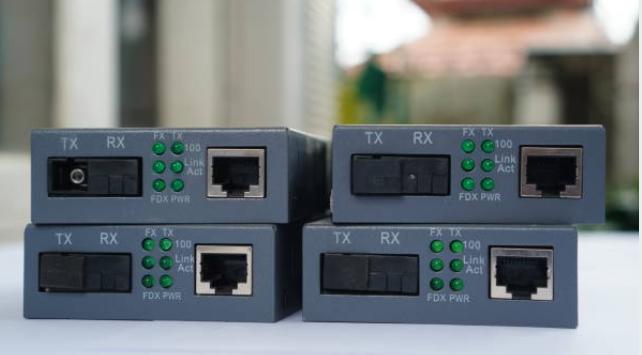
At its most basic level, a media converter is a networking device that connects two different types of network media, such as converting electrical signals from copper twisted-pair cables (like Cat6) into light signals for fiber optic cables, and vice versa.
As our detailed guide on what is a media converter explains, it acts as a seamless translator, making the conversion process invisible to other network devices like switches and routers. This allows different segments of your network to communicate effortlessly.
For a network engineer, this functionality is a superpower. For a deeper technical dive, our comprehensive guide for engineers on what does a media converter do breaks down its role in protocol conversion, signal extension, and network design flexibility. In short, a media converter lets you leverage the best of both worlds: the cost-effectiveness and ubiquity of copper for local connections, and the speed, distance, and immunity of fiber for your network’s backbone and long-haul links.

Why Do We Need Fiber Media Converters?
The need for these devices arises from the fundamental limitations of copper cabling and the practical realities of managing network infrastructure.
Our article on why do we need fiber media converters outlines several critical reasons:
1. Extending Network Reach
This is the most common driver. Copper Ethernet is limited to about 100 meters (328 feet) before signal quality degrades. Fiber optics can transmit data for kilometers without loss. Media converters are the tool that bridges this gap, allowing you to connect a remote building, a security camera at the far end of a campus, or a device in a large industrial facility.
2. Protecting Your Investment
Replacing all your existing copper-based equipment (switches, routers, computers) with fiber-optic equivalents is prohibitively expensive for most organizations. Media converters allow you to build a high-speed fiber backbone while keeping your existing gear, extending the life of your investment and enabling a gradual, cost-effective migration.
3. Overcoming Interference
Environments like factories, hospitals, and data centers are full of electromagnetic interference (EMI) from heavy machinery, lighting, and other equipment. Fiber optics are completely immune to EMI, ensuring data integrity. Converters let you run fiber through these noisy areas while still connecting to standard copper devices.
4. Enhancing Security
Fiber optics do not radiate signals, making them extremely difficult to tap without detection. For sensitive data in finance, healthcare, or government, using fiber with media converters adds a critical layer of physical security.
5. Simplifying Network Segmentation
Converters help create logical network divisions while maintaining physical connections, aiding in traffic management, security, and performance optimization across different departments or network functions.
Types of Fiber Media Converters
Not all media converters are created equal. Choosing the right one depends on your specific network requirements. Here are the primary ways they are categorized, based on our complete guide to understanding fiber media converter types.
1. By Fiber Mode: Single-Mode vs. Multi-Mode
This is the most fundamental distinction, dictated by your fiber optic cable.
Single-Mode Fiber (SMF) Converters
Designed for long-distance communication (up to 100 km or more), using laser-based light. They are used in telecommunications, ISPs, and large campus backbones.
Multi-Mode Fiber (MMF) Converters
Best for shorter distances (up to 550 meters with OM3/OM4 fiber), typically within a building or data center. They are generally more cost-effective for shorter runs.
Crucial Note:Single-mode and multi-mode fiber are not directly compatible. Your converter must match your installed fiber type.
2. By Port Type: Fixed vs. SFP-Based
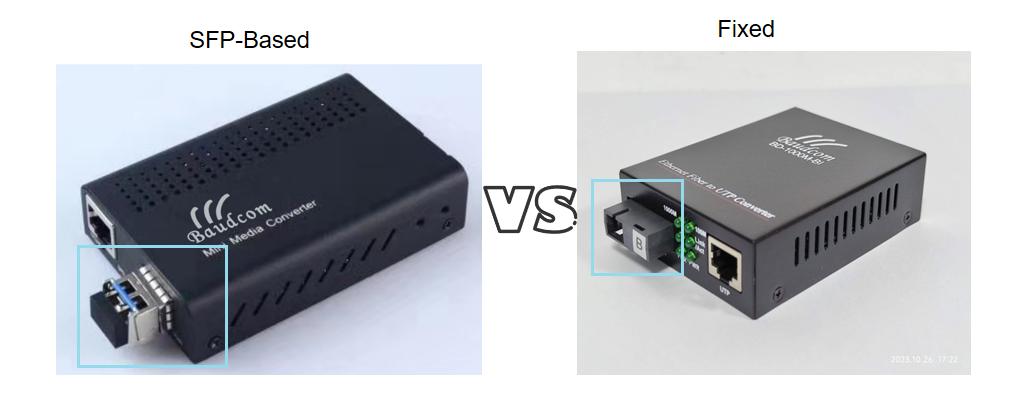
This choice affects flexibility and future-proofing.
Fixed Port Converters
The fiber transceiver is built into the unit for a specific fiber type, wavelength, and connector. They are ideal for simple, permanent, single-use links.
SFP-Based Converters
These have a slot for a Small Form-factor Pluggable (SFP) module. The converter handles copper-to-fiber conversion, but the fiber type, distance, and wavelength are determined by the SFP you plug in. This offers immense flexibility, allowing you to change the fiber link without replacing the whole converter.
3. By Form Factor: Standalone vs. Rack-Mount Chassis
Your installation environment will dictate this choice.
Standalone (Desktop) Units
Single-port devices perfect for a few point-to-point connections. They are simple, affordable, and easy to deploy.
Rack-Mount Chassis
As your network grows, managing a pile of standalone converters with individual power bricks becomes a nightmare. A rack-mount fiber media converter chassis is a specialized enclosure that holds multiple converter modules in a single, organized unit. It provides centralized, often redundant power, proper cooling, and a clean, professional appearance in a server rack. This is essential for data centers, wiring closets, and any high-density installation.

4. By Management: Managed vs. Unmanaged
Unmanaged Converters
Plug-and-play devices with no configuration. They are reliable and cost-effective for basic connectivity where simple extension is the only goal.
Managed Converters
Offer advanced features like SNMP monitoring, remote diagnostics, VLAN support, and Quality of Service (QoS). They are crucial for critical network segments where visibility, control, and proactive troubleshooting are required.
5. Application-Specific Designs
PoE Media Converters
A PoE media converter combines signal conversion with Power over Ethernet. It can deliver both data and electrical power (up to PoE++ standards) over the copper cable to a remote device like an IP camera, wireless access point, or VoIP phone. This eliminates the need for a separate power source at the device location, simplifying installation.
Industrial Media Converters
Built with rugged, hardened casings to withstand extreme temperatures, moisture, dust, and vibrations. They are designed for factory floors, outdoor enclosures, traffic management systems, and other harsh environments.
Fiber to Fiber Converters
Used to connect different types of fiber, such as converting a multimode fiber link to single-mode, or for wavelength conversion using WDM technology.

How to Choose the Right Fiber Media Converter
Selecting the correct device is a process of matching your network’s needs with the converter’s specifications. Follow this decision-making framework, and consult our guide on how to choose the right fiber media converter for more details.
- What is the distance?
- Long → Single-mode
- Short → Multi-mode
- What is your required speed?
- 1Gbps, 10Gbps, etc.
- Where will it be installed?
- Office/server room → Desktop or Chassis
- Harsh environment → Industrial
- Do you need remote management?
- Critical link → Managed
- Simple link → Unmanaged
- Do you need to power a remote device?
- Yes → PoE Media Converter
- Will your fiber needs change?
- Yes → SFP-based
- No → Fixed Port
- How many conversions do you have at one location?
- 1-2 → Standalone
- 4+ → Rack-Mount Chassis
How to Install and Use a Fiber Media Converter
Once you’ve chosen the right converter, proper installation is key to a reliable link. Our step-by-step guide on how to install and use fiber media converter provides a detailed walkthrough, but here are the golden rules:
Preparation is Everything: Verify fiber type consistency (single-mode or multi-mode), wavelength matching (e.g., both ends at 1310nm), and speed parity (a Gigabit SFP needs a Gigabit converter).
The Connection Sequence:
Insert any SFP modules first.
Connect the fiber cable. Crucial: For duplex links, you must cross the connection (TX of Device A to RX of Device B, and vice versa).
Connect the copper (RJ45) cable.
Power on.
Test the Connection: Verify link LEDs and perform a simple ping test to ensure communication.
The Future: Will Media Converters Be Replaced by PON?
With the rise of Passive Optical Networks (PON) for Fiber-to-the-Home (FTTH) and business access, a common question arises about the longevity of media converters. The short answer is no. As explored in our article, will media converter be replaced by PON, these technologies are not direct competitors but rather serve different purposes.
PON is a point-to-multipoint network architecture designed for efficiently serving many users from a single fiber line.
Media converters are Layer 1 interface tools that solve the problem of physical interoperability.
In fact, they often work together. A PON network terminates at an Optical Network Terminal (ONT), which typically provides a standard copper Ethernet port. If you need to connect a device far from that ONT, you would use a media converter to extend that connection over fiber. Media converters are the essential bridge that connects the old with the new, and copper with fiber, regardless of the overarching network architecture. Their role is secure as long as we live in a hybrid world of different network media.
Conclusion
Fiber media converters are unsung heroes of modern networking. They provide a simple, cost-effective, and infinitely flexible way to build robust, high-performance networks that can span great distances and withstand challenging environments. By understanding the different types and matching them to your specific needs, you can ensure your network is not only operational today but is also ready for the demands of tomorrow.


