
In modern networking, bridging different transmission media is a common requirement—especially when expanding networks over long distances or integrating legacy systems with newer infrastructure. This is where fiber media converters play a critical role. If you’ve ever asked “what is a fiber media converter?” or searched for the best media converter fiber to Ethernet, this guide will give you a deeper, more practical understanding.

What is a Fiber Media Converter?
A fiber media converter is a networking device that converts electrical Ethernet signals (used in copper cables) into optical signals (used in fiber optic cables), and vice versa. This enables seamless communication between devices that operate on completely different physical media.
Key Function:
- Converts Ethernet (RJ45) → Fiber (optical signal)
- Converts Fiber → Ethernet
In practical deployments, this means you can connect a standard Ethernet switch or router to a fiber backbone without replacing your existing equipment. It acts as a bridge between two transmission technologies that would otherwise be incompatible.
Why Fiber Media Converters Matter
Copper Ethernet cables are typically limited to about 100 meters (328 feet) due to signal attenuation and electromagnetic interference. In contrast, fiber optic cables can transmit data over distances ranging from several kilometers to over 80 km, depending on the type.
By using a media converter, you can extend your network far beyond copper limitations while maintaining signal integrity, higher bandwidth, and resistance to interference. Additionally, fiber is immune to EMI/RFI (making it ideal for factories and hospitals) and is much harder to tap into without detection, offering built-in security advantages. This is especially valuable in campus networks, industrial sites, and ISP deployments.

Key Applications
Fiber media converters are used across a wide range of industries due to their flexibility and cost efficiency.
- Enterprise networks: Extend connections between buildings without running expensive copper infrastructure.
- Telecommunications: Integrate fiber backbone networks with customer Ethernet devices.
- Surveillance systems: Connect IP cameras over long distances where copper would fail.
- Industrial automation: Provide stable communication in environments with high electromagnetic interference.
Their ability to extend distance while maintaining signal quality makes them indispensable in modern network design.
How to Choose the Best Fiber Media Converter?
Now that you understand the “why” and the common applications, let’s look at the “how.” Finding the best fiber media converter for your specific job depends on several key factors. Below, each factor is explained in detail, including a clear comparison between different types within that category.
Choosing the wrong combination will result in either no connection at all or very poor performance with constant disconnections.
1. Copper-to-Fiber vs. Fiber-to-Fiber Converters
What it is: Media converters are not all the same in terms of what they connect. The two primary categories are based on the input and output media types.

Copper-to-Fiber converters: These accept a standard copper Ethernet cable (RJ45) on one side and convert the signal to fiber optic on the other side. This is the most common type.
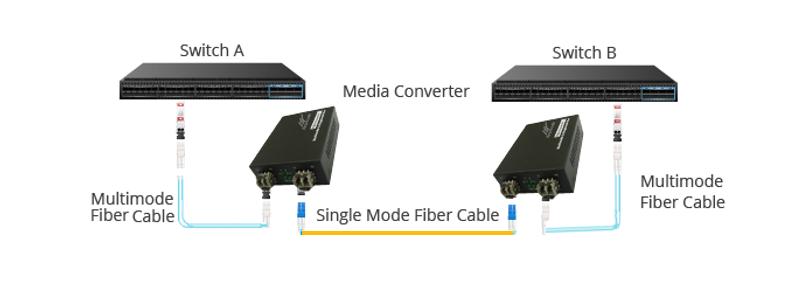
Fiber-to-Fiber converters: These accept fiber on both sides but convert between different fiber types (e.g., multi-mode to single-mode, Dual Fiber to Single Fiber), different wavelengths, or different connector types. They do not involve copper at all.
How to choose: Look at what you are connecting.
Choose Copper-to-Fiber if you have a standard Ethernet device (router, switch, IP camera, PC) that you want to connect to a fiber backbone or a long-distance fiber link. This is the typical scenario for most users.
Choose Fiber-to-Fiber if you already have fiber on both sides but need to bridge incompatible fiber networks. Common examples include:
- Converting multi-mode fiber to single-mode fiber to extend distance
- Converting between different wavelengths (e.g., 850nm to 1310nm)
- Converting between different connector types when re-termination is not practical
Verdict: For 95% of users extending a standard network over distance, a copper-to-fiber converter is the correct choice. Fiber-to-fiber converters are specialized tools for network integration scenarios.
2. Match the Fiber Type (Single-mode vs. Multi-mode)
What it is: Fiber optic cables come in two main types, defined by the diameter of the glass core. You must match your converter to the cable type you have installed.
Multi-mode (MM) fiber converters: These have a larger core (typically 50 or 62.5 microns) and use cheaper LED light sources. They are labeled with “SX” or “SR” standards.
Single-mode (SM) fiber converters: These have a much smaller core (9 microns) and use precise laser light sources. They are labeled with “LX” or “LH” standards.
How to choose: This decision is based entirely on distance.
Choose Multi-mode for short distances, generally under 2 kilometers (about 1.2 miles). This is the right choice for networking inside a single building, such as connecting floors in an office tower or linking two server rooms within the same campus.
Choose Single-mode for long distances, from 10 km up to 120 km (75 miles). This is the mandatory choice for running cable between two separate buildings, across a large farm, or along a highway for traffic cameras.
Pro Tip: If you are running cable between two buildings, always use single-mode fiber. While it costs slightly more for the optics, it is completely future-proof because you can run faster speeds (10G, 40G) over the same glass later without digging up the cable again.
3. Choose the Right Speed
What it is: Media converters are designed for specific data transfer speeds. They are not interchangeable between speeds unless they specifically advertise “auto-negotiation” across speeds, which is rare.
Comparison:
100Mbps (Fast Ethernet) vs. 1 Gbps (Gigabit) vs. 10 Gbps
How to choose: Match the speed to your network’s needs and your existing equipment.
Choose 100Mbps for legacy systems like old access control panels, basic PTZ security cameras that don’t stream 4K video, or industrial sensors that only send small packets of temperature data every few seconds.
Choose 1 Gbps for almost all modern business and home networks. This includes extending office Wi-Fi, connecting a standard VoIP phone system, or linking a guest house to your main router. It offers ten times the speed of Fast Ethernet for only a small price increase.
Choose 10 Gbps only for data centers, high-end 8K video editing directly from a network drive, or backbone connections for large university campuses with thousands of simultaneous users. Be aware that 10G converters are significantly more expensive and generate more heat.
4. Managed vs. Unmanaged Converters
What it is: This refers to the level of control and visibility you have over the converter’s operation.
Unmanaged converters: Plug-and-play devices that require no configuration. Ideal for simple deployments where basic connectivity is sufficient.
Managed converters: Offer advanced control features such as remote monitoring (SNMP), fault detection, link pass-through, and performance statistics.
How to choose: This decision depends entirely on whether you need to “see” what the converter is doing.
Choose Unmanaged for simple point-to-point links, such as extending a router to a barn, a security gate, a remote weather station, or a single IP camera at the end of a long driveway. They are cheap, reliable, and easy to install.
Choose Managed (SNMP) for large-scale or mission-critical networks where uptime and visibility are important. With a managed converter, a network administrator can see real-time data like current signal strength (optical power), internal temperature, power supply voltage, and total uptime. This is essential for critical infrastructure like hospital networks, airport security systems, or bank data centers.
5. PoE vs. Non-PoE Media Converters
What it is: This refers to whether the converter can deliver electrical power over the copper Ethernet cable to a remote device.
PoE (Power over Ethernet) converters: These not only convert copper to fiber but also inject electrical power (typically 15.4W for 802.3af or 30W for 802.3at) over the RJ45 cable to power remote devices. They eliminate the need for a separate electrical outlet at the far end.
Non-PoE converters: These only convert data signals. They do not provide any power over the Ethernet cable. The remote device must have its own independent power source (a wall outlet, battery, or local power supply).

How to choose: Look at the power requirements of your remote device and the availability of local power.
Choose PoE media converters if the device at the far end of your fiber link needs power and you do not have a convenient electrical outlet nearby. Common examples include:
- IP security cameras mounted on poles, fences, or building exteriors
- Outdoor wireless access points on rooftops or light poles
- VoIP phones in gatehouses or guard shacks without dedicated power
- Remote sensors in agricultural or industrial sites
Choose Non-PoE if:
- The remote device already has its own local power source (e.g., a switch in a powered equipment closet)
- The device does not support PoE (e.g., an old PC or a legacy industrial controller)
- You are on a very tight budget (PoE converters cost more)
Verdict: If you need to power a camera, phone, or Wi-Fi access point at the far end of a long cable run with no nearby outlet, choose PoE. Otherwise, a standard non-PoE converter is sufficient and more affordable.
6. Standalone vs. Chassis-Based Converters
What it is: This refers to the physical form factor and how the converter is deployed.
Standalone converters: Individual units, typically powered by external adapters (wall warts). Each unit operates independently.
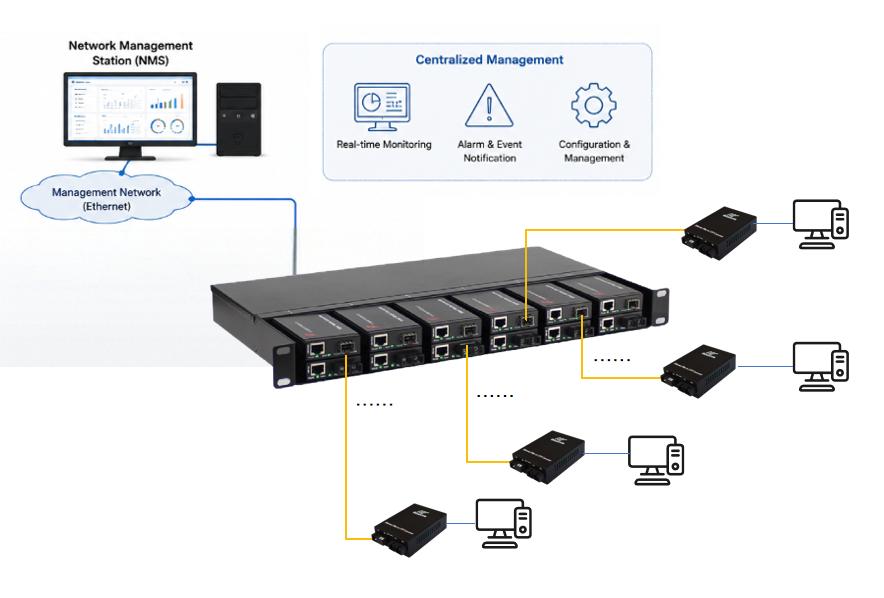
Chassis-based systems: A centralized rack-mounted enclosure (chassis) that accepts multiple converter “cards” or modules. The chassis provides shared power, cooling, and—critically— centralized management. A single management interface allows you to configure, monitor, and troubleshoot all converter modules in the chassis from one location, rather than managing each unit individually.

How to choose: This is primarily a question of scale.
Choose Standalone for small networks, remote sites, or when you only need 1-4 converters spread across different locations. They are simple, inexpensive, and easy to replace individually.
Choose Chassis-based for enterprise environments where you need to install 5 or more converters in a single location (like a central server room or data center). Chassis systems simplify power and function management (one power cord instead of many wall warts), improve scalability, and make maintenance easier because you can swap modules without unplugging individual power supplies.
7. Environmental Hardening (Commercial vs. Industrial)
What it is: Converters are built to different physical durability standards based on where they will be installed.
Commercial grade: Designed for indoor, climate-controlled environments.
Industrial grade: Built to survive extreme temperatures, dust, humidity, and vibration.
How to choose: Consider the physical location where you will install the converter.
Choose Commercial grade for office closets, server rooms, home basements, or any indoor space with heating and air conditioning. These units typically operate within 0°C to 40°C (32°F to 104°F).
Choose Industrial grade for outdoor cabinets, factory floors near ovens or freezers, oil rigs, roadside traffic control boxes, or any location without climate control. These units survive -40°C to 85°C (-40°F to 185°F) and feature conformal-coated circuit boards that resist dust, humidity, and corrosion, plus redundant power inputs.
Warning: If you put a commercial converter in an attic that reaches 50°C (122°F) in the summer, it will overheat, freeze up, and stop passing data until it cools down.
8. Dual Fiber vs. Single Fiber (BiDi) Fiber media converter
What it is: This choice is about how many glass strands are inside your fiber cable and how they are used for transmission.
Dual Fiber media converter: Uses two separate fiber strands. One strand is dedicated to Transmit (TX), the other to Receive (RX). This is the traditional and most common method.
Single Fiber (BiDi – Bidirectional) Fiber media converter: Uses only one fiber strand to both transmit and receive data simultaneously. It does this by using two different wavelengths of light (colors) — for example, one side transmits at 1310nm and receives at 1550nm, while the other side does the opposite.
How to choose: Look at your existing fiber cable or your budget for new cable.
- Choose Dual Fiber if you have abundant fiber optic resources. The Dual Fibermedia converter are cheaper and easier to find. Troubleshooting is also simpler because you can test each strand independently.

- Choose Single Fiber (BiDi) if you have limited fiber resources—for example, if your existing cable only has one strand available, or if you are running new cable and want to minimize the amount of fiber you install. BiDi converters themselves are slightly more expensive than dual-fiber converters. However, by using only one fiber strand, you save on the cost of the fiber cabling itself.
9. Connector Type (SC vs. LC vs. ST vs. RJ45)
What it is: Different devices and fiber cables use different physical connector interfaces. You cannot assume every fiber cable ends with the same plug.
Comparison of common fiber connectors:
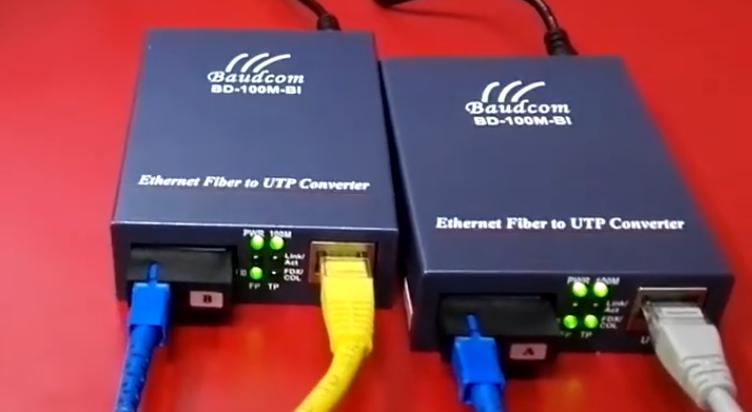
RJ45: The standard connector for Ethernet copper cables. Every media converter will have at least one RJ45 port. This side is universal.
SC connector: Square and snaps into place with a push-pull motion. Often found on older enterprise equipment or industrial setups because it is robust and easy to clean.
LC connector: Smaller (about half the size of SC) and clicks into place like a telephone RJ45. This is the most widely used connector today because its small size allows for high-density ports on switches and SFP modules.
ST connector: Uses a bayonet-style twist lock (similar to a BNC connector on old coaxial cables). Commonly seen in legacy industrial or military networks.
How to choose: Check the connector on your existing fiber cable or the device you are connecting to. Match it exactly.
Why it matters: If you buy a converter with an SC port but your fiber cable has LC connectors, you cannot force them together. You would need a separate adapter cable, which adds extra connection points and signal loss (insertion loss). Over long distances, even a small amount of extra loss can cause intermittent disconnections or complete link failure.
10. SFP Slot vs. Fixed Port
What it is: This refers to whether the fiber optic components are built-in (fixed) or removable (modular).
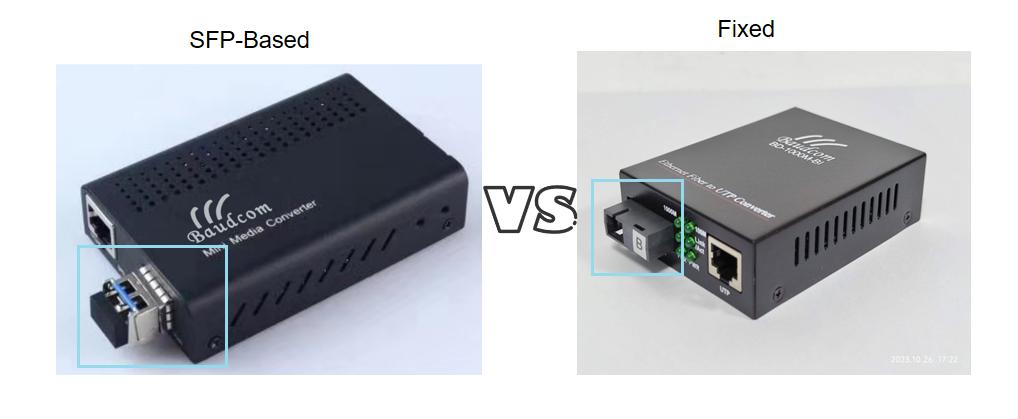
Fixed-port converters: The fiber optics are permanently soldered onto the circuit board. You cannot remove or change the optical part. The converter comes with a specific fiber interface (e.g., SC multi-mode, LC single-mode) built directly into the unit.
SFP-based converters: These have a small empty slot called an SFP (Small Form-factor Pluggable) port. You buy the SFP module separately and plug it into the slot. The SFP module contains all the optical components (the laser, the receiver, and the connector housing).
How to choose: Consider whether you need future flexibility.
Choose Fixed-port for very simple, permanent, short-range installations that will never change. Also, Fixed-port converters are cheaper than SFP-based converters because they have fewer components and no modular slot to manufacture. However, if your needs change later, you must replace the entire unit.
Choose SFP-based for long-term adaptability. If you need to change distance, fiber type, or wavelength, you simply swap the SFP module. If the optical laser fails, you replace only the SFP module instead of the entire converter.
Verdict: For evolving networks, SFP-based converters are the smarter investment. They allow you to stock a few different SFP types and use the same converter chassis for any job.
Conclusion
Don’t let the fear of fiber optics stop you from building a robust, future-proof network. While physically splicing or terminating fiber optic cable requires a professional with expensive tools, using a media converter is no harder than plugging in a home router.
Keep Learning
The Ultimate Guide to Fiber Media Converters:Types, Uses, and How to Choose?


