
SIP to E1 converter Trunk Gateway


Short Description:
BD-E1-SIP is cost-effective trunk gateway equipment specific design for open source market to work with Asterisk/Elastix/small IPPBX. It’s built-in echo canceller function and voice decoding conversion function. Users can flexibly select G.711A/U, G.729, G.723,iLBC a variety voice decoding and it easily completes IP and PSTN voice and signal converti…Description
Specification
Application
Order
Downloads/FAQ
Product Tags
Reviews
Description
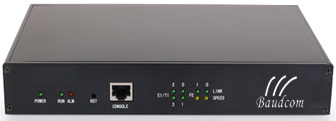
BD-E1-SIP is cost-effective trunk gateway equipment specific design for open source market to work with Asterisk/Elastix/small IPPBX. It’s built-in echo canceller function and voice decoding conversion function. Users can flexibly select G.711A/U, G.729, G.723,iLBC a variety voice decoding and it easily completes IP and PSTN voice and signal converting. In addition, BD-E1-SIP provides friendly GUI configuration interface, users can freely configure and manage the equipment.
Key Benefits
● Cost-effective VoIP trunk gateway
● Support echo cancellation, DJB, VNG, VAD and Qos
● Voice codec option: G.711A/U,G.723.1 (option), G.729A/B(option), iLBC(option)
● Simple Configuration, friendly GUI, strong handling capacity, stability system
● Good compatibility, support Asterisk, Elastix, Freeswitch and Small and medium IPPBX platform
Physical Interface
● ISDN Interface
1/2* E1/T1, G.703, 120Ω RJ-48c
● Network Interface
WAN and LAN, 2 * 10/100M Base-TX, RJ-45
● RS232 Console
RJ-45, 115200bps
Signal
● PRI/PRA
ISDN E1/T1,Japan T1.
ITU-T I.431, Q.921, Q.931, ETSI Q.sig
● R2
China and other 22 variants
Voice and Fax
● G.711A/U law (G.723.1, G.729A/B, iLBC –optional)
● Silence Suppression & Detection
● Comfort Noise Generation (CNG)
● Voice Activity Detection (VAD)
● Echo Cancellation (G.168)
● Adaptive (Dynamic) Jitter Buffer
● Call Progress Tone Generation
● Programmable Gain Control
● T.38/Pass-through
● DTMF Mode: Signal/RFC2833/Inband
Protocol
● SIP-RFC3261,3262,3263,3264,
3265,3515,2976,3311
● SDP -RFC 2327
● RTP/RTCP-RFC2198,1889
● Network Protocol
IP,TCP, UDP,TFTP, FTP, RTP, RTCP,
ARP/RARP,ICMP Ping, NTP, SNTP,
Http, DNS
Physical Feature
● Power supply:100-240V,50-60Hz
output:12VDC,1.0A
● Temperature(operation): 0 ℃ ~ 45 ℃
• (storage): -20 ℃ ~80 ℃
● Operation Humidity: 10%-90% no condensation
● Dimension(w/D/H): 225*150*38mm
● Weight: 0.75kg
Maintain & Upgrade
● Web based configuration
● Data backup/restore
● Support English and Chinese
● Firmware upgrade by TFTP/web
● Web & Telnet login password modify
● Factory reset
● Output CDR/logs by syslog
● Call statistics
● NTP Configuration
Certifications
•CE, FCC
Question1: Does the SIP E1 gateway support SS7 protocol?
Answer: Baudcom BD-E1-SIP trunk gateway can support SS7, but this is optional function. If the client need to pay for the additional charge for SS7 license.
Question2: Can the SIP E1 voip gateway support both SS7 and PRI protocol?
Answer: Baudcom BD-E1-SIP gateway can support SS7 and PRI. SS7 need extral charge for license. PRI is free.
Question3: Can your E1 SIP converter support both PRI and R2 protocol? Which standard does R2 protocol of SIP E1 gateway use?
Answer: Yes, PRI and R2 protocol can be supported. BD-E1-SIP trunk gateway’s R2 protocal is MFC standard. If you want the R2 protocol of your device uses UK standard, you can choose our another model E1 SIP gateway BD-MG-E1.
Question4: Can the E1 voip gateway support H.323 protocol?
Answer: H.323 protocol is not supported.
Question5: I would prefer for SIP to T1 conversion for this customer as we currently have a T1 connection. Can the SIP converter support T1?
Answer: The sip gateway normal configuration is for E1. If you need T1, we can specially make it for you, please note the information to us when you place order.
Specification
Application

Order
| Product Model | Descriptions | Inquiry |
|---|---|---|
| BD-E1-SIP | ISDN Interface 1/2* E1/T1, G.703, 120Ω RJ-48c | Request Price |
Downloads/FAQ
BD-E1-SIP E1 to SIP Trunk Gateway User Manual
BD-E1-SIP E1 to SIP Voip gateway Quick configuration installation user manual
Question: what is the login account and password of the SIP to E1 converter Trunk Gateway?
Answer: account: admin password: admin@123#
Question: I have a t1 24 chanells all voice l need to have a sip connection for an asterik based pbx to terminate calls to the t1
Answer: Our E1 SIP gateway can also support T1, used as T1 to SIP trunk gateway, our device can support your application.
Question: I was going through the spec sheet for the gateway. It says the gateway will work with ”open source” PBX systems such as Asterisk/Elastix/small IPPBX. Our customer needs to deploy this on Avaya which is proprietary. Can the SIP to E1 gateway work with Avaya?
Answer: Yes. Our E1 SIP gateway can work with Avaya, as long as it supports SIP protocol.
Question: Please we would like to have an option regarding this technology for the future, since a SIP-trunk technological update towards E1 (with MFCr2 signaling) is being presented. Can your device support?
Answer: Yes, our E1 to sip CONVERTER can support MFCR2.
Qustion: Can this SIP device work with an alcatel oxe pabx? Are they compatible?
Answer: Yes, our device can work with alcatel PBX. As long as it supports the SIP protocol, it’s ok.
Question: Does your System Support Firewall to Prevent Cyber Attackes?
Answer: Yes, BD-E1-SIP gateway support.
Question: I’m resuming an integration project for a conventional PBX and a SIP trunk, so I require a BD-E1-SIP gateway for an E1 with MFCR2 signaling, g711 and g729 codecs, and UDP and SIP protocols. Can your equipment support my application?
Answer: Yes, our BD-E1-SIP support your application. MFC R2 is not general function, which will produce extral cost for the SIP-E1 device.
Product Tags
Reviews
3 reviews
5

3 responses

20E1 to SIP Voip Trunk Gateway

2FXS 2FXO VoIP Gateway PBX Voice Over IP PBX

32 FXO Analog VOIP Gateway


Can the device support powered 48Vdc?
Normally the E1 gateway is powered by AC 220V (or 110V), it is assembly with one AC220V/DC12V power adapter.
If you need DC48V power supply, we can specially make the device for you, please send us your detail power supply requirement when you place order.
That E1 to SIP gateway has function which in the settings to adjust the calling number and the number being called, that’s help us a lots.